Write into flash
Hi,
BF706 series with w25q32bv
To write a .ldr file into a flash, I am using below command.
cldp -proc ADSP-BF706 -emu 1000 -driver "C:\Analog Devices\ADSP-BF706_EZ-KIT_Mini-Rel1.1.0\BF706_EZ-Kit_MINI\Blackfin\Examples\Device_programmer\bf706_w25q32bv_dpia.dxe" -cmd prog -erase all -offset 0 -format hex -file "C:\Users\Test\Debug\Test.ldr"
The .ldr will be write into flash at adresse 0x40000000 (SPI2 memory)
My question is, what if I want to use Write_flash_page() function to write a .ldr file to flash at the addresse 0x40001000. The Write_flash_page() function is:
void Write_flash_page(unsigned int PAGE_ADDR, unsigned char* flash_page_data_buff, unsigned short page_data_count)
{
*pREG_SPI2_SLVSEL &= ~ENUM_SPI_SLVSEL_SSEL1_HI ; // selct_flash;
flash_byte_access(FLASH_WR_EN); // send write enable command
*pREG_SPI2_SLVSEL |= ENUM_SPI_SLVSEL_SSEL1_HI ; // deselct_flash;
wait_for_flash_status(WEL, 1);
*pREG_SPI2_SLVSEL &= ~ENUM_SPI_SLVSEL_SSEL1_HI ; // selct_flash;
flash_byte_access(FLASH_PG_PRM); // send page program command
flash_byte_access(PAGE_ADDR >> 16);
flash_byte_access(PAGE_ADDR >> 8);
flash_byte_access(PAGE_ADDR);
int i;
for(i=0; i<page_data_count; i++)
flash_byte_access(*flash_page_data_buff++);
*pREG_SPI2_SLVSEL |= ENUM_SPI_SLVSEL_SSEL1_HI ; // deselct_flash;
wait_for_flash_status(WIP, 0);
}
Can I just call the above function like this:
Write_flash_page(0x40000000, unsigned char* flash_page_data_buff, unsigned short page_data_count);
Anyone can please help me.
Audio Signal Processors
flash
cross core
bf706
ldr
Blackfin Embedded Processors
spi-flash
adsp-bf706
blackfin
Show More
Hi,
Yes, you can use this approach to load the .ldr into flash.
BTW, I'm attaching a simple project that can write loader into flash. This was tested on ADSP-BF707 EZ-kit. Please use this as a reference and modify for ADSP-BF706 accordingly.
Regards,
Anand.S
SPI_Flash_test.zip
Hi Anand,
Thank you for your reply.
I want to ask you some more question here.
1. After I am finished with writing into flash, the controller has to be power off and then on to run the application. To avoid power off/on, I want to boot the rom or make a watchdog. But nothing happens.
I am using:
*pREG_L1IM_ICTL = 0;
adi_rom_Boot(0x40000000, 0, 0, 0, 0x207);
To boot from flash address 0x00
And the watchdog code is:
/*SEC configuration for WDOG to issue FAULT*/
*pREG_RCU0_BCODE = 0x0;
*pREG_RCU0_CTL |= BITM_RCU_CTL_SRSTREQEN;
*pREG_SEC0_GCTL = ENUM_SEC_GCTL_EN;
*pREG_SEC0_SCTL3 = BITM_SEC_SCTL_FEN | BITM_SEC_SCTL_SEN;
*pREG_SEC0_FCTL = BITM_SEC_FCTL_EN | BITM_SEC_FCTL_SREN ;
*pREG_WDOG0_CNT = 0x1312D00;
*pREG_WDOG0_CTL = 0x01;
I put these codes right after when I have checked the result for flash "check_result()".
Would you please tell me, what I am doing wrong?
2. I assume that your .ldr file is in include format. But mine is in hex format, so I parse the overheads and then I write hex data into the flash.
The .ldr file looks here:
:020000040000FA (this line is overhead)
:10000000015018AD0000A011000000002470010094 (0x10 is the size of the line, 0x0000 is the start address in flash, 0x00 is last, and 01, 50, 18, AD, 00, 00, A0, 11, 00, 00, 00, 00, 24, 70, 01, 00 are the code hex data which they will write to flash, correct?)
:20001000010094AD00200008100000000000000004200008000000000C20000800000000F6
:20003000010084AD1020000810000000000000004D6F64655F546573742E64786500000043
:200050000100EEAD20200008D49E00000000000000E80300F9B0B8B0616071C2012001DA4E
.......
:20FFA40000D8B011E808000200D8B011F8120000F1B9FFE37EDB00D8B011E0080002012086
:20FFC400422000D8B01138094004080C3C1000D8B0113A094004000C181421E10002006081
:1CFFE40000DE00081275000000D8B0119408000221E14000006000DE000812754E
:020000040001F9
:20000000000000D8B011940800021E2000D8B0113A094004080C181400D8B011FC12000064
:200020000960FFE348DB00D8B011E408000200D8B011041300000960FFE33DDB00D8B0111F
:20004000EC0800020120012000E22A131899080C0218682300D8B0119208050A00D8B01104
.......
:1070240001809DAD0000A0110000000000000000E0
:00000001FF
The .ldr starts with an overhead ":020000040000FA" and next line indicates the start address 0x0000 into the flash. The hex data will be written to the flash until address 0xFFE4, which the last hex data 0x75 (line 8) will be write into the flash. Then at line 9, there is again an overhead ":020000040001F9", and the next line indicates start address 0x0000 for the flash.
Why are there two overheads?,
How can I deal with two overhead?
I assume, line 10 start address is not 0x0000, and it has to be 0x10004, correct?
All the overheads have to be parsed and only the hex data have to be written to the flash, correct?
I have studied the EE-240 paper but I need more understanding for ldr format, and if you can explain it to me in a simple way, I will be happy.
Thank you.
Hi,
I've tested the code with adi_rom_Boot and it works fine. However, as you mentioned we tested it using Include format. Can you let me know why you are very specific in using HEX format? Did you get a chance to test it using Include format?
Can you also elaborate on what you mean by overheads?
Regards,
Anand Selvaraj.
Hi Anand,
I don't understand how can it will be effected on adi_rom_Boot if I use ldr file in include format or hex format.
adi_rom_Boot(0x40000000,0,0,0,0x20210202);
I want to boot from address 0x40000000 which it is flash address.
What is your command?
Regarding hex overhead EE-240:
Best Regards
SVA
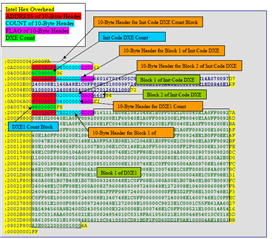
Any idea?
I want to read data from flash, how can I do that according to your attaching project?
Lets assume I want to read data from address 0x10 (0x40000010), then how can I do it?
Read_flash (RD_Block_ID, Read_BUFF, sizeof(Read_BUFF));
Hi,
I'm attaching the code that I tested on ADSP-BF707 Ez-kit. This code first writes to flash, verify its contents and finally make a call to adi_rom_Boot. Please refer this and modify as per your requirement.
Regarding the Intel HEX overhead, can you share the steps and its screenshot on how you have generated the loader stream. I generated the loader stream(for a simple LED Blink application) in Intel HEX format and could not observe any such issues.
ADSP_BF707_SPI_Flash_test.zip
Regards,
Anand Selvaraj.
Hi Anand,
Thank you for your reply.
I have found a solution for intel hex file.
if you could answer my question regarding reading from flash, I will appreciate you.
I want to read data from flash, how can I do that according to your attaching project?
Lets assume I want to read data from address 0x10 (0x40000010), then how can I do it?
Read_flash (RD_Block_ID, Read_BUFF, sizeof(Read_BUFF));
I am asking this question because, I want to display some data from flash into PC after reboot the controller. Therefore it is important to read the data from a flash address.
When I use your attached project, inside the verification function, the flash device ID is 0x7016 in my case. The manufacture ID is xEF which it is correct. What am I doing wrong?
I assume, I can check the memory register (0x40000000 flash) to be sure that the ldr file is written into the flash. But when I open the memory register at address 0x40000000 the debug is halted and nothing can be done anymore, and as I can see 0xFF is written into the flash. Whole flash is filled with 0xFF.
thank you
Hi,
The code that we sent does a flash write or read from different Blocks as defined by RD_Block_ID. We currently do not have an example as per your requirement. However, you can take this as a reference and modify as per your requirement.
Having said this, you could also try using CLDP for flashing into particular flash address. For this, you can use -offset command.
For instance, for flashing into 0x40080000 address, you can specify the offset as "-offset 0x80000" and flash.
Regards,
Anand Selvaraj.
Please log in to reply.