Sigma Studio "Comms Failed" Issue
I'm using the Dayton Audio ICP and DSPB-K circuit boards which feature the ADAU1701, and no matter what I do I cannot get past the link compile download step to download the DSP to the chip. Everytime I get the Comms Failed issue. I have read through many other forum posts suggesting USB2 instead of 3 and I have tried multiple different micro USB cables for data transfer. Are there any possible steps I might just be missing or other trouble shooting methods I could try? This has become incredibly frustrating as I have tried all of the other suggestions from other forum posts to no avail.
Audio Signal Processors
sigma studio
SigmaDSP Audio Processors
usb
comms
dsp&processors
adau 1701
adau1701
Show More
Hello,
There are a few things we can check. Since you have connected multiple micro USB cables, we can reasonably assume that at least one of them has data transfer wires.
In SigmaStudio, does the "USB" text in the USBi block have a green background? The indicator changes from red to green when a USBi is detected.
If the USBi block does not turn green, I recommend searching for the programmer in Device Manager. Please verify that Windows recognizes the programmer and has selected the correct driver as shown below. I am curious about how Dayton's device will show up; I haven't seen this particular USBi replacement before.
Joshua
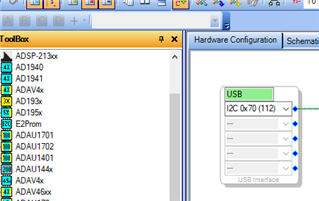
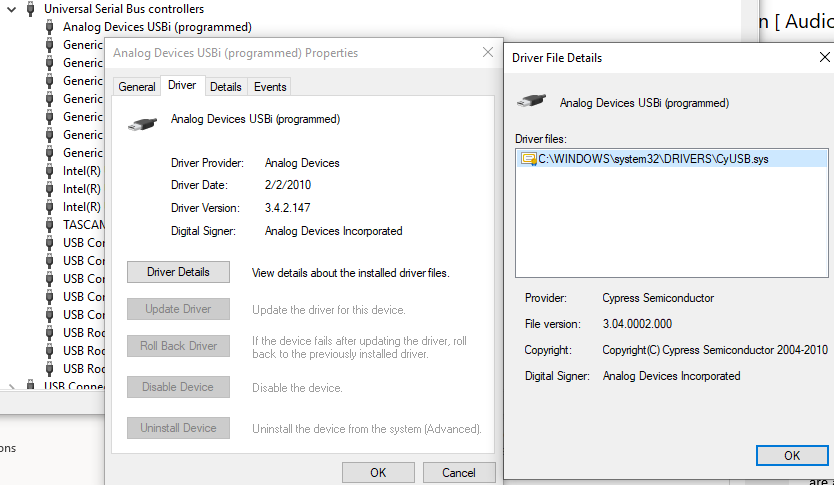
Every time I’ve tried it I’ve gotten the green to show up, I can just never get it to download to the chip. However when looking in device manager it showed up, but this was in the events log. I believed it was downloaded correctly-but could this be something?
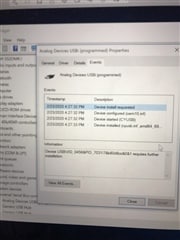
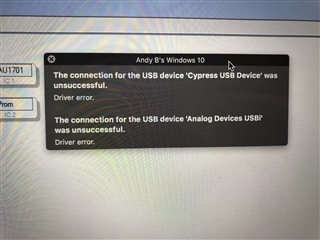
This also occasionally occurs, but only if I hit reset on the chip or unplug and plug back in if it was already green.
Hello,
Since SigmaStudio's USBi indicator is turning green I would generally expect the download to work. However, I don't know exactly what behavior to expect from this Dayton product.
It is still possible there is some kind of driver issue. Did you follow the standard installation process and install the USB drivers along with SigmaStudio?
From your most recent graphic it looks like you are running Windows through a virtualization environment. If I remember correctly I've used a USBi before in VMware on my personal Mac. What happens if you connect the USBi to your virtual machine before starting SigmaStudio? I think I might have needed to do something like that.
Joshua
Hello Andrew,
There very well can be driver issues.
I want to step back and check some other obvious stuff.
Is this DSPB-K board setup for I2C comms or SPI comms to the ADAU1701 DSP? The DSP can do both but usually people use I2C since it uses fewer pins.
Is the target board powered up? I have personally used our eval board with the jumper removed that picks up the power from the USB and I can attest it does not work with no power. LOL. You get the Comms Failed message.
Are there I2C pull up resistors on the PCB? Are there some on the programmer? Have you looked at the I2C traffic on an oscilloscope? That will tell you if there are no pull up resistors or if the programmer is not sending anything out. You have to set it to a single sweep to capture the one byte it sends out then waits for the ACK.
Dave T
I believe I followed the installation process correctly yes-I also just deleted it and reinstalled it to verify. I still have that flag from the earlier picture that says “requires further installation” which I feel could be the problem.
If I connect if before I launch the software it normally doesn’t recognize the USBi, so then I have to plug cycle it and it recognizes-but still won’t download.
It is setup for I2C comms. Would the target board in this case be the DSPB-K board? The Dayton ICP I believe is the equivalent to your eval board-if so both appear to be powering up fine.
I unfortunately do not have an oscilloscope to be able to test that.
Hello Andrew,
I think you are using the Dayton Audio Programmer board correct? If you are not using our EVAL-ADUSB2 eval board as your USB to I2C interface then I would contact Dayton Audio for assistance.
Dave T
Yes. Thank you for the advice
If I were to purchase one of your boards, would it work with the Dayton Audio K Board-just a 6 pin JST on it. If so, would it be the ADUSB2EBZ or the ADUSBSEBUZ?
Hello Andrew,
I am making some assumptions but not too far off of normal.
Assumption 1: They are using I2C. Almost 100% certain of that.
Assumption 2: The I2C pullups are located on the target board and not on the programmer. Our programmer has some weak pull ups but there probably should be some on the target board as well.
Then you would have to build a custom cable to connect to their board. All that really HAS to be connected is the two I2C lines, SDA/SCL and ground. But there may be more needed.
Look at the schematic on their board to see if they need to have the 5V connected to either power up their board or to set some logic like to defeat the Write Protect on the EEPROM.
So it would take a bit of study of the six pins on their connector to see what they are used for. I feel that our programmer would most likely work but as I said, it will take a bit of custom wiring work and looking at the details.
Besides that, I2C is I2C and as long as our programmer can directly communicate with the DSP it will work.
Dave T
That definitely puts me in the right direction! Thank you so much for all of your assistance.
Did you ever get this problem fixed im having the same issue
Hello ob1silvia,
I assume you are using the USB to I2C interface that came with the Dayton Audio Board? If you are then you need to contact them about this issue. We only support the USBi that we supply with our eval boards.
Dave T
I struggled with this issue, and have learned that doing things in a particular order avoids the problem.
By way of background, I am running SigmaStudio 4.7.0 on a Macintosh computer under Parallels 18.0.2, with Windows 10. I therefore need an extra step or two. I am using the Wondom APM2 DSP board with an ADAU1701, and I am connecting it using the Wondom ICP3 USB board. This is a very inexpensive configuration that, other than this annoying Comms Failed problem, works well for me.
To avoid the "Comms Failed" message, I do the following:
Disconnect the ICP3 board from the computer.
Disconnect the APM2 from the ICP3 (6-wire harness) <== CRUCIAL
[With Parallels running, connect the USB cable from computer to ICP3. This will cause the Parallels environment to ask whether the new USB device (ICP3) should be connected to the virtual environment. Select the Windows virtual machine for the USB interface.]
Start SigmaStudio from Windows
Open or create new file whose hardware configuration has the USBi as the data source.
If this is working properly, the text box at the top of the "USB Interface" icon should be Green with the word "USB". If it is RED, the ICP3 has not been recognized (see HINTS).
Only after steps 4 through 6, connect the 6-wire cable harness from the ICP3 to the APM2.
At this point, I am reliably able to Link, Compile, Download and to control the ADAU1701 in real-time.
HINTS:
The Windows Device Manager should contain an entry for the USBi Interface. If it does not, you may have to install or reinstall the USBi driver from the SigmaStudio download.
The ICP3 has a reset push button near the large IC. Pressing that button is more or less equivalent to disconnecting, then reconnecting, the USB from computer to ICP3.
The ICP3 has a tiny mode switch (a slider) adjacent to the JST harness connector. At times, I have found that changing it from position 1 to position 2 and back can clear a Comms failure - but this may be superstitious on my part. The nominal function of that switch is to toggle between "Programming" (position 1) and "Bluetooth Control" (position 2) modes.
Step 3 is not relevant if you are running Windows natively.
I hope that someone is helped by this.
I also had this error on VMWare (Ubuntu host).
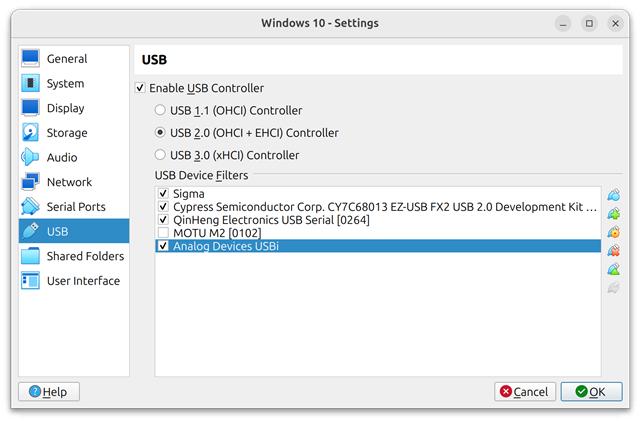
Selecting USB 2.0 (not USB 3.0) made it work.
Please log in to reply.