DC Input Entry No Mips
Hi ADI and friends,
Just started playing around with SS and overall I'm impressed with it's ease of use, but the documentation is poor at best if I'm being honest (but you already know that).
For the application I'm working on, I'll need to squeeze every cycle possible out of the SDSP and need to use quite a few DC entry blocks to set constants. I figured this wouldn't be an issue because a no mips DC entry block exists, however this block seems unusable!
On the left you can see the standard dc block and on the right the no mips variant. It seems to be missing a way to connect it's output value. Am I missing something that is documented somewhere (or not documented somewhere *angry face*)? It looks like the no mips switch has this same problem.
As an alternative, is there a more resource friendly way to set constants?
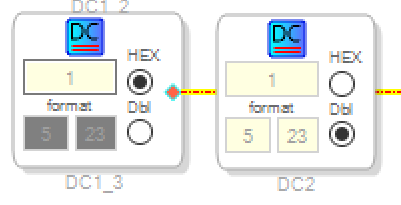
Forgot to mention I'm using the ADAU1787
Hello TreyG,
The No-MIPS version only resides in parameter RAM and is not part of the DSP program itself. Hence, No Mips. This would be used by a controller to read something like a serial number or software revision number that is setup when the program is compiled. The DSP can read this memory location but then you are using MIPS to do it.
So if you need a constant in your program you have to use the standard DC cell. It uses very few MIPS. I think it is one instruction to fetch the data from Parameter RAM. So you are correct to try to use these as much as possible if your calculation will be the same every cycle. I also use the Alias feature a lot. It cleans up your schematic and costs no MIPS.
For instance, I will setup two DC cells. One that stores a "1" in the proper format, and one that stores a Zero. Then I setup an alias and use that tag in many places in the design. This way you save memory space. To use an Alias you right click on the output pin and you will see the selection.
The No-MIPS switch is not very useful. Some of these cells are holdovers from the early SigmaDSPs where they had a lot less memory and some companies would ask for some specific cell and we then include it into the library. I do not know the story of how the No-MIPS switch was intended to be used. Others on the forum might chime in here.
Dave T
Thanks for the quick reply Dave!
I ended up figuring out the alias trick and have a bunch my constants instantiated at the top level of the schematic. I just feed them into board cells as I need them and this works well. Overall I'm very impressed with the tool. Kudos to the ADI team...just work on the documentation ;)
Please log in to reply.