ADAU1452 digital crossover volume issue
Greetings,
I have built a digital speaker crossover using an ADAU1452, two AK4490 DAC boards, and a USB receiver. The DACs are connected directly to power amplifiers (no passive/analog preamp) and I'm using the AK4490 built-in digital volume control via an Arduino. So far everything is working fine, music plays on the speakers, and the crossover is doing it's job.
The problem is that the overall volume is so low I have to set the volume control on the DACs to almost 100%, telling me that something's wrong.
Usually when I use one DAC directly connected to the USB receiver, the volume of around 30% is already too loud.
For now I'm only using 16bit/48khz audio from my PC, but I'm not sure if the USB receiver is upsampling to 32bit (both the receiver and DAC are 32bit/768khz capable).
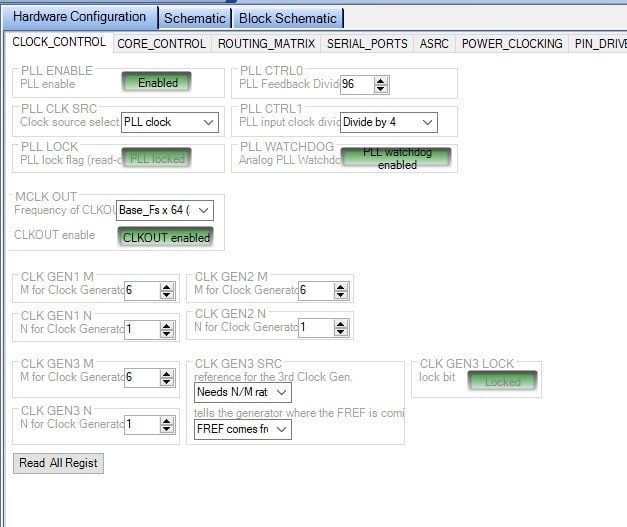
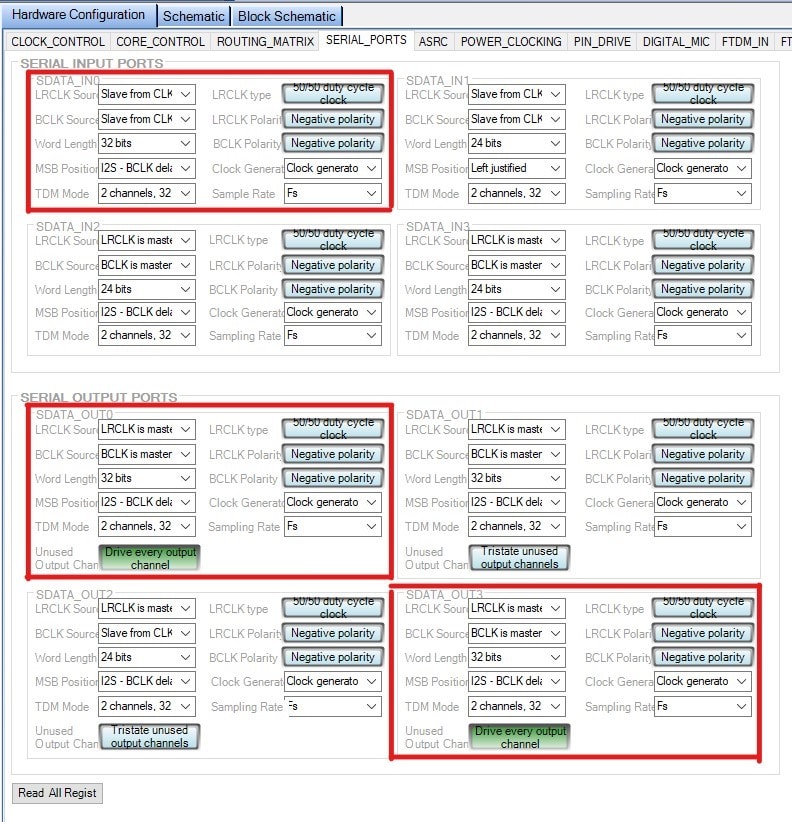
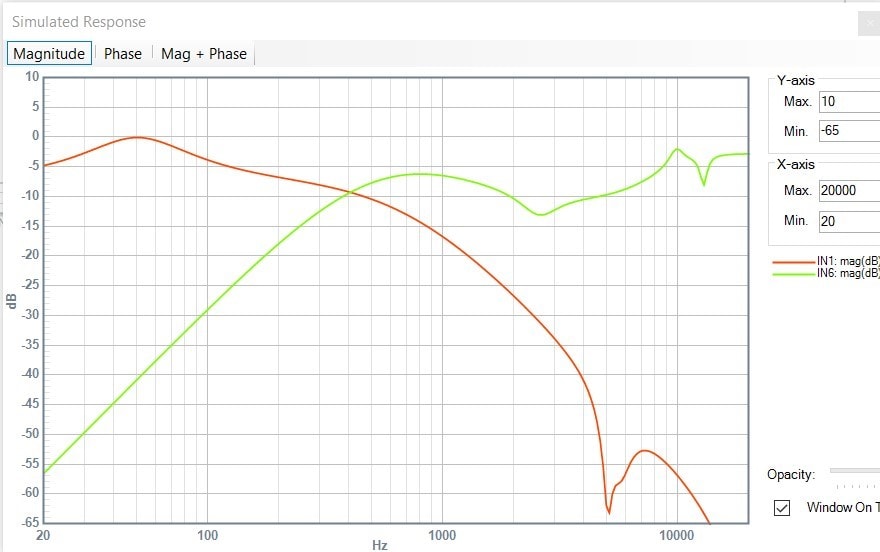
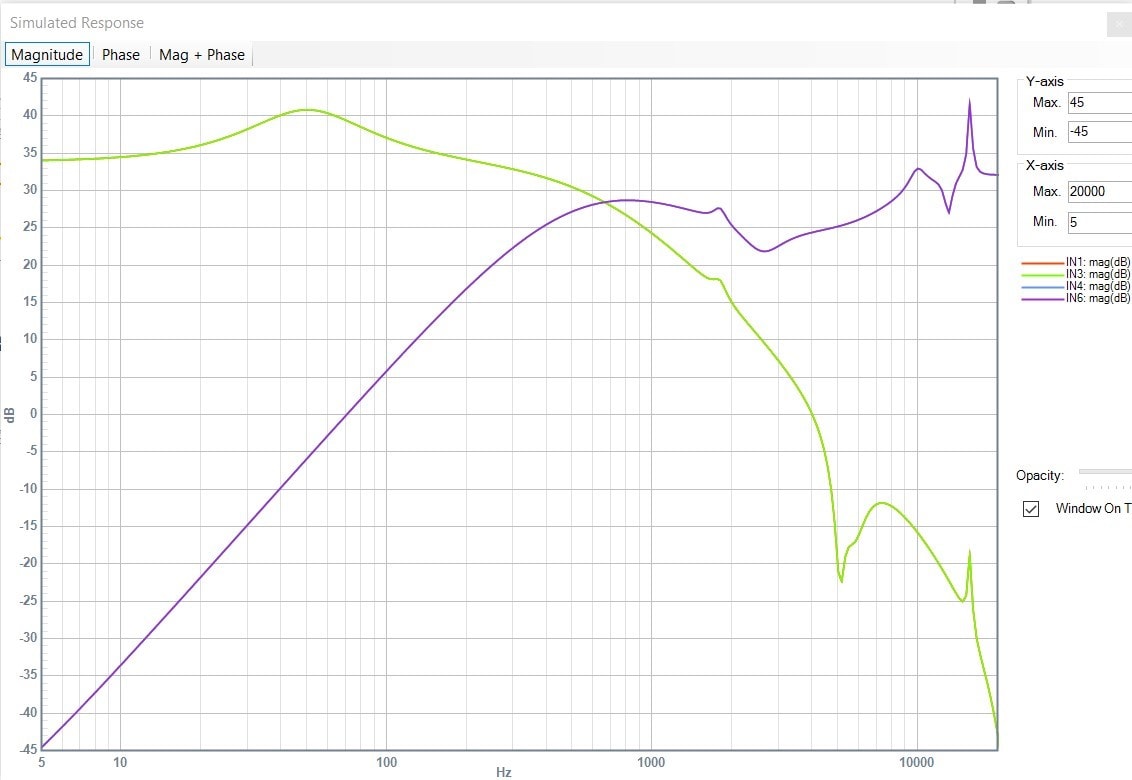
Here are my settings for clock control and serial ports, and a screenshot of the crossover curves:
I tried changing the settings, and if I set the MSB Position to Left justified either on input or on the outputs, I get a much higher volume, but with a lot of clipping/distortion.
So am I missing something or should I be using the ASRC somehow to get the proper signal to the DAC boards?
I am still reading the datasheets of both ADAU1452 and AK4490 but any help is very welcome.
Audio Signal Processors
adau1452
SigmaDSP Audio Processors
Hello nahero,
OK, let's chip away at this. There are a few things I will mention that will not fix this but will make performance better for some things.
For the input clocking. I see you have it set up as a slave. That is fine. Now there are two ways of doing this.
1) This first way is a bit more involved but you end up with sample accurate audio. You have the core slaved to the serial input port rate.
So on the config page the second tab from the left is the Core Control tab. Then near the upper left you will see the Start Pulse register. Set this to Serial Port 0 so it starts the program running at the rate of the data coming in. Keep in mind that doing this will mean that if there are no clocks coming from the USB, then the DSP will not start its program and so it will do nothing. This might not be a problem with your application but it also might stop in its tracks and put out DC. The amp and speakers might not like that.
Then the serial output ports cannot easily be setup to run at that serial input port rate. So you will have to jumper the BCLK and LRCLK from the serial input clock pins over to one of the serial output port clock pins. Then set that port to slave to those clock pins. So if you jumper them over to output port 0, then output port 0 is set to be a slave from serial port 0 and serial port 3 you setup to slave to the serial port 0 as well. So they both will be on the same clocks and everything will follow the incoming serial clocks.
Like I said the down side is that if the USB data stops, everything stops.
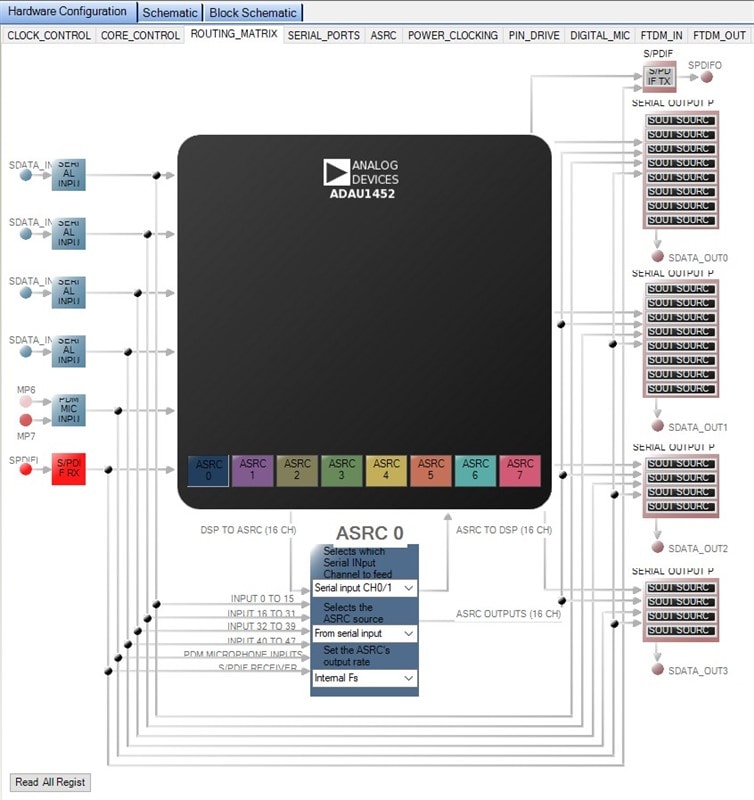
2) Use the ASRCs. I would use them coming into the DSP. So set one of the ASRCs to get its data from Serial port 0,1 and then set the output clocks to the internal fs. Now you are translating everything to the core rate. Then the serial output ports can run off the internal fs clock and it is all in sync.
Next, the serial input port is set to 32 bits. This is not needed and so I suggest you set it for 24bits. The 16 bit data will be left justified so the volume will be the same just the resolution of the low level signals will be less because there are only 16 bits. This should not fix the level issues.
It looks like you have SimgaStudio setup and are using it to program the DSP. This is very helpful and can make things easier. It is a huge troubleshooting tool.
You can do two things. The first is to place an oscillator into the project and a switch to be able to switch to it and send the oscillator directly out of the DSP to the DACs. The oscillator, when set to 0dB, will put out exactly a 0dBFS signal. Be sure to lower the DAC and possibly not have speakers attached when you do this. It could be super loud.
Now, I am assuming that the DAC is expecting a standard I2S signal. This would be left justified data delayed by one bit clock period. An LRCLK of 50/50 duty cycle and 32 bit slots per channel.
So what the DSP will send out is a 24 bit signal left justified, with the 1bit delay, but the last 8 data slots will be empty. Again, this means the level will be able to go up to the max and just the lower bits will be zeros so the resolution will be lower. So this will test your DSP to DAC chain.
Once this is working as expected, then focus on the input. For that you can use a meter in sigmaStudio. Keep in mind that the meters in SigmaStudo will read -3dB when a 0dBFS signal is present. So now the problem is how to get a 0dBFS signal out of the PC and into the DSP. If you can find a sound file that is known full scale then see if it is coming in at full scale. If it is 6dB down then the serial port settings on one side or the other is wrong. See what you find then we can cross that bridge.
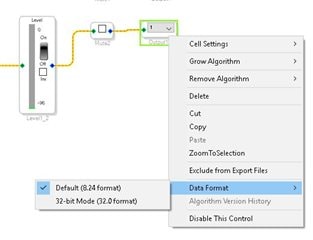
Now, since you have a 32 bit DAC you might as well use it. The SigmaDSP does have the capability of sending out 32 bit data. The data in the core is 32 bits. We have saturators to convert the 32 bit data to 24 bit data to send to the serial ports. It is easy to bypass this and just send the 32 bit data. Simply right click on the output cells and set the data format to 32 bits.
Now the data in the core gets transferred to the DAC. I would do this AFTER you have verified the 24bit data is at the correct level with the oscillator. Because, now the oscillator will be putting out a full scale 1.24 signal which is much lower level than that signal being sent out as an 8.24 format signal. The signal will be 7 bits below 0dBFS for a 32 bit signal. 7x6dB= 42 dB down. So I would do these things one step at a time.
Once you are sending out the 32 bit data you probably will have to gain up the signal a lot in the DSP depending on the processing you are doing.
I know I hit you with a lot here...
See how much further you can get.
Dave T
Hello Dave,
thank you so much for the detailed explanation, really appreciate it!
So based on your instructions, here is what I did (sorry for the long post...).
1) I didn't go for the first option of jumpering the input and output LRCLK/BCLK firstly because there are no DC blocking capacitors in my DACs or amplifiers, so I want to be on the safe side. But regarding this, could you elaborate what you mean by sample accurate audio?
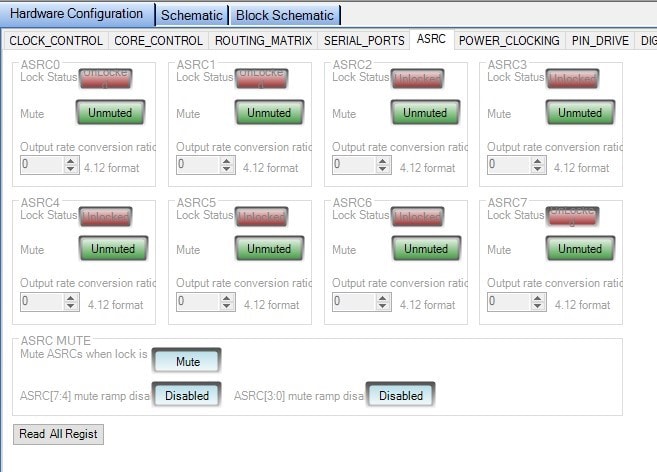
2) So I set the ASRC as you can see in the screenshot, but I can't say there was any difference. Also, when you say I can run the output ports off the internal fs clock does that mean selecting the "LRCLK/BCLK is master" or "Slave from CLK 0"? Because the second option is not working. Checking the ASRC tab I noticed that the ASRC0 did not lock on to anything, and I recall seeing this before when experimenting.
For the input/output test, I connected an oscillator, set it to 1khz and 0dBFS, bypassed the crossover section, and got -3dB on the input meters as well as output meters. The AC voltage level on the DAC output was 2,743V (with the DAC volume set to maximum value of 255). When I switched to the input while playing a 1khz 0dBFS signal from my PC I also got -3dB on input and output meters (sometimes falling to -4dB on output), and 2,704V on the DAC output.
With the crossover in place I got 1,326V on the tweeter DAC output (oscillator) and 1,308V (PC input). If you take a look at the crossover curve this was expected, as the tweeter gain is -9,8dB, has high-pass at 700hz and some high shelf and other EQs applied.
I also repeated the test after switching the outputs from 8.24 format to 32.0 and the signal was down to 0,01V and 0,02V (with and without crossover). This is the -42dB difference you mentioned.
So I conclude that the output is working fine, unless I missed something.
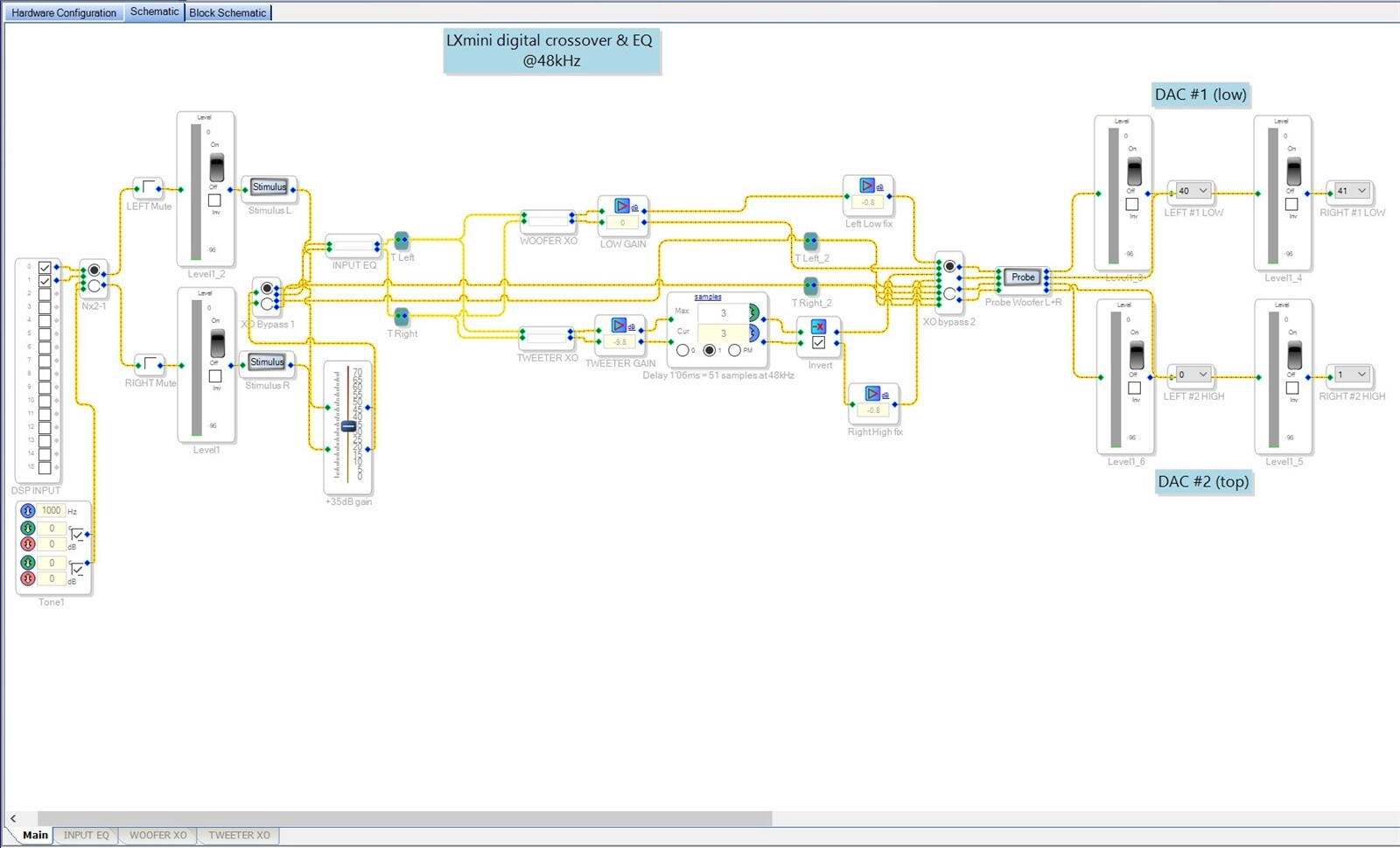
After changing outputs to 32.0 format I added a gain of +42dB to both channels. This brought the signal to the proper level, and I also noticed that anything above 42dB has no additional change. In the end I set it to +35dB and removed a -7dB gain which I had on my woofer section. (There is also a huge peak in the 15khz section that wasn't showing in crossover curve I posted because I had the stimulus placed after the global input EQ. You can see it in the new screenshot.)
Soundwise I got a somewhat more coherent sound from my speakers, but that was also due to dealing with that 15khz spike not causing clipping anymore (the tweeter signal from DSP to DAC was 7dB lower this time). At the same time I felt that some dynamics were gone.
And still, the volume level is so low I have to set it to 95% for normal listening.
For some additional questions:
Does adding this much gain of +42dB (or +35dB in my example) produce any losses in the signal? Can't say I hear anything bad though.
With this setup what actually happens when I switch the source from 48 to 96 or 192khz? Tried it quickly with my MacBook Pro, but I can't say I heard any difference whatsoever.
Can you please clarify a bit what it means that the resolution of the low level signals will be less because there are only 16 bits? Should I be switching between 16bit and 24bit operation depending on the signal coming in to preserve this resolution?
Here is what my crossover setup looks like in SigmaStudio, still messy but I will clean up later
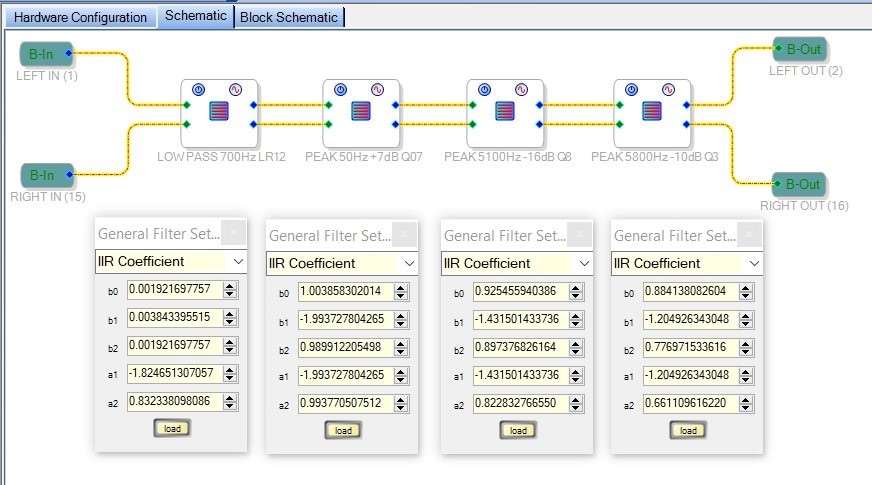
Woofer XO board, all the filters are in IIR form (derived from MiniDSP coefficient calculator). Tweeter XO and Input EQ are similar.
The resulting crossover curve with the 32.0 format applied
Again, thank you very much for taking the time Dave.
Hello nahero,
nahero said:
1) I didn't go for the first option of jumpering the input and output LRCLK/BCLK firstly because there are no DC blocking capacitors in my DACs or amplifiers, so I want to be on the safe side. But regarding this, could you elaborate what you mean by sample accurate audio?
Jumpering the clocks from the input to output serial ports has nothing to do with the actual audio signal. It has to do with the clocks clocking the audio signals. Yes, if the clocks go away they it can be stuck on DC but then you may have other issues at that point. So if the audio being sent to the output serial port has no DC then the output will have no DC regardless of the source of the clocks. (provided the clocks are valid of course)
If you synchronize the input serial port to the output serial port, then they will be transferring audio at the same rate. Then if you have the DSP core running the program to process the audio at the rate of the serial input ports then all will be in sync. The sample comes in, gets processed by the core and then sent out. Sample accurate, no interpolation.
If you use the ASRC then what happens is that the incoming audio is resampled to a much higher rate then down sampled to the output rate to translate between the two sample rates. To do this it interpolates the data in between the sample periods when going from a low rate to a high rate and it looks at the interpolated curves when down sampling. So the data coming in is changed. The sample processed will not be the exact same sample of the audio coming in. Most of the time this is not an issue and it works quite well. however, there are times where it is not good like then the audio is encoded or the waveform MUST be exactly what is coming in. So this is not sample accurate.
The meters inside of SigmaStudio will show -3dB with a full scale 0dBFS signal coming in on the serial port. If you use an internal oscillator, (which I recommend you do for trouble shooting, you eliminate the input serial ports),
Now this level is the nominal 8.24 signal not the full scale. That is the 42 dB I was talking about. Now I would not raise the level up by 35 dB only leaving 7 dB of headroom. I would want at least 14 dB and if you are booting with the EQ you might want more. It also depends on the type of audio and also if you have limiters in the signal path. A lot of this is subjective.
Also, when you boosted the signal by 42 dB then boosted it further you were clipping it so you would not see any more gain because there are no more bits to represent this greater level.
The resolution of 16 bits verses 24 bits means that there are move bits to describe a low level signal. Put in a very low level signal into the serial port. Like -70 or -80 dB then boosting it up a lot. It will sound granular because there are only a few bits to represent the level of the audio. I imagine there are examples of this on YouTube for audio education.
Dave T
Dave thanks again for all the clarifications, I have a better understanding of what I'm doing now.
In the meantime I re-read what mr. Linkwitz posted about the signal level for the LX mini crossover and it basically turns out that this low output level is expected given the tweeter level is at -9.8dB and combined with +7dB peak at 50Hz the overall signal level should be around -17dB down to prevent clipping. But as you said the margin in dB should be even larger.
He was operating the MiniDSP 2x4 at 900mV input and output levels, and controlling the volume by amplifying the analog output signal after the DACs. In my system the volume control is the digital internal DAC control, and the output analog section is only an op-amp based buffer. I will build an output section with gain control, or even a separate preamplifier, and see what I can get from this.
Apart from this, I also had some clicking sounds or dropouts in the signal which were very obvious when playing sinewaves, but not so obvious when playing music, and using the input ASRC together with output clock from the ADAU1452 to connect to AK4490 DACs MCLK solved that last bit of problem I had.
Now the whole crossover is working properly, although I can only use the DSP onboard clock generator which is probably worse than the one on the USB receiver, but I have a good quality external clock and FIFO reclocker waiting to be plugged into this system, and we'll see how that sounds.
Please log in to reply.