ADAU 1467/ SigmaStudio4.5 An error on probe unit when using with the parametric filter
Parametric EQ(Filters-Second Order-Double Precision-Multichannel),
It has the ability to adjust the frequency response for 15 frequencies on one screen.
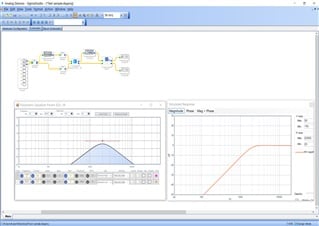
The Probe unit together with the Parametric EQ unit displays only 1 first frequency set in the Parametric EQ unit.
The remaining 14 frequencies on the frequency response curve in the PROBE unit are not displayed.
And physically all 15 frequencies set in the Parametric EQ unit work correctly.
I have ADAU1442 and ADAU1467. I experienced this phenomena only on ADAU1467, not on ADAU1442.
I know the same error was raised in 2019, but I do not know the solution yet.
Please advice me.
Audio Signal Processors
adau1467
adau1442
SigmaDSP Audio Processors
Hello omnisound,
I think the priority on changing this is low because you can see the curves on the screen in the GUI so you really do not need to see it repeated with the stimulus and probe. I know for the filters that are index selectable SigmaStudio has no way to know which one is active but with these it could read the parameter for the selected EQ curve since that is stored in SigmaStudio .
Dave T
Thank you for your advice. Yes, it is sure that I can see the filter frequency curves in the each GUI individually, but when I need to monitor the total frequency curves including other circuit as a whole, I have to use the stimulus on the input point and the probe on the output point. In this case, this tool does not work. I think this is a fatal error.
Hello omnisound,
This simply is not possible and beyond the scope of the stimulus and probe. It works in SigmaStudio not on the actual DSP. So if you run your signal through other blocks that are actually running in the DSP it is not possible for SigmaStudio to know what is happening in the DSP. The USB connection is not fast enough for the audio to be sent back up to SigmaStudio.
So you need to use external tools that are connected to the audio in and out of the evaluation board.
Dave T
Thank you for your quick response. My explanation might be not correct enough. When designing the complex circuit, we apply not only the filter unit but also other many function units in a circuit. And when we want to know the total frequency response as a whole, we have to set the stimulus/input and probe/output. This is a very important desire to evaluate the design, but it does not work. On the ADAU1442, no problem was observed.
Hello Omnisound,
I would like to see the project that the stimulus and probe works through most of the project on the 1442. It is no different and is not a different implementation of how this feature works. I think where it worked on the 1442 was mostly by coincidence of the cells that were in the signal flow allowed it to function. Then it would be good to see a similar project of yours using the 1467 where it did not work. The details should tell us more.
Feel free to send the projects to me via private messages since I am assuming these are completed projects. If you can show this with projects that can be shared with the community that would be great.
Dave T
Hello Dave, I'll attach a very simplified sample, which has 3 filters, several delays and others. To know the total frequency response, the stimulus and probe unit are placed on the front/back ends. As you see the attached result, the probe displays only one first frequency set in the each parametric EQ unit. This project does not show the same error on 1442.

Hello omnisound,
Can you attach the actual project?
You have to zip it first then it can be attached.
Thanks,
Dave T
Hello Dave, thank you for your cooperation. I 'll attach a sample project. Pls check it.01 Test.zip
Hello Dave, thank you for the kind analysis. Did the sample project arrive at the support community?
01 Test.zip
Up0Down
Hello Dave, Have you received the zipped project I sent ?
01 Test.zip
Hello omnisound,
Yes, I did. Sorry, I have been a bit busy the last few days.
I did get the same results you did. It certainly seems like it is a bug that needs to be fixed. I am checking to see if it has been previously reported to the programming team and if it has not I will report it.
There is a workaround. If you use the General 2nd order filters and grow them you will be able to see the result of all of them but the interface on the screen is nowhere near as nice for you.
Dave T
Hello Dave, It is a great relief to hear that you got the same result ! And thank you for the alternative proposal to apply the General 2nd order filters. I will try it. I 'm looking forward to get the updated version.
Hellow Dave, I have confirmed that the latest SigmaStudio 4.5.1 beta version has corrected this problem. Thank you for your effort.
Please log in to reply.