Sigma Studio -> Linkwits Transform
Hi,
This is my first post. Please bare with me, as I am not an egineer and I am learning the basics of Sigma Studio to configure my ADAU1701 DSP. If this is not the correct site to make my rookie's questions, just let me know.
I am using my ADAU1701 to integrate my subwoofer to my mains and to get the proper room response. It's a DIY 15" sealed SW and I would like to implement a Linkwitz Transform to get better low frequency response.
I already implemented using another DSP software (from MiniDSP), but I would really know how to implement it on Sigma Studio. From the spechsheet I get the digital biquad coefficients, that they look like this:
a1
1,996297042315250
a2
-0,996303883545513
b0
1,001259526446320
b1
-1,996288114509760
b2
0,995053284904683
I don't know where to integrate properly this info in Sigma Studio. Well, this is my birst question regarding my ADAU1701, but I have a ton more... hope you can help me.
Thanks in advance!
Audio Signal Processors
SigmaDSP Audio Processors
adau1701
Hello mga2009,
If you really want to use these coefficients you can enter them into the General 2nd Order filter cell. Here are the details:
However, why don't you simply use the crossover cells that are available in the library? They use Linkwitz/Riley filters and are easy to use.
I had put together this example project for a 2-way crossover to a mono sub as an example file a while back.
ADAU1701 Crossover with Sub Output.zip
I think this will work fine for you.
There is a help page for the crossover but it does not explain much. Fortunately the GUI interface is easy to understand.
https://wiki.analog.com/resources/tools-software/sigmastudio/toolbox/filters/crossover
Dave T
Dave,
Thanks for your quick reply! I will thoroughly check the information.
I've been testing your suggestions and found the General 2nd Order filter cell is accepted, but using "Stimulus and Probe" to check it is working, I don't get the correct equalization...
After switching the a1 and a2 signs (left the a1 as a negative number and a2 as a positive number) , it seems to work.- Is this a glitch in SigmaStudio?
Leaving it like this, it seems to work:
b0 1,001259526446320
b1 -1,996288114509760
b2 0,995053284904683
a1 -1,996297042315250
a2 0,996303883545513
Also, I noticed using the cell "Parametric EQ" in "Second Order" - "Double Precision" - "Multichannel" is also doable, but here the "minus" sign does not have the same effect.
Thanks
Please don't consider the "commas" in the numbers above... I am using "." in SigmaStudio.
Still when I use "Parametric EQ" cell with IIR Coefficient and IIR Table I get a different response than when using "General 2nd Order filter" cell with IIR Coefficient. (The difference is made by the "-" sing in a1 and a2.
UPDATE:
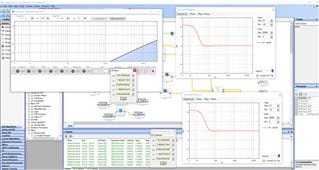
Here I uplooaded a picture that shows using the same IIR Coefficients and the same simulated response, but the "parametric Equalizer Param EQ! window does not show the proper equalization (If I switch the "-" sign between a1 and a2 it shows a correct equalization, but the simulated response fails.

Hello mga2009,
I think this is a slight difference in the implementation. There are a lot of posts on the subject. It is not a glitch.
Dave T
Thanks Dave,
I uploaded a picture showing the difference between the simulated response and the "Parametric Equalizer" window. Anyway, I will test it with General 2nd Order and download it to my DSP. Thank you for your help.
Hello mga2009,
I have just read your questions with great interest. I have been dealing with the problem of transferring the coefficients of the Linkwitz transform into Sigma Studio for a long time. Have you found a solution in the meantime. If so, do the rules generally apply to all filters?
I am looking forward to your answer
Many greetings from Berlin, Germany
Yes.
Thanks to Dave's help and some reading here in EngineerZone I managed to properly implment the LT in SigmaStudio.
Sigma Studio doesn't have a 'Linkwitz Transform' filter block, so the solution is to implement it as a IIR filter.
The coefficients are calculated with the spreadsheet in the MiniDSP site, and from the info I've read (credits to all those who found/though of this), the spreadsheet and Sigmastudio use different definitions of coefficients a1 and a2, so you have to multiply the spreadsheet's a1 and a2 values by -1 before plugging them into Sigmastudio.
Please log in to reply.