Writing parameters to EEPROM memory by MCU
I just started my career studying the ADAU1701 audio processor. Now I’m trying to figure out how to write to memory. I am trying to write data to memory through the i2c interface, using the arduino, but so far it does not work out. I read many articles and posts both on this site and on the Internet as a whole, but I still could not find an answer to my questions, but the questions are:
1) What blocks is the memory divided into? I have read the datasheet of microchips many times, but I still could not figure it out.
2) How to adjust the parameters through the microcontroller? That is, how to correctly record the necessary parameters (in which memory cells, etc.)? For example, I want to adjust the volume.
And so far, there are no more questions. While writing this, I realized how badly I understand the topic and how difficult it is to explain what I do not understand, but I really hope for the help of other people.
P. s. English is not my default language, any errors may occur.
Audio Signal Processors
SigmaDSP Audio Processors
adau1701
Hello in_text,
Let me start by explaining a few things. SigmaStudio has two basic jobs to do. The 1st is to provide a GUI interface to allow you to assemble and create programs graphically. Then it will compile this program into executable code and download it into the DSP
The second job is to control the program running in the DSP using the graphical interface in SigmaStudio.
So these are two different modes. If you look at the bottom right corner of the screen it will say if it is in "design mode" or "Active Downloaded". Once the program is compiled and downloaded, the program is running in the DSP and NOT in the host computer that is running SigmaStudio.
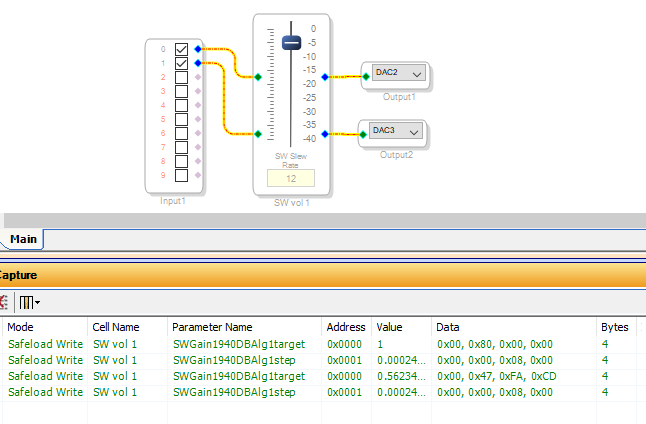
So in the Active Download mode, SigmaStudio is communicating to the DSP that is running the program in the exact same way your controller has to communicate with the DSP. You can see the communications in the Capture window. Here is a screenshot of what happened when I changed the gain of the volume control. Look at this screenshot:
You can see that the SigmaStudio sent two messages to the DSP. Both were using Safeload writes which in this DSP processor you MUST use to prevent clicks or pops in the audio. Our newer DSPs do not require safeload writes for simple objects like volume controls. Only for filters. We learned how to do this better with newer generations of the SigmaDSP parts.
Now, the second write that SigmaStudio is sending is actually not required. There are things that the SigmaStudio programmers added that are not needed but they are covering for that fact that SigmaStudio does not know if the state of the DSP was changed so there are extra writes you will find from time to time but I do not want to complicate things too much right now. The simple answer is you can see how SigmaStudio communicates with the object running in the DSP.
The address of the objects can and will change when the program is changed and recompiled so you will need to export the system files and update the defines in your program to point to the correct memory locations.
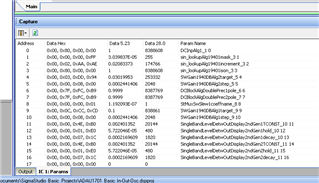
The other thing I want to point your attention to is the Params window. It is a tab in the bottom of the Capture window. Here is a screenshot of it.
This is the actual parameter memory in order. Here you can see what control parameters are exposed for the objects running in the DSP. These are the settings you are writing to when you change something like a volume control. You can right-click on this window to change things like make the address display in Hex which really should be the default. Programmers do not think of this since they do not work in Hex as much as hardware engineers.
The really helpful thing they did do in this window is to display the contents of the memory locations in three formats. Hex, 5.23 (fixed point) and 28.0 (unsigned integer). For some objects it is helpful to look at it in one of these formats and not the other so you always have a choice which is great. You can also click on any of these data fields and enter in new numbers and it will send it to the DSP! Really cool! But keep in mind if you do this the object GUI on the screen does not know you did this and so it will have the wrong display.
Memory:
This is in the datasheet but I guess you have to dig a bit for it.
The data memory in this part is 28 bits wide. So it uses 32 bits (4 bytes) of memory for each parameter. So you must send it four complete bytes to write to each memory location. The address is for each word and NOT for each byte. it is not possible to address individual bytes, it must be a complete 32 bit transfer for the data to actually be written to the memory. Your software must account for this.
Look at table 31 to see the register map. This map shows the size of the registers. There is a column called No. of Bytes, that shows how many bytes that register has. It varies from 1 to 5.
The program memory is 40 bits wide.
Now one other detail you will run into is with the readback feature. This feature is where you can select a point in the program determined by the program instruction counter, to grab the contents of the accumulator or a few other registers that are part of the core. The contents are transferred over to the communications port and can be read by an external controller. However, this transfer is only 24 bits wide. So it only grabs the 24 most significant bits of the data. This is usually fine with a fixed point number but if you are using an unsigned integer then you cannot see the last four bits. You work around this by multiplying by 4 twice to shift the LSBs over by four so you can see them with a readback. This will become more clear as you use the program.
So this should get you started. There is a lot on the forum for this part but I understand that you need to become a little more familiar with it for you to understand some of the posts.
Enjoy! This is a great little processor that can do a lot for its size!
Oh! one more thing about the capture window. SimgaStudio does hide some of the communications because it would clutter up the window. Communications with the meters are not shown and any other continuous communications are not shown. It would be too much traffic.
Dave T

Thanks for the answer! In the morning I’ve been studying how the memory registers in the processor work. And the question arose, I have the same input chain - the volume control - the output, I understood how the data changes when the volume changes (for example, increasing the volume by 5 units), and began to figure out how to write this data to memory, but here having problems.
If you believe the Decision 1.params file, the parameter that is responsible for the volume level has an address of 0 - but how can the address be 0, if it is said in Figure 28 that the very first memory address is the parameters of the chipboard core itself. Next, I looked at table 20 and it only confused me - it says that the parameters of the values are in the range from 0 to 1023, which logically conflicts with what is shown in Figure 28. This is the first problem.
The second problem: even if I got the desired volume value (0x00, 0x80, 0x00, 0x00) and converted it to 5.23 format, how should I write it to memory? I have a function in the code that can write bytes to an address, and when translating a value into 5.23 format, I can get a fractional value, how should I write it? Just like a floating point variable?
Thanks in advance for your answers.
Hello in_text,
Actually your English is quite good! Controlling SigmaDSPs from a micro always appears difficult when first starting out. I'll try to help with your questions:
Page 30 of the ADAU1701 Data Sheet describes the memory map. The -1701 has parameter RAM (0000-03FF), program RAM (0400-07FF), and control registers beginning at 0800. There's also data RAM which SigmaStudio allocates to store audio data within delays and such, but we need not mess with that. You'll need to load program RAM as well as adjust a few bits in the control registers if you want to have your Arduino boot your -1701 instead of self-booting from a E2PROM. To adjust parameters like volume, you'll need to safeload the correct values into parameter RAM.
When you add a controllable block (like a volume control or filter) into your schematic, SigmaStudio assigns parameter memory for it. Thus now the control has a spot in parameter RAM which your Arduino can adjust. Use the Capture Window to find where and how to adjust:
For this example I set the Volume Control to use 5 dB steps just to make it easy to see the results (do this by right-clicking its knob). Link-Compile-Download your schematic (with hardware connected or not), then clear the Capture Window. In this example I show two volume settings -- the first is zero dB, the second, -5 dB. Each setting wrote to the same two parameter RAM addresses, 0000 and 0001.
Looking at the data, we see that the contents of Address 0000 gets adjusted when volume is changed. Its decimal value is 1 at 0 dB and 0.562 at -5 dB. We can see that these values are simply the linear gain -- that is, the number that the Volume Control multiplies the input signal to adjust its volume. 1 is a "straight wire." 0.562 is a 5 dB drop in volume. In general, you can calculate the decimal value with the formula:
Linear Gain = 10^(dB/20). For example, 10^(-5/20) = 0.562
We also see that the contents of the second parameter address 0001 is always the same, 0.00024. This relates to the SW slew number below the Volume Control's slider (change it and see). The slew number adjusts how slowly the Volume Control changes the volume -- your Arduino program can just leave this parameter alone.
So far we know:
For this example the Volume parameter is at address 0000. SigmaStudio assigns these addresses in order of program execution, so that blocks that appear to the right in your your schematic (and thus depend upon earlier blocks) get higher parameter addresses. Parameter addresses can change if you rewire the schematic.
To adjust volume, write the linear gain you want to this address. You'll need to have your Arduino program calculate or lookup the correct linear gain.
The next step is to safeload the parameter. The general idea of safeloading a -1701 is described pretty well in this tutorial. Having no experience with Arduino programming, I cannot help further. Also, of course your hardware connections from the Arduino to the -1701 must be correct.
I'd be really surprised if by now there aren't any DIY Arduino projects out there with schematics, program libraries, etc. Have you tried searching Arduino users groups, etc.? If anyone on EZ can chime in here, please do.
Best regards,
Bob
Thanks for the answer, Bob!
For example, I want to assign a volume value of 1 (I am considering the S Mixer1 component) - for this I multiply the unit by 2 to the power of 23 and, in accordance with the 5.23 format, translate it to 32-bit representation -> 0000 1000 0000 0000 0000 0000 0000
And here lies my main problem - how should I write such a number into memory? That is, I have to write 0000 to memory 0, 1000 to memory 1, 0000 to memory 2, 0000 to memory 3, 0000 to memory 4, 0000 to memory 5 and 0000 to memory 6. Either is and everything is quite simple, or I didn’t understand everything correctly!
Best regards,
in_text
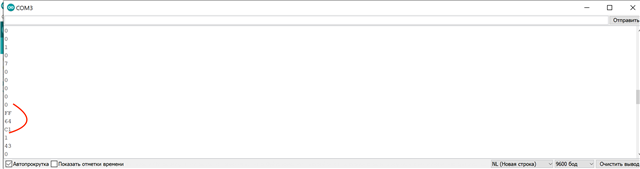
I just read through the memory cells with the help of arduino.
It turned out like this:
Why, if in all places the sigma studio tells me that the address of the volume parameter is 0x0000, but in fact, in the zero cell there is a completely different value?
Here is what the contents of EEPROM from 0 to 74 cells look like:
1 0 5 0 8 1C 0 58
3 3 3 3 3 3 3 3
3 3 3 3 3 3 3 3
3 3 1 0 23 0 8 0
0 0 0 0 0 0 0 0
0 0 0 0 0 0 0 0
0 0 0 0 0 0 0 0
0 0 0 0 0 0 0 0
1 0 7 0 0 0 0 0
FF 64 C1
After that, I tried to change 4 parameters at 71-74, wrote down 0x00 0x80 0x00 0x00, respectively, rebooted the processor and it stopped passing the signal through itself. Why did this happen?
With the help of arduino, I read the data in EEPROM. Why, if a sigma studio tells me that the data regarding the volume level is at 0x0000, then when I looked at the memory, I could not find them there? These parameters were in the memory cells at the address from 71 to 74.
And the data from 0 to 70 cells were the same as shown in Figure 28 from the datasheet.
When I tried to change the values of cells 71-74 to 0x00 0x80 0x00 0x00, respectively, after the processor rebooted, it stopped passing the signal through itself.
Maybe you need to write not in EEPROM, but directly in ADAU?
I also tried to scan available devices on the I2C bus. Arduino finds EEPROM without problems, but does not detect ADAU. This may be due to the fact that the WB conclusion is not pulled to the ground (it is in the air).
Hello,
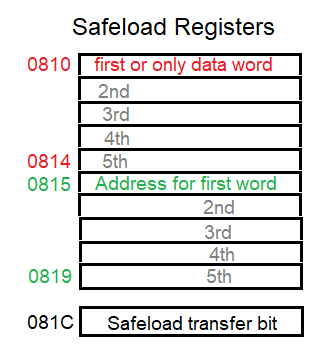
You have the 5.23 format correct. Actually the entire 32 bits goes into Address 0000, that is, the parameter address for the volume control. Each RAM location is a 4-byte word which can hold the 28-bit value with four zeros padded on the most-significant end. What gets confusing is the I2C transfers which occur as bytes. And besides, we cannot directly write the new volume word into parameter RAM because doing that in a running DSP disrupts the processes, causing audible pops and clicks. So instead we safeload the data, using a set of fixed registers the ADAU1701 provides for this purpose. These are up in the control register address area:
The basic procedure is, you place your data word describing the volume you want into register 0810. Then place the parameter address for this data (in our example, the volume parameter address is 0x0000) into register 0815. Finally, set the transfer bit in register 081C to start the safeload. The -1701's built-in process will then move the data you want into the parameter address where it belongs, during the dead time between audio samples -- thus no clicks or pops. If you were safeloading a filter which needs five coefficient words, you'll fill all the safeload registers then transfer it all together.
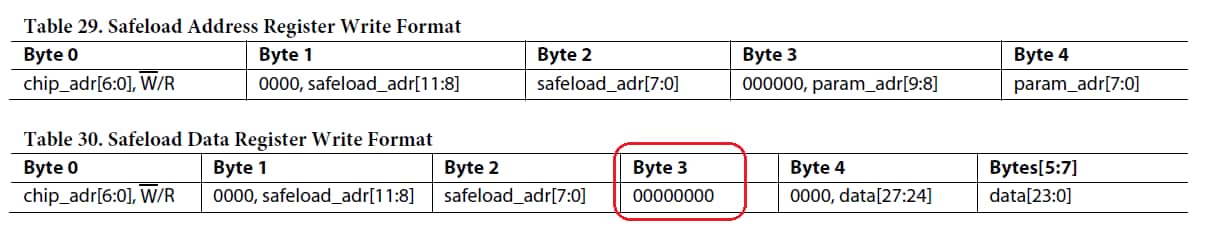
Next is how to fill up these registers with the address and data. The Data Sheet, page 31 shows the format of bytes you need to fill these registers with:
Note the extra byte circled above, this is because safeload was originally designed to transfer five-byte instructions as well as four-byte parameters. The instruction loading was never implemented but this vestige remains. Just don't forget to include it in your I2C writes to fill up the registers.
The safeload procedure is also described here:
Implementing Safeload Writes on the ADAU1701
Best regards,
Bob
Yes, after the -1701 self-boots it doesn't read from the EEPROM anymore. Thus to change the volume or other parameters, you have your Arduino write them to the -1701, using the safeload procedure described above. You could even dispense with the EEPROM altogether and have your micro boot the -1701 by burst-writing the initial program, parameter, and control register loads at startup. But one thing at a time...
Best regards,
Bob
Hello Bob! Thanks for helping!
#include <Wire.h>
#define EEPROM_ADDRESS 0x50
void setup() {
Wire.begin();
Serial.begin(9600);
Serial.print("Write byte to EEPROM memory...");
Wire.beginTransmission(EEPROM_ADDRESS);
Wire.write(2064 >> 8);
Wire.write(2064 & 0xFF);
Wire.write(0x0000800000);
byte status= Wire.endTransmission();
Wire.beginTransmission(EEPROM_ADDRESS);
Wire.write(2069 >> 8);
Wire.write(2069 & 0xFF);
Wire.write(0x0000);
status= Wire.endTransmission();
Wire.beginTransmission(EEPROM_ADDRESS);
Wire.write(2076 >> 8);
Wire.write(2076 & 0xFF);
Wire.write(0x003C);
status= Wire.endTransmission();
if (status == 0)Serial.println ("Ок");
delay(10);
I got such a code. Is that all right?
in_text
I cannot understand what the numbers in square brackets mean byte values in tables 28-29. Could you explain what is written in the tables?
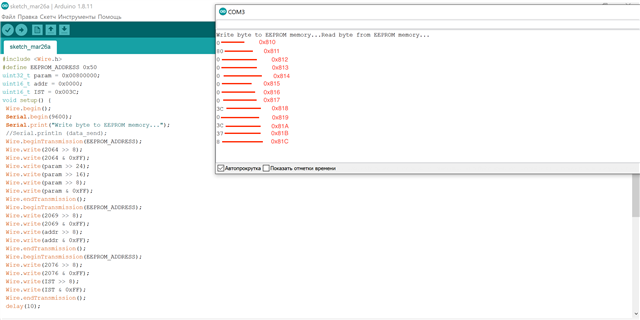
Here is the code I'm using at the moment:
#include <Wire.h>
#define EEPROM_ADDRESS 0x50
uint32_t param = 0x00800000;
uint16_t addr = 0x0000;
uint16_t IST = 0x003C;
void setup() {
pinMode(13,INPUT_PULLUP); //ADAU_WP
pinMode(12,INPUT_PULLUP); //ADAU_RESET
digitalWrite(12,1);
digitalWrite(13,1);
pinMode(13,OUTPUT);
pinMode(12,OUTPUT);
Wire.begin();
Serial.begin(9600);
Serial.print("Write byte to EEPROM memory...");
digitalWrite(13,0);
//Serial.println (data_send);
Wire.beginTransmission(EEPROM_ADDRESS);
Wire.write(2064 >> 8);
Wire.write(2064 & 0xFF);
Wire.write(param >> 24);
Wire.write(param >> 16);
Wire.write(param >> 8);
Wire.write(param & 0xFF);
Wire.endTransmission();
Wire.beginTransmission(EEPROM_ADDRESS);
Wire.write(2069 >> 8);
Wire.write(2069 & 0xFF);
Wire.write(addr >> 8);
Wire.write(addr & 0xFF);
Wire.endTransmission();
Wire.beginTransmission(EEPROM_ADDRESS);
Wire.write(2076 >> 8);
Wire.write(2076 & 0xFF);
Wire.write(IST >> 8);
Wire.write(IST & 0xFF);
Wire.endTransmission();
digitalWrite(13,1);
digitalWrite(12,0);
delay(5);
digitalWrite(12,1);
Serial.println("Read byte from EEPROM memory...");
for (int i = 2064; i<2077; i++) {
Wire.beginTransmission(EEPROM_ADDRESS);
Wire.write(i >> 8);
Wire.write(i & 0xFF);
byte status= Wire.endTransmission();
//if (status == 0)Serial.println ("Ок"); // stop transmitting
Wire.requestFrom(EEPROM_ADDRESS, (byte)1);
byte data = 0;
if (Wire.available())
{
data = Wire.read();
}
Serial.println (data, HEX); }
}
void loop() {
}
It’s like I’m writing in the correct cells, but it still doesn’t work out. Could there be an error in the code?
Here is what I can read from the memory of EEPROM:
Maybe I'm spelling it wrong? Please help me!
And what do D32, D11, D15, etc., in the top line of table 31 mean? (Register Map)
Thanks:)
Hello,
My friend I work with does the HW design as well as most of the PIC MCU programming so I'm not familiar with how I2C works. However, in our -1701 designs both WB and SELFBOOT are grounded (we boot the DSP from the MCU). Perhaps a member who has done uC control after selfboot could comment on how they did it (or you could start a new thread with this question). Also we have 1K pullups on the SCL and SDA lines.
Best,
Bob
Hello in_text,
The Arduino is looking for standard objects that have some descriptors and standard addresses etc. The ADAU1701 is not a standard device so if the Arduino addresses the part it will send an ACK but then there is no standard descriptors or anything that it will respond with. The best way to test if it is there is to send a read command to read a memory location that you know what the default value will be. Also, to read the message must be properly formatted with a write to write the address then a repeated start and then the chip address with the R/W bit high and then you can clock out the data. This is all explained in the datasheet and so this needs to be setup in the Arduino to properly format the messages.
The WB function is the Write Back function. This is for writing back the state of a few objects using interface registers back to EEPROM when power is failing so that they will be restored after power is restored. So the WB pin needs to be tied high or low to keep noise from triggering this. It is an edge triggered function and the default is low to high edge. If this function is desired then the WP ( Note WP not WB) pin needs to be pulled high and be connected to the Write Protect pin of the EEPROM. When the WB is triggered, then the DSP will pull down the WP pin which will remove the Write Protect function of the EEPROM allowing the writeback to happen.
So with the WB pin pulled high this series of events will not happen. If it does accidentally get triggered because it is floating between a high or a low then I suppose it could cause the I2C comms port problems. During a WriteBack the port reverts to being a master on the bus and that would cause issues. So there is a chance you might be experiencing this problem.
Dave T
I hasten to share the good news! I managed to change the volume parameter. The whole problem was that I tried to work with EEPROM (0x50) memory when I had to work with the processor itself (0x34).
Now a piece of code that loads the desired parameter into the processor looks like this:
uint32_t param = 0x00800000;
Wire.begin();
Serial.println("Write byte to EEPROM memory...");
digitalWrite(13, 0);
Wire.beginTransmission(0x34);
Wire.write(0x0000 >> 8);
Wire.write(0x0000 & 0xFF);
Wire.write((param & 0xFF000000) >> 24);
Wire.write((param & 0xFF0000) >> 16);
Wire.write((param & 0xFF00) >> 8);
Wire.write((param & 0xFF));
Wire.endTransmission();
Thanks to everyone who tried to help !!!
But there was one more question: if I want to work with selfload should I also work with adau (0x34) or should I continue to work with EEPROM (0x50)?
Please log in to reply.