ADAU1452 Selfboot problem
Problem ADAU1452 SelfBoot
I'm using ADAU1452 development board (from China) and USBi-Programmer-
Interface CypressFX2DVK board.
For test-purpose I run a very simplified program on Sigma Studio (SS).
Using Action / LinkCompilDownload in SS everything works as expected.
To implement SelfBoot-mode I applicated the following steps:
---Set "selfboot" jumper on DSP-board to GND
---in SS Action / LinkCompilDownload -----success (green)
---in SS HardwareConfig. rightClick on ADAU1452 /SelfBootMemory/
WriteLatestCompilation through DSP--OK (takes some seconds)
---then SS HardwareConfig. rightClick on ADAU1452 /SelfBootMemory/
CheckLatestCompilation through DSP--OK (takes some minutes)
(In both cases I can see, that SDA and SCL-pins of EEPROM on DSP-board are
in action.)
---Disconnect USBi programmer from DSP, set "selfboot" jumper to HIGH:
The expected functions on DSP are still OK, because program runs from DSP's-internal RAM)
If I disconnect supply from DSP-board and reconnect ---no reactions--even if
I apply a manual RESET ! (furthermore also no reaction is seen on the SDA,SCL-pins of EEPROM.)
If I have understood from comments and descriptions --after RESET the
contents of EEPROM should be written to internal RAM----this doesn't take
place.!
Do You have any idea, what goes wrong ? (see also attached pictures)
Best regards
KNadun
Audio Signal Processors
adau1452
SigmaDSP Audio Processors
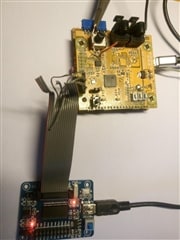

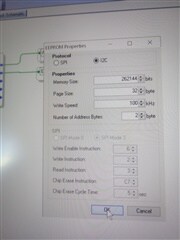
Hello,
Thanks for mentioning that the I2C bus is active, and that the "Check Latest Compilation through DSP" works. This narrows things down a lot.
Since you have an I2C EEPROM, the SS_M/MP0 pin should be pulled down with a 10kΩ resistor. Is this resistor in place? It tells the device to boot from I2C instead of SPI.
Also, please check the voltage on the SELFBOOT pin. If the switch is working properly, the SELFBOOT pin will be at logic high when the switch is on.
Are you sure that the EEPROM properties you selected are correct for your device? If one of these parameters is slightly off, the data in the EEPROM could be fragmented.
Joshua
Hello Joshua,
thanks a lot for your advice ! Indeed pulldown resistor at SS_M was missing.
Now Selfboot works !
Best regards KNadun
hi joshua,
i have this board https://www.hifiberry.com/shop/beocreate/beocreate-4-channel-amplifier/ and it has an ADAU1451 with an SPI eeprom and the reccomended settings by manufacturer are like this:
i have a second board from same brand just without the ampfiler (https://www.hifiberry.com/shop/boards/hifiberry-dac-dsp/) which works like a charme (standalone meanwhile).
only my board with ampfiler dousnt start from the eeprom. i already tried everything. after switch off and on power, it only starts working after i click on "link compile download" or write the dsp-profile to eeprom in sigmastudio. also the manufacturer didnt helped me yet. very dissapointed...
its kinda very strange that one board works fine and the other not. any suggestions? i could upload my dsp project if you need it.
hope you guys can help me, because this the last and main issue to finish my project.
thanks in advance and greetings from germany,
Luca
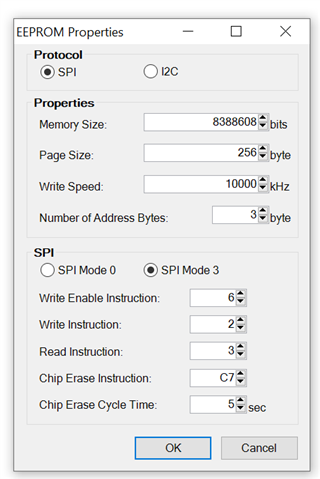
Hello Luca,
I looked for parts details on the link you supplied and could not find any. Do you know the part number of the EEPROM that is on the PCB? The 256 byte page size might be an issue. The size as well.
When you write the EEPROM through the DSP does the Check the EEPROM command have a successful result?
Dave T
hi dave,
actually its exactly what the manufacturer recommends... see here (sadly there are no details at all, and its a great product...)
https://www.hifiberry.com/beocreate/beocreate-doc/beocreate-use-sigmastudio/
i just checked the board, it must be something like "54232 TBM AF2V" or "25LC1024 I/SM 1914CR1"
the boards have a selfboot-jumper that need to be removed for writing and put in place for starting automatically from eeprom.
and no, there are no problems after writing and then checking! like i told you, my other board from same brand works fine. in my opinion it is a problem with the settings of hardware configuration - IC ADA145x Register controls? really dont know what i can try next. will put my dspprj here for you if you have any time to give it a quick look. thanks,
DesktopSpeaker_ALLinONE.rar
Luca
DesktopSpeaker_ALLinONE.rar
Hello Luca,
I took a quick glance at the 25LC1024 and it does use a 256 byte page size. This EEPROM is WAY oversize for what is needed. But I think it may not be the issue but we may revisit this topic if we do not find the problem.
I am wondering if this is an issue with the TCIP module in SigmaStudio not working well with the 1451. Just a guess. It is probably not the issue but it is an easy one to try. Since you are able to program the DSP with SigmaStudio and you can write and verify the EEPROM it seems that this is an issue on the PCB.
Here is your project that I converted to the ADAU1452. This will work on the 1451 and your program is small enough. So this is just a test. I did remove the hierarchy board since that caused some issues with me converting your schematic to the 1452. Plus there was nothing in the board anyway.
So give this a try but right now we are trying to eliminate possible causes.
DesktopSpeaker_ALLinONE-DT-Edits.zip
Next, try to verify that two pins are indeed set properly.
Pin 43, the Selfboot pin. Is this pin sitting high?
Does pin 26 IS this pin left floating? Can you carefully see that it is not sitting low? It should float up high.
Can you read some registers once the DSP tried to boot?
Read registers 0xF433 and 0xF434,
They are both 16 bit registers and are in the datasheet but not in SigmaStudio. The Read/Write window in SigmaStudio seems to read it on my computer. This will tell me if it tried to selfboot but was not successful.
So those are a few things to try.
By the Way, I lived in Germany for two years. Had a wonderful time. I was in Augsburg. But, it was a long time ago! :)
Dave T
hey dave,
nice that you liked germany! not bad living here!
back to the eeprom problem: I have to say that i dont know how to read the registers and how to check if Pin 43 is in high. sorry... Im pretty new in this, but actually happy making my dsp working with potis and rotary encoders.
i have a question about solving this problem a completely different way: I know that my dsp-program works well after compiling in sigmastudio. is there a way how i can run the commands in a script on booting that sigma does exactly when compiling? this would force my boad booting from eeprom.
also i found this: https://support.hifiberry.com/hc/en-us/community/posts/360006824805-ADAU1451-EEPROM-Memory-Failure but this dousnt work at all.
Kanto_YU6neu - Kopie.rar This is my project i use in the other board without amp which works (and boots) perfectly. maybe there is a difference?
thanks so much,
Luca
Hello Luka,
To check pin 43 and pin 26 you must either use a voltmeter or an oscilloscope. An oscilloscope is best because you can see if it is slowly changing or is unstable.
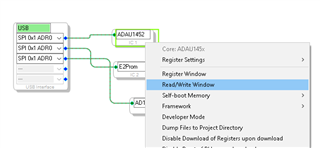
To read the register you can use SigmaStudio to do this. I had mentioned the read/write window. Here is where you find it:
You right-click on the DSP GUI and select Read/Write Window like this:
Then this window will pop up:
The only irritating thing with this window is that it was written by programmers and not hardware engineers. So the register address is in decimal instead of hex. So you have to convert the hex address yourself.
So I still think this may be an issue with the board. There can also be a bad solder joint on one of the pins I mentioned that can be causing the problem. Reading the registers I mentioned is a good clue because it will tell you if it tried to boot and failed. Then it will have a non-zero value. If it is zero then either it booted and the program is running or it never tried to boot. All those are clues.
Dave T
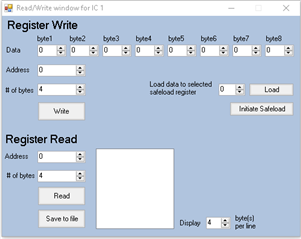
Hi Dave, thanks for detailed answer!
so i found out:
after writing to eeprom 0 0 0 3F
after compiling 0 0 0 3F
after power off/on without compiling, only connecting in sigmastudio
(just waiting if raspberry is avaiable via ssh) 0 0 0 0
i have a voltmeter here, but are you telling me to check the pins at the ADAU-chip while booting?
hm, my pins from my voltmeter are - lets say fat - so i guess im gonna damage something by causing a circuit where it shouldnt be? or am i understanding you completely wrong?
i put you here an original dsp-file from manufacturer (yes, its Bang&Olufsen). cound it be, that i need to intigrate something like automute?!
dsp.rar
Thanks , Luca
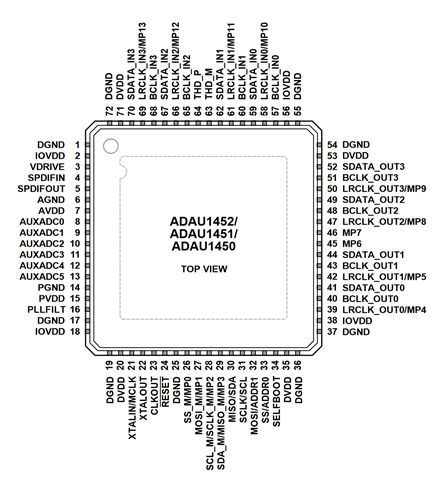
Hello Luka,
Backing up a bit. I understand you are having an issue where selfboot is not working. Correct?
So step #1 is to be certain that the selfboot pin is indeed set high.
Yes, it is difficult to place a probe directly onto the pins. I have some small sharp probes but even still, when you look under a microscope to line it up it looks like a telephone pole trying to make contact with a small tomato stake. So I get it. Sometimes you can use a nearby via or component instead of the actual pin. You have understand that you are making an assumption that the pin is actually connected. There is always a chance for a bad solder joint.
I am not asking you to check the pin during selfboot. If you want to do that then an oscilloscope would be the tool to use to see if it changes over time.
So if the part is actually trying to selfboot then if it fails it places a code into the two registers I mentioned. So that is the second question. If the Selfboot pin is properly tied then is the selfboot failing? If it is then we have to proceed to why it is failing.
TheLGMaster said:
after writing to eeprom 0 0 0 3F
after compiling 0 0 0 3F
after power off/on without compiling, only connecting in sigmastudio
(just waiting if raspberry is avaiable via ssh) 0 0 0 0
This value is a bit confusing. How many bytes were you reading? Bytes, not words. If you read in four bytes you will get the two registers 0xF433 and 0xF434. Software will often change a 0x00 result into "0".
So it looks like you are reading in 4 bytes.
Then you also said after writing to EEPROM. This was not my understanding of your issue. Not writing to EEPROM but booting up from the EEPROM. It still may be an issue with writing to it but from your earlier post on Apr 27th I get the impression that you can program the EEPROM and check it with no errors. It is the booting up that does not work.
TheLGMaster said:
after power off/on without compiling, only connecting in sigmastudio
(just waiting if raspberry is avaiable via ssh) 0 0 0 0
For this last part, I think you may be falling into the trap where the DSP is not actually in SPI mode yet. This has gotten me a number of times. When you power down and back up the DSP is in I2C mode and it takes three toggles of the Slave Select pin to put it into SPI mode. So you need to try to read the register four times. The fourth time will be the correct result. You will get zeros before the fourth read.
No where does your question of automute come into this? That caught me by surprise.
Dave T
Please log in to reply.