[SHARING] TCPi Interface for Sigma Studio, using ESP8266 or ESP32.
Hello guys,
I'm making available here files to write on ESP8266, this will give you, all functions USBi does, but using WiFi TCP/IP ( Exception will apply, see another topic q-a/115184 )
Before write, set the folowing, also note there are 2 versions, with and without debug, so pay attention.
For ESP8266 Board
CPU Frequency: 160Mhz
Flash Size: 4MB (FS:1MB OTA:~1019kb)
iwIP Variant: v2 Higher Bandwidth
Debug Port: Disabled ( Set port only if you want debug messages, it will slow down all comunications! )
Debug Level: NoAssert-NDEBUG
Wire Connections
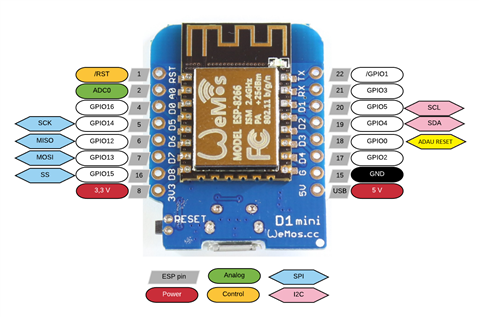
ESP8266 D1 port to Adau board i2C SCL port
ESP8266 D2 port to Adau board i2C SDA port
ESP8266 D3 port to Adau board RESET ( ESP8266 needs reset DSP wheen boot/powerup )
ESP8266 D4 port to Adau board SELF BOOT ( Not available on this version )
DO NOT forget, I2C lines requires 2k2 resistor on each pin, if your ADAU board does not have resistors, you must add!
I2C Address is fixed at this moment:
Eeprom: 0x50 => 0xA1
DSP: 0x34 => 0x68
Serial Debug baudrate: 115.200
For ESP32 board ( Beta version, added on 2020/07/03 )
CPU Frequency: 240Mhz
Flash Size: 4MB (FS:1.5MB)
Core debug Level: None
Wire Connections
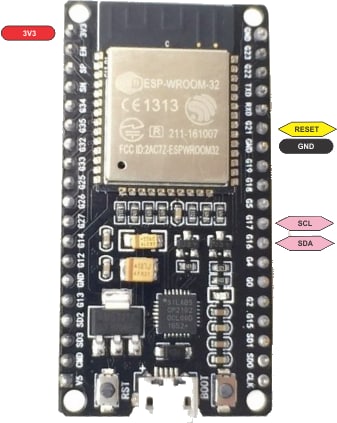
ESP32 17 port to Adau board i2C SCL port
ESP32 16 port to Adau board i2C SDA port
ESP32 21 port to Adau board RESET ( ESP8266 needs reset DSP wheen boot/powerup )
ESP32 xx port to Adau board SELF BOOT ( Not available on this version )
DO NOT forget, I2C lines requires 2k2 resistor on each pin, if your ADAU board does not have resistors, you must add!
I2C Address is automatic in the folowing interval:
Eeprom: 0xA0 .. 0xAE
DSP: 0x68 .. 0x76
Serial debug baudrate: 250000
ESP8266/ESP32 Network configuration:
Wifi SSID: TCPi
WiFi password: SigmaStudio#*
IP: 192.168.0.1/24
TCP Port: 8086
Persistent connect to an existing SSID ( WiFi Router ), updated on 2020/04/15
After connect to TCPi, use the folowing url: http : //192.168.0.1 / connect ? ssid=ssidname & password=wifipassword
If ( wrong provided ssid or password ) or ( provided ssid is off-line ), TCPi will keep in AP Mode
Firmware: version 1.0.0.4 build 2020/04/16
6558.TCPi-ESP8266.zip
Firmware: version 1.0.0.4 build 2020/07/03
8182.TCPi-ESP32.rar
For ESP8266 user who have trouble with Filesystem Format, build the folowing sketch, then load it on ESP8266 Module before write TCPi Firmware or write firmware using esptool with the folowing:
( Thanks to RichT tip ) esptool.py --port COMx write_flash --flash_size 4MB-c1 0x0 filename.bin
/*
Please note, this will work only o ESP8266 Modules with 4MB flash size.
Choose board like bellow
Board: NodeMCU 1.0(ESP-12E-Module)
Cpu Frequency: 160 Mhz
Flash Size: 4MB (FS:2MB OTA:~1019KB) ==> Very Important!!! Flash Partitions size.
Write this sketch using arduino! This will create partitions on your ESP Module.
After see sucessfull message over serial.
you may write TCPi firmware using your preffered tool.
*/
void setup() {
Serial.begin(115200);
while (!Serial);
Serial.write("\r\nThis sketch is working\r\n");
Serial.write("You may now write TCPi firmware using you preferred tool.\r\n");
}
void loop() {
delay(1);
}
I have done some improvents on code, so i will upload this soon, includes:
I2C now can handle all possible address ( DSP AND EEPROM ) in automatic way.
SPI is now possible, but need some person with ADAU1701 with SPI connection for try out ( I do not have that! ), please send private message about that.
Can handle ADAU1452 too, its almost done, left only safeload implementation wich is in progress.
Automatic detection TCP/IP Protocols between ADAU1401/ADAU1701/ADAU1452
I will be updating this post, whenever there are changes.
If you encounter any problems, let me know, sending a private message.
Edit Notes
Updateing
[edited by: Rocha at 4:01 AM (GMT 0) on 16 Jul 2020]
Audio Signal Processors
adau1452
adau1401
microcontroller
usbi
TCP/IP
SigmaDSP Audio Processors
TCPi
adau1701
Show More
Hi Rocha,
that's great !
we got already a couple of insight from others like the hifiberry implementation of a sigmatcp server for raspberrypi, now you give us a great standalone solution.
I d like to port this for a 1466/67 using SPI would you be ok to share the source code ? please PM me, at least I need the first piece of code for connecting the sockets, thats where I had some issue in some past tentatives last summer. SigmaStudio was not recognizing the connection to my 8266. I think I can deal with the sigmatcp protocol :) , awaiting that ADI team releases a 4.6 version with a clean tcp.dll
Thansk for sharing with the community
Have you confirmed that it works with a Adau1701?
I am asking because i have the cheap boards from china to try your amazing work on, One is from Wondom/sure and the other is Adau1401 https://www.aliexpress.com/item/32869692900.html. I have no problem flashing the esp8266 and connect to the SSID. I have soldered the required resistors and ground to the esp8266 but powering the Wondom board with own usb.
But, its the required IP in TCPi1701 the is giving me an error as soon as i try to connect.
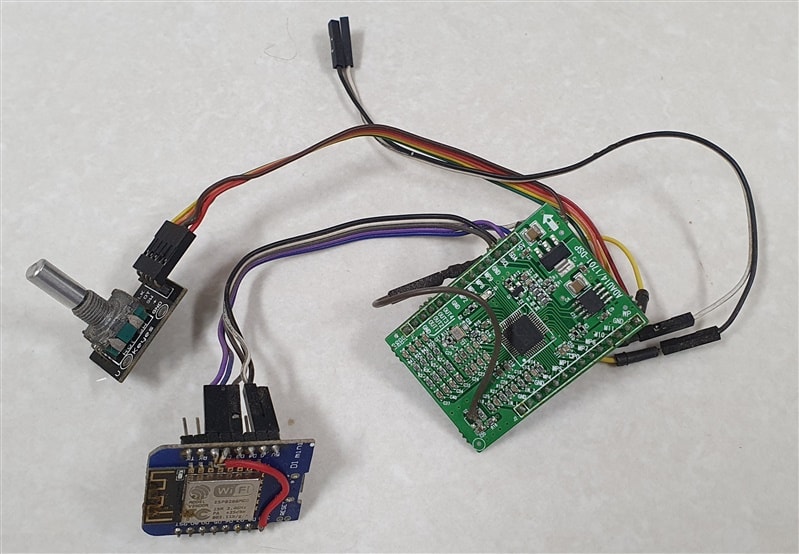
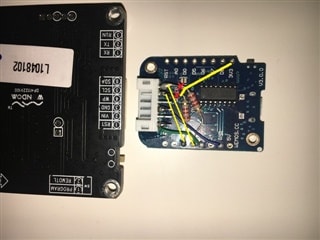
Yes, Works great, ADAU1401 and ADA1701, i have Chinese boards too ( more than one model ), one is same as yours, did u ping device first? checked if IP is assigned correctly by router? have u tried in AP mode? did u used port 8086? i will attach picture, in that picture resitors are smd at end of red wire, also adau reset with brown wire ( that board does not have reset pin header ), ADAU board is powered from USB connected to ESP8266.
After I connected to the ESP and visit 192.168.0.1/connect
I am greater with your message.
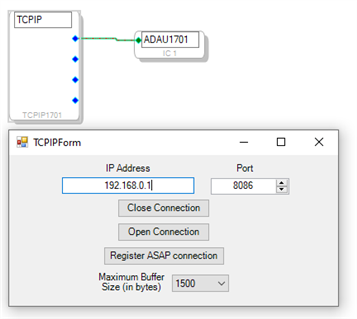
but it is when I add the block TCPI1701 and enter the setting 192.168.0.1/24 I get an error.
As you understand I am far from your level, I work as an acoustic consult and build speakers on my free time. But I am one hell of a test pilot since I try everything that someone like your self probably wouldn’t.
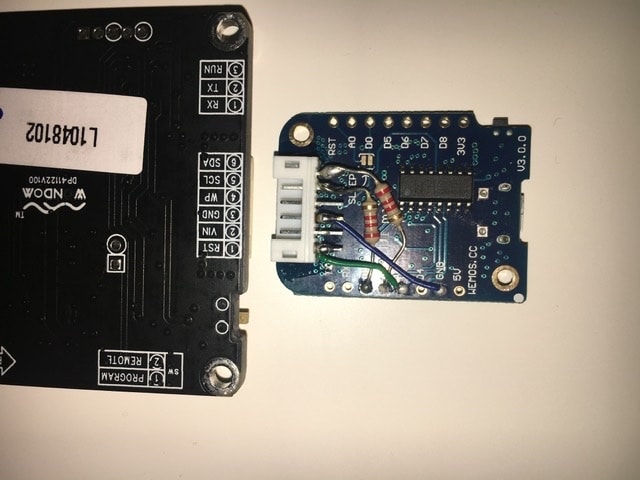
Hi Nisse.p, DO NOT use netmask on IP Address at Sigma Studio, Its only 192.168.0.1 on your case, see attached image. PS Resistors for SDA and SCL are Pullups ( Both Connected to +3v ), see corrections, PS: Its based on white connector is not part of ESP8266 module!, its attached with glue.
I told you I would try something you never would.. why did you mention 192.168.0.1/24 as the ip?
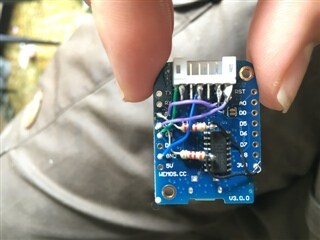
And the white connector is the same used by wondoms version of a Usbi that’s why I glued that on.
Added ESP32 Firmware, Its in beta version!
Have wemos D1 v2.1.0 with debug output. flashed using your image with Tazmotiter and starts ok, havent connected it to target device, just verifying its starting and connected to AP. Looking at debug via pio. Seeing problems when connecting that appears its not saving the wifi details
Ready
Last reset reason: External System
Eeprom does not reponding at 0x50 (2)
DSP does not reponding at 0x34 (2)
[WS-Server] Server Started.
[SPIFFS] Checking filesystem...
[SPIFFS] Formatting filesystem...
[SPIFFS] Error Formatting!
[WIFI] Initilizing WiFi in AP Mode, ssid: TCPi
[WIFI] Station connected: 9c:b6:d0:e1:51:01:
[HTTP] Connecting to ssid: abcd with password: abcdefghijklmnop
[SPIFSS] Error! Saving config file.
Unsure on what its doing regarding check and format. Please advise
Hi RichT, i have updated this post with information related about filesystem format, please read above and follow instructions, let me know if u have any trouble.
Thanks that gave me the insight I needed. Can also achieve from the command line with:
esptool.py --port COM4 write_flash --flash_size 4MB-c1 0x0 TCPi-ESP8266-with-debug.bin
Appears now to start up ok and formats filesystem, saves config, etc.
Hi,
sorry for maybe asking the obvious. What did you do to be able to control this board using i2c? I have such a board and cant get the i2c to work. I am using a teensy which works great on a sure dsp board with the same chip.
Is there any trick?
I am sending the dsp program from the teensy but also tried the dsp loading the program of the eeprom. No chance with i2c.
Help would be greatly appreciated.
Cheers,
Jens
Hi jenskuehnemann, this Chinese ADAU1401 board works, but needs attention, i can do I2C at high speeds with no problem, you will need wires connect ( 5V, GND, SDA and SCL ) Pins to USB-I or TCP-I, this board does not have reset pin, if you need it, wire connect with solder, like image i posted above ( see, brown wire soldered on board ), this board already have I2C PullUps, but worked for me only after adding another pullups maybe resistor values is not good enough.
Please note, on image above, i have added two 1205 SMD Resistors for PullUps ( its not easy to see... check at red wires connected to ESP8266 pins )
About audio its ok, i think its have a higher input gain than especified on ADAU1401 datasheet ( maybe wrong resistor values ), i does not matter for me, because after learn Sigma Studio and played a lot with this board, i have builded my own boards, that fit my needs.
To enable eeprom programing, you need to wire connect WP pin too.
Best regards.
Thanks a lot for your help
Hello
Thanks for the ESP32 Version.
I wanted to test it but it dont launch on myn esp32-wroom-32d
this is my esptool command :
esptool.py --port /dev/ttyUSB0 write_flash --flash_size 4MB 0x1000 TCPiMix_ESP32.bin
I tested it on linux and W7: the ESP32 keeps rebooting and no AP shows up
Did I miss something ?
Same issue here with my ESP-Wroom-32 board.
Any solutions to this?
Hi, Rocha!
Thank you for the firmware, it works great.
Could you please share the source code if it possible? Currently I working on esp8266 control firmware for adau1701 and your TCPi implementation would help a lot for debugging DSP via wifi.
Hi,
does this also support writing the current program and param data to eeprom when clicking on "Register ASAP connection"?
I Would also be interested in the source code. Would you mind sharing?
Is it possible to control parameters of the circuit using i2c by running Sigma Studio on another computer? If I wanted to control certain things with pots on the esp I would still have to use a library or write into the dsp's register right?
Yes, with sigma Studio you can control all parameters in real time using i2c, im developping an http interface capable to direct control any parameter on DSP without Sigma Studio, like volume, EQs, Filters and a lot of more, UI can be customized without type code, just using web browser, also can do same on android app, this will be available soom.
Hi mprintz, Write Eeprom using "Register ASAP conecction" is not included on current shared version, but is already implemented, on next upload, you can do that.
Hi Rocha,
sounds good. Looking forward to the next version...
Hi rocha !
Seems you did a great job, thanks a lot for sharing !
Could you please confirm that the binaries shared in this post are now compatible with ADAU1452 ?
Thanks !
At this moment is not full compatible, TCPi can recognize all TCP packets from ADAU145x, can read data from DSP, but cant write to DSP, needs safeload corrections/implementation, but i dont have ADAU1452 board to debug, i have planed buy cheaper one from China, but due to logistic, its not possible at this moment, if anyone from comunity gift me one board, i can finish that development.
Hi Rocha, I'm playing with a ADAU1466 china core board, it's being built up for a PA speaker system I've been working on to explore different linear phase filters, protection etc, pretty crude, being able have access via wifi would be great.
If it would help then I could order one and try get it sent out to you, not sure how to exchange contact details, my username is 'SubSoniks' on DIYAudio forum that has a private message system.
hi! can you help me for correct uploading your binary firmware for ESP32.
After use esptool.py --port /dev/ttyUSB0 write_flash --flash_size 4MB 0x1000 TCPiMix_ESP32.bin
my ESP doesnt started, uart log:
rst:0x10 (RTCWDT_RTC_RESET),boot:0x17 (SPI_FAST_FLASH_BOOT)
configsip: 0, SPIWP:0xee
clk_drv:0x00,q_drv:0x00,d_drv:0x00,cs0_drv:0x00,hd_drv:0x00,wp_drv:0x00
mode:DIO, clock div:1
load:0x3f400020,len:210852
ets Jun 8 2016 00:22:57
Hi, please read your private messages, i will send you ab easy way to do that.
can`t use it, please help one more time! thx!
Hi, I am having similar issue for ESP32 board, can you PM flash command please?
I will share a new version in a few days with many improvents, also many new features.
I solved this problem by performing the flash using the ESPHome-Flasher utility. Appears to be a bootloader or partition table issue.
Rocha Hello! write to me in private messages, for some reason I cannot write to you. I have a 1701 board and have some developments, we can be useful to each other! Or write to egorovanton86@mail.ru
Holla Rocha,
first many Thanks for your great Work !
I tested both Files and both works very great. Unfortunately, the memory function for the EEProm is still missing. I can't understand the missing support from AD. Should it be in their own interest to Support you, or better they offer you a job as a programmer ;-)
greetings from Germany
Karsten
Hi KarstenE, new version is comming, and it does not needs "eeprom IC hardware anymore "less PCB components", ESP can now load DSP program on every boot, just need upload XML file exported from Sigma Studio, usign html interface, each time you needs, also now works on almost available ADAU DSPs, not only 1401/1701 ones.
Hi Rocha,
Thank you for sharing this great project!
I am building now a digital crossover for my speakers based on a chinese board with ADAU1466 and I wonder if it is possible for you to share an updated version of ESP32 firmware that supports ADAU1466.
Thanks,
Plamen
Hi, Rocha thanks for the work done.
How can I get the source code?
Great work Rocha. Any chance its source code would be made public? :-)
Thank you so much for this. Well done, sir. It works well with my ESP8266 and aliexpress ADAU1701 Core board via I2C. This firmware is just the missing piece I needed.
I'm curious to know where the project stands? I believe you mentioned you were working on an HTML interface?
Hi, thanks for using it, Yes, there is an html interface, that can control mute, volume, filters ans so on... but new version is not fully ready, because arduinojson 6 library is not working as expected, so im trying to fix that or maybe downgrade to arduinojson 5, if you want to try it, ask in private.
It seems I'm too new of a member here to privately PM you, but I am interested in taking a look at the interface. Would you mind initiating the PM? Thanks :)
First, You need to request frienship or accept my friendship request.
Dear Rocha!
Can I request project source codes?
Dear Rocha,
Contrats for this dev !
Is there a way to download the latest 2.x beta version ?
I can't find it on GIT and no link on your website tcpi.top
I'd like to use it with a Adau1467 ans ESP32.
THANKS
I have everything set up according to this thread and the details in the Git repo. I can connect to the ESP32 over wifi. I have pull up resistors connected to the serial lines and 3.3v. I have the reset pin connected. I can see signals on these lines when I interact with SS. I am using the lastest Sigma Studio. I am using the cheap Chinese boards. The 5v on the ESP powers the 1401. The green LED flashes at the start. It goes out when I download from SS.
I cannot get the board to operate consistently. I have created a simple oscillator connected to an output DAC. Every so often, went powering everything up I get the output of the DAC and it responds to SigmaStudio when I change the frequency. But I cannot get it to accept a new configuration and start working. Went I do a link, compile and download, I see a long chain of hex outputs in the ESP serial terminal with an Unknown Data comment.
Can anyone tell me the status of TCPi and Sigma Studio. What works/does not? Any any suggestions on what might be wrong with my set up would be appreciated.
I have developed a programming interface for the ADAU1401/1701 that enables pop-free data loading from SigmaStudio. Designed for seamless implementation and straightforward flashing, it provides a clean, reliable solution for real-time tuning without audio transients.
Hello rarranzb,
Nice project!
I'm testing your interface and the communication works fine.
Writing to the eprom however is a little unclear.
To my knowledge the WP pin of the eprom should be pulled low to enable programming.
I don't see any mentioning of a connection to the WP pin.
Maybe I'm missing something?
The selfboot pin on my board is always high and I never had to pull it low when using a USBi programmer, so not sure if that line is needed.
I see that you're still updating github so maybe I'm just to early...
You're right — the firmware doesn't control a WP pin. The assumption is that WP is permanently tied to GND on the PCB, which disables write protection unconditionally. This is the most common configuration on ADAU1701 eval boards and Chinese clone modules (the pad is simply soldered to GND). If your board routes WP to VCC or leaves it floating, writes will silently fail — in that case you'd need to pull it low externally or wire it to a spare GPIO.
Re: SELFBOOT
The project does use SELFBOOT, but as a GPIO you control rather than a permanent tie. The reason is that this interface bridges two distinct modes:
Programming mode (SigmaStudio connected via TCP) → SELFBOOT kept LOW so the ADAU1701 listens for I2C commands from a master instead of reading the EEPROM.
EEPROM boot (normal operation / after resetDSP()) → SELFBOOT briefly pulsed HIGH around the RESET edge so the chip loads the program from EEPROM, then pulled back LOW.
If your board has SELFBOOT hardwired HIGH, the ADAU1701 will always try to load from EEPROM on every reset, which still works fine as long as the EEPROM is programmed. The GPIO manipulation in the code just becomes a no-op in that case. The main thing you'd lose is the clean master-boot path that lets SigmaStudio reprogram the DSP over TCP without having to physically press a button — but if you're only using the web interface and not reprogramming via SigmaStudio live, it doesn't matter.
So in short: both observations are valid for boards that differ from the reference design, but neither should stop the interface from working once you account for your specific hardware wiring.
I get it, my Chinese clone is just not setup the way you describe. I must have a Wondom board somewhere so I'll give it a try with that one.
Thanks for the detailed reply!
Does your single detector work over the tcpip protocol?
Please log in to reply.