AD1939 Failing to Verify PLL Lock ADSP-21489
Hi, I am working on an audio design using the AD1939 codec alongside Sharc ADSP-21489. The design is largely based on the audio features present in the ADSP-21489 ez-kit, as are the schematic and layout.
I am running a test program based on the code from the ADSP-21489 ez-kit (having previously verified that it works with the ez-kit). ADSP-21489 is responding to code (using ICE-1000 debugger), io pins are working with SRU, SPI is working to read control values from an MCP3208 12-bit DAC chip. However, I am running into some issues with the AD1939 codec setup.
The program freezes in the ez-kit function: init1939viaSPI(). See the full function below:
void init1939viaSPI(void)
{
int configSize = sizeof(ConfigParam1939);
int i,j=0 ;
unsigned char tmpA[sizeof(ConfigParam1939) / 3];
/* Set up AD1939 */
SetupSPI1939(AD1939_CS);
/* Write register settings*/
for(i = 0; i < configSize-6; i+=3)
{
Configure1939Register(ConfigParam1939[i], ConfigParam1939[i+1], ConfigParam1939[i+2], AD1939_CS);
Delay(272);
AD1939_Config_Test[j] = ConfigParam1939[i+2];
/* Read back register settings for debugging */
AD1938_Regs_Read[j++] = Get1939Register(ConfigParam1939[i+1], AD1939_CS);
Delay(272);
}
/* Make sure the PLL is locked before enabling the CODEC.*/
LockTest = Get1939Register(0x1, AD1939_CS);
while (!(LockTest & AD1938_PLL_LOCK))
{
LockTest = Get1939Register(CLKCTRL1, AD1939_CS);
LockCount++;
}
for(i = configSize-6; i < configSize; i+=3)
{
Configure1939Register(ConfigParam1939[i], ConfigParam1939[i+1], ConfigParam1939[i+2], AD1939_CS);
Delay(272);
/* Read back register settings for debugging */
AD1938_Regs_Read[j++] = Get1939Register(ConfigParam1939[i+1], AD1939_CS);
Delay(272);
}
DisableSPI1939();
}
The particular section that it freezes on is the following:
/* Make sure the PLL is locked before enabling the CODEC.*/
LockTest = Get1939Register(0x1, AD1939_CS);
while (!(LockTest & AD1938_PLL_LOCK))
{
LockTest = Get1939Register(CLKCTRL1, AD1939_CS);
LockCount++;
}
Whenever I pause the debugger, the breakpoint goes back to the same section in this function and LockCount has incremented higher. This tells me the Codec is failing to enter PLL lock. I have checked the debug variable AD1939_Regs_Read and verified that all AD1939 registers were written correctly via SPI. That would seem to suggest this is a hardware issue. I have tested that the clock input is showing on the appropriate pin and that the chip is receiving power.
Are there any particular things I should check for that might be causing the PLL lock failure?
Audio Signal Processors
ezkit
adsp-21489
pll enable
Integrated/Special Purpose A/D Converters
pll lock
ad1939
SHARC Audio Processors/SoCs
Audio CODECs
Show More
Hello thegrinch,
I support the AD1939 so let me jump in here to see if I can help. The part does not need much to have the PLL lock. It could be a hardware issue so lets eliminate that possible cause. Do you have an oscilloscope?
If you do then look at the master clock into the part. That would be pin 2. See if you have a clock there? What frequency? Does it look clean as in goes up close to AVDD, and down close to ground? Are there a lot of reflections or over/undershoot on the signal?
Check that you have AVDD and DVDD.
Then look at pin 62, the LF (Loop Filter) pin. What is the voltage? Is there any kind of signal on the DC level?
Depending on the results, then we can look more closely at the software.
What is the actual register configuration are you sending to the part? If the hardware looks good then knowing what is actually being sent would be helpful. Then I can see if the register settings agree with the inputs to the hardware.
Thanks,
Dave T
Hey Dave, this is actually your old student Emmett from Berklee. Good to hear from you again! Hope you are doing well and staying safe with everything that's going on right now.
I see clean 3.3V power input at all the AVDD and DVDD input pins.
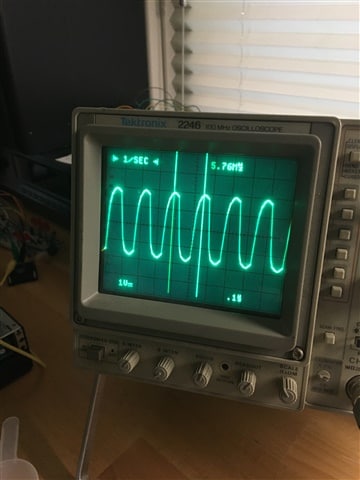
I see a clock input at pin 2, it's a relatively clean looking sine wave at 5.75 mHz.
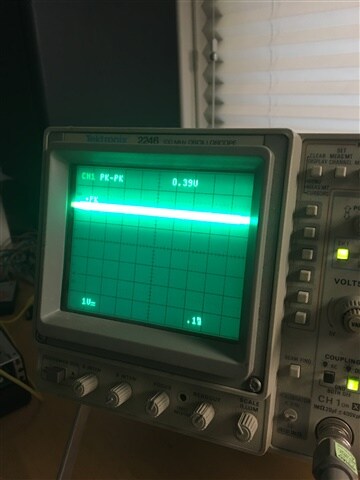
I think the loop filter pin is actually 61. 62 is an AVDD pin. On the pin 62 AVDD I see a clean 3.3V. On the pin 61 loop filter I see ~2V DC with ~0.35V peak-peak noise.
Here is what the registers look like:
//This is what appears in init1939viaSPI.c verbatim:
#define USE_48_KHZ_SAMPLE_RATE
//#define USE_96_KHZ_SAMPLE_RATE
//#define USE_192_KHZ_SAMPLE_RATE
/* Setup the SPI parameters here in a buffer first */
unsigned char ConfigParam1939 [] = {
(AD1939_ADDR), DACMUTE, 0x00,
(AD1939_ADDR), CLKCTRL0, DIS_ADC_DAC | INPUT256 | PLL_IN_MCLK | MCLK_OUT_OFF | PLL_PWR_DWN,
(AD1939_ADDR), CLKCTRL1, DAC_CLK_PLL | ADC_CLK_PLL | DIS_VREF,
#ifdef USE_48_KHZ_SAMPLE_RATE
(AD1939_ADDR), DACCTRL0, DAC_FMT_I2S | DAC_BCLK_DLY_1 | DAC_SR_48K,
#endif
#ifdef USE_96_KHZ_SAMPLE_RATE
(AD1939_ADDR), DACCTRL0, DAC_FMT_I2S | DAC_BCLK_DLY_1 | DAC_SR_96K,
#endif
#ifdef USE_192_KHZ_SAMPLE_RATE
(AD1939_ADDR), DACCTRL0, DAC_FMT_I2S | DAC_BCLK_DLY_1 | DAC_SR_192K,
#endif
(AD1939_ADDR), DACCTRL1, DAC_BCLK_SLAVE| DAC_LRCLK_SLAVE | DAC_CHANNELS_2 | DAC_LATCH_MID, //Ddebug
(AD1939_ADDR), DACCTRL1, DAC_BCLK_SLAVE| DAC_LRCLK_SLAVE | DAC_CHANNELS_2 | DAC_LATCH_MID, //Ddebug
(AD1939_ADDR), DACCTRL2, DAC_WIDTH_24,
#ifdef USE_48_KHZ_SAMPLE_RATE
(AD1939_ADDR), ADCCTRL0, ADC_SR_48K,
#endif
#ifdef USE_96_KHZ_SAMPLE_RATE
(AD1939_ADDR), ADCCTRL0, ADC_SR_96K,
#endif
#ifdef USE_192_KHZ_SAMPLE_RATE
(AD1939_ADDR), ADCCTRL0, ADC_SR_192K,
#endif
(AD1939_ADDR), ADCCTRL1, ADC_LATCH_MID | ADC_FMT_I2S | ADC_BCLK_DLY_1 | ADC_WIDTH_24,
(AD1939_ADDR), ADCCTRL2, ADC_BCLK_SRC_INTERNAL | ADC_BCLK_MASTER | ADC_CHANNELS_2 | ADC_LRCLK_MASTER | ADC_LRCLK_FMT_50_50|ADC_LRCLK_POL_NORM|ADC_BCLK_POL_NORM, // NDdebug
(AD1939_ADDR), ADCCTRL2, ADC_BCLK_SRC_INTERNAL | ADC_BCLK_MASTER | ADC_CHANNELS_2 | ADC_LRCLK_MASTER | ADC_LRCLK_FMT_50_50|ADC_LRCLK_POL_NORM|ADC_BCLK_POL_NORM, // NDdebug
(AD1939_ADDR), DACVOL_L1, DACVOL_MAX,
(AD1939_ADDR), DACVOL_R1, DACVOL_MAX,
(AD1939_ADDR), DACVOL_L2, DACVOL_MAX,
(AD1939_ADDR), DACVOL_R2, DACVOL_MAX,
(AD1939_ADDR), DACVOL_L3, DACVOL_MAX,
(AD1939_ADDR), DACVOL_R3, DACVOL_MAX,
(AD1939_ADDR), DACVOL_L4, DACVOL_MAX,
(AD1939_ADDR), DACVOL_R4, DACVOL_MAX,
(AD1939_ADDR), CLKCTRL0, DIS_ADC_DAC | PLL_IN_MCLK | MCLK_OUT_OFF | INPUT256 | PLL_PWR_UP,
(AD1939_ADDR), CLKCTRL0, ENA_ADC_DAC | PLL_IN_MCLK | MCLK_OUT_OFF | INPUT256 | PLL_PWR_UP,
(AD1939_ADDR), DACMUTE, 0x00,
} ;
//this is the reg configuration with all the defines removed, to be more human readable. each line consists of (AD1939_ADDR), the register address, and then the register's value
unsigned char ConfigParam1939 [] = {
(AD1939_ADDR), DACMUTE, 0x00,
(AD1939_ADDR), CLKCTRL0, DIS_ADC_DAC | INPUT256 | PLL_IN_MCLK | MCLK_OUT_OFF | PLL_PWR_DWN,
(AD1939_ADDR), CLKCTRL1, DAC_CLK_PLL | ADC_CLK_PLL | DIS_VREF,
(AD1939_ADDR), DACCTRL0, DAC_FMT_I2S | DAC_BCLK_DLY_1 | DAC_SR_48K,
(AD1939_ADDR), DACCTRL1, DAC_BCLK_SLAVE| DAC_LRCLK_SLAVE | DAC_CHANNELS_2 | DAC_LATCH_MID, //Ddebug
(AD1939_ADDR), DACCTRL1, DAC_BCLK_SLAVE| DAC_LRCLK_SLAVE | DAC_CHANNELS_2 | DAC_LATCH_MID, //Ddebug
(AD1939_ADDR), DACCTRL2, DAC_WIDTH_24,
(AD1939_ADDR), ADCCTRL0, ADC_SR_48K,
(AD1939_ADDR), ADCCTRL1, ADC_LATCH_MID | ADC_FMT_I2S | ADC_BCLK_DLY_1 | ADC_WIDTH_24,
(AD1939_ADDR), ADCCTRL2, ADC_BCLK_SRC_INTERNAL | ADC_BCLK_MASTER | ADC_CHANNELS_2 | ADC_LRCLK_MASTER | ADC_LRCLK_FMT_50_50|ADC_LRCLK_POL_NORM|ADC_BCLK_POL_NORM, // NDdebug
(AD1939_ADDR), ADCCTRL2, ADC_BCLK_SRC_INTERNAL | ADC_BCLK_MASTER | ADC_CHANNELS_2 | ADC_LRCLK_MASTER | ADC_LRCLK_FMT_50_50|ADC_LRCLK_POL_NORM|ADC_BCLK_POL_NORM, // NDdebug
(AD1939_ADDR), DACVOL_L1, DACVOL_MAX,
(AD1939_ADDR), DACVOL_R1, DACVOL_MAX,
(AD1939_ADDR), DACVOL_L2, DACVOL_MAX,
(AD1939_ADDR), DACVOL_R2, DACVOL_MAX,
(AD1939_ADDR), DACVOL_L3, DACVOL_MAX,
(AD1939_ADDR), DACVOL_R3, DACVOL_MAX,
(AD1939_ADDR), DACVOL_L4, DACVOL_MAX,
(AD1939_ADDR), DACVOL_R4, DACVOL_MAX,
(AD1939_ADDR), CLKCTRL0, DIS_ADC_DAC | PLL_IN_MCLK | MCLK_OUT_OFF | INPUT256 | PLL_PWR_UP,
(AD1939_ADDR), CLKCTRL0, ENA_ADC_DAC | PLL_IN_MCLK | MCLK_OUT_OFF | INPUT256 | PLL_PWR_UP,
(AD1939_ADDR), DACMUTE, 0x00,
} ;
//this is what returns from the debugging process reading the AD1939 registers after they are written by the above ConfigParam[] array:
AD1938_Regs_Read unsigned char[] {...}
[0] unsigned char 0
[1] unsigned char 25
[2] unsigned char 0
[3] unsigned char 0
[4] unsigned char 0
[5] unsigned char 0
[6] unsigned char 0
[7] unsigned char 0
[8] unsigned char 0
[9] unsigned char 200
[10] unsigned char 200
[11] unsigned char 0
[12] unsigned char 0
[13] unsigned char 0
[14] unsigned char 0
[15] unsigned char 0
[16] unsigned char 0
[17] unsigned char 0
[18] unsigned char 0
[19] unsigned char 24
[20] unsigned char 0
[21] unsigned char 0
Here's what the oscilloscope reads at the clock input pin 2, it's the same as what I see on the clock input to the Sharc, which is working correctly:
Here's what the oscilloscope reads at the loop filter pin 61:
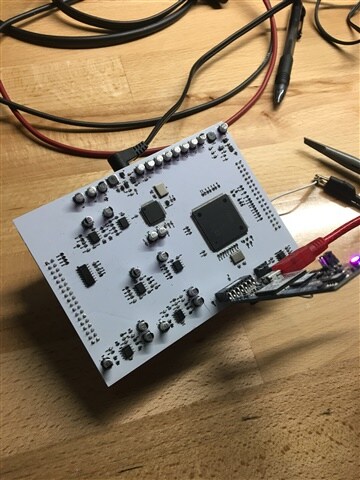
Here is a picture of the board I am working with for good measure, I can upload more detail pics or even share schematic / pcb files from KiCad if that would be helpful:
Does this information suggest any issues I should look at?
Hello Emmitt,
I forgot that this was your user name. :)
All is fine here at home. I have a great setup here at the house.
The MCLK frequency is too low. The minimum is 6.9MHz if you are using the PLL. So this is probably why it is not locking.
Looking at your scope it looks like the amplitude of the MCLK is a bit high. I see you are set to 1V per division so it looks like the waveform is around 3.6 or 3.7V PP which is greater than the 3.3V IOVDD power rail. This will not cause the issue you are having but it is not good and can inject noise onto the power rails. It is also not good for the part and over time might cause some failures.
On your layout I do not see very many bypass caps and certainly not near the pins as they should be. How the ground planes are done is important on this part. Any ground fills on the top also needs to be done carefully. I did download KiCAD on my personal machine but have not used it much yet. Feel free to send the files to my personal email address. I expect you still have it? My Berklee address is also good.
For this part the master clock must be exactly 256 x fs which in your case would be a sampling rate of 22.4609375kHz. Kind of a strange rate. If there is not the correct number of master clock cycles in each frame it will mute the audio. This is an older part with a few quirks in it but it still is a great sounding part.
Dave T
Haha yeah Grinch is a funny one, inside joke with some of my friends from Berklee. Glad to hear you're doing good. I'm working from home as well on contract projects for the time being and appreciate the support.
Okay, now that I'm checking closer I see that the AD1939 on the ez-kit gets a 12.288 mHz clock input. The oscillator component exists as a series available in a bunch of different frequencies at it appears the wrong frequency was populated. Is there any risk of an incorrect clock frequency damaging the part, or would the issue probably be resolved by repopulating that component with the correct oscillator frequency?
There are multiple people working on this project and I actually didn't do the board layout so it gets difficult to keep track of these details. I think at some point in the process the information about which frequency for the clock components didn't get passed along. In the case of the Sharc this ended up being fine, as it seems to run okay with a ~6mHz clock, which meant I wasn't necessarily looking at clock frequency being the issue. Appreciate you catching that one!
The bypass caps are actually on the reverse side of the board, pretty much directly underneath the power pins and connected through vias. So they are present and close to the appropriate pins. A little hard to get a picture of since this is a stacked PCB, separated into digital and analog layers. KiCad versioning gets a little weird with all this stuff, but I can send you a schematic for starters since that works as just a pdf.
Hello Grinch... I mean Emmitt,... LOL
The part will not be damaged at all with the lower clock frequency. It just will not work so you are good there. Change the frequency to 12.288MHz and that will make your life easier.
Regarding the bypass caps on the bottom That is really bad. You might not bother even putting them in because they are not effective at all placed there. Trust me on this one. We have had several large customers make this mistake and not listen to us and it came back to bite them just before full production. The bypass caps must be close to the pins and there cannot be any vias between the caps and the pins. Then if there is a small ground fill under the part on the top layer, then the ground pins must not connect to it. Let that be its own small plane with its own vias to the actual ground plane but do not tie it to any of the pins. Have the layout person get in touch with me. This needs to be changed or you will have issues with audio performance and PLL locking/unlocking issues etc.
I hate to be the bearer of bad news but it would be worse if you have shipped thousands of units.
Dave T
Hey Dave, changed out the oscillator chip for an 12.288MHz component. Still getting PLL lock failure. I can see a pretty clock signal coming in on the clock input pin with my oscilloscope.
Haven't changed out the ADSP-21489 oscillator yet, but it doesn't seem like that would affect PLL for the AD1939.
Do you think the PLL lock failure is a result of the bypass cap placement? Or is there anything else I can check?
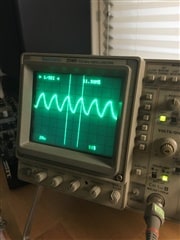
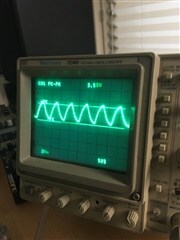
Here is what I see on the AD1939 clock input pin after switching out the components. I'm working with an older analog oscilloscope, so the frequency and voltage readings aren't necessarily the most accurate, but both seem in the right ballpark given the margin of error here:
Hello Emmitt,
It does look like the voltage is slightly too high but I will ignore that for the moment.
I do not like the wave shape. It looks like there is too much capacitance on the clock lines. I am guessing that there is actually a cap to ground on the line. I think you should send over the KiCad files so I can have a look at the design. You can send it using my Berklee email address since KiCad is installed on my MAC and not my ADI PC. You know the address so I do not have to reveal it here.
Then I can also make more comments on the PCB layout.
Now, one other thing. Is the bit clock and LRCLK coming from the SHARC also derived from this same 12.288MHz clock? Your comments lead me to believe it is not. Now you are correct that it would not effect the PLL locking or setting up the part. It would effect getting the DACs to unmute.
Dave T
Hey Dave, just sent the files to your Berklee email. Let me know when you get them! Also included the code I am using to test.
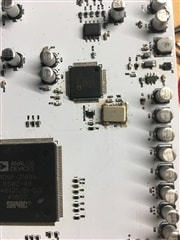
There isn't a cap to group on the clock signal line, but I did have to resolder this by hand, and as an SMT component without exposed pads and no area for leverage underneath the part that was pretty difficult. Soldering job may be affecting the signal quality:
As far as LRCLK, I'm using the same configuration as the Ez-Kit example code, which appears to have the ADC set up as a master device and the DAC set up as a slave device, when I check the config registers. So yes, I think the LRCLK for the DAC originates with the Sharc's clock.
I'd like to wait on switching out the clock chip for the ADSP-21489 until I'm done debugging this first issue however, just because I'm having issues with the first clock chip I replaced and I don't want to be stuck with a nonfunctional board.
Please log in to reply.