ADAU1467 full range external input n-channel compressor gain step size (RMS (no gain) N-Channel RMS Compressor with Ext. Detect)
In our new product we are shifting from adau1442 to adau1467. We are controlling the dsp through an mcu and must therefore fully understand what is what in the register map. There are several good explanations for the 1442 compressor with 34 + 3 registers for gain (-90:3:+6dB) and control. There are no big differences in the corresponding 1467 full range compressor. However, I have a question about the gain registers.
First, the size of the compressor block is 54 (gain) + 3 (tc, hold, decay) registers. How does those 54 gain regs map to the range of 40 - (-140) = 180 dB? adau1442 has 34-1 registers mapped onto 6-(-90) dB, i.e. step size of 96/(33-1) = 3 dB. For adau1467 it seems that the step size is 180/(54-1) = 3.3962 dB or 180/(53-1) = 3.4615 dB. depending if adau1467 is using one register for levels below -140 as is the case for adau1442 (levels below -90).
What is the correct gain step size? Does adau1467 compressor use one gain register for levels below -140 dB?
Best,
Alexander
Edit Notes
spelling
[edited by: Alexander at 2:49 PM (GMT 0) on 24 Apr 2020]
Audio Signal Processors
register configuration
compressor
adau1467
adau1442
SigmaDSP Audio Processors
Show More
Hello Alex,
The compressors for the two processors work very much the same. The difference is that the 1467 ( any of the Sigma300/350 processors) have more headroom and so need a wider range for the compressor. The 1442 used a 5.23 fixed point data size and the 1467 uses an 8.24 number. So it can work over a larger range.
For those reading this that do not have as much experience with this, There is a table of points that detail what gain should be applied to the signal when the input level in the sidechain is X high. These points are stored in the parameter RAM and not exactly in registers as Alex mentioned but I know that he is talking about these memory locations. This does not mean that there are only 54 different gains that can be applied, what it means is that there are 54 points to define a curve then if the level falls between points, which is usually does, it will interpolate what the gain is between the two points so it is really smooth as the level goes up and down.
Back to your question. Both processorsuse a spacing of 3dB per point in the compressor curve. The range in the tree toolbox is not correct. When you open the curve in the GUI there it shows what is going on.
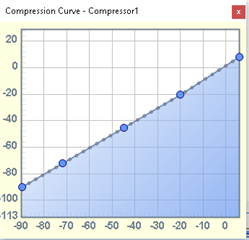
The 1442 the graph goes from -90 to +6 dB.
This is 96 dB of range, so 96/3 = 32. Then we add a couple of points on each end to use for interpolation. That is the 34 points you have with the 1442.
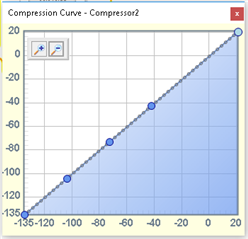
For the Sigma300/350 parts you have this table:
It is hard to tell but it goes from -135 to +21 dB. This is a range of 156dB. So 156 / 3 = 52 points. So add one on each end and you get 54 points. So it has the same granularity as the 1442 just over a larger range of signal levels.
So your work you did with your MCU should not be too difficult to translate over to these new processors. These extremes of levels I am guessing will not be need very often as noise floors and headroom usually confines the range of inputs but it is there in case you need them. Keep in mind that these points are not like filter coefficients, you do not have to write to all the points. You can update a smaller subset of them if you are only making small changes.
I did ask the programmer what happens when the levels fall outside the range. I did not get a great answer so I will perform some experiments to see for myself. I would hope it would hold the gain factor of the last point and not snap back to 1 or zero.
Dave T
Thank's Brett.
I tried to understand the beginning and the end of the 54 params data values and find the 0dB point address. It seems that 0dB is at address 46 (top address is 54). It also seems that address 54 is not seen in the graph but seems to represent levels above 21dB. Tested by modifying the graph to have flat response above 0dB, i.e. -3dB gain per point.
Best,
A.
A question about the 3 control registers. Have compared the params values (tc:120, hold:0, decay:10) for sample rate 96k and 192k. The params values are unchanged so I assume that they do not depend on the sample rate of the DSP. Correct?
Hello Alex,
They do change with the sample rate. Let me show you what is happening on the dashboard and under the hood to use a car analogy.
On the dashboard.
The GUI is helping you by having the information able to be input in a way that is useful to the user. In samples is not terribly useful.
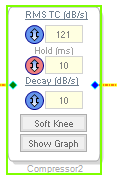
Here is a screenshot of one of the compressors:
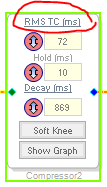
It will let you enter the time in dB per second and in milliseconds. All useful. You can also do this trick with some of the newer SigmaDSP processors. You click on the text in the top and the RMS TC and Decay change to time.
Click on the text I circled and it will change the display.
Note the colors of the up and down arrows changed as well to show it is displaying time. The hold time does not change.
Now these numbers are used in the GUI on the SigmaStudio program running on the PC. It will take this input and translate it to a number based on the sampling rate set in SigmaStudio. Remember that SigmaStudio has no way to know the actual sampling rate of the DSP. So you have to have it set properly.
So now, let's look at the parameters in the DSP by using the Params Window.
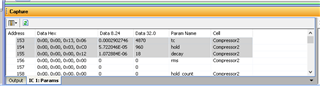
Here are the parameters in the DSP
Note that the highlighted parameters are in samples. 10 ms of hold time is 960 samples at 96kHz fs.
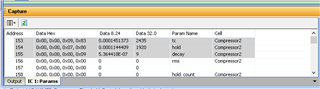
Now I will change the sampling rate in SigmaStudio and I will not change the numbers in the GUI.
You have to re-compile before you see it change but here are the same parameters at 192kHz fs setting:
So under the hood the numbers are being translated to samples for timing purposes.
Dave T
Please log in to reply.