Driver install problem - Win10
I'm having a problem with installing drivers for the USBi - I'm getting the "one of the installers for the device cannot perform the installation at this time". I've had a look at the USBi documentation but there doesn't seem to be anything helpful there. Unfortunately I can't try using a different port as the netbook I'm using only has one available. Is this a Windoze 10 issue I wonder? Does anyone have a solution please?
(NB I tried adding this onto a somewhat similar thread but with the FTDI - however it didn't appear on the discussions list, so I've re-posted as a new thread)
Hello dunmail,
You were correct to submit this now question. The place where posted first is about an older evaluation board that had a USB interface as part of the eval board and they used an FTDI driver that is not supported anymore. This is why we went away from that design over ten years ago.
Have a look at this post. It is not the exact issue you are having but the solutions might be similar.
https://ez.analog.com/dsp/sigmadsp/f/q-a/64303/usbi-comm-error-with-windows-10
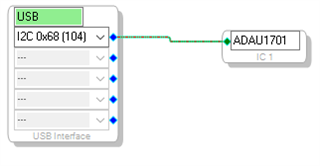
Have you tried to open up SigmaStudio and start a new project? Try that and drag in the USBi and hook it up to a processor and see if the top of the USBi GIU is green?
If it is green then it is "seeing" the USBi.
I will ask someone in the company that knows more about the installers than I do to watch this thread.
Thanks,
Dave T
Hi Dave
Thanks for the speedy reply. In answer to your question, no it doesn't go green (I'd already tried that as I know from bitter experience that Windoze sometimes speaks with a forked tongue). I've had a read through that linked thread and as that's more about problems once it's installed (which fills me with further dread!) it's not quite the same issue - I'm not able to get that far. FYI, I'm running Sigma Studio 4.5 & Win 10 home v19.mumble, not Pro and I'm not inclined to spend on an upgrade as it has cost so me so much wasted time and money so far, and it will likely stop various things that work OK at the moment functioning - it is truly the worst operating system Microsoft have ever brought out in my experience. If you're able to offer any further advice (is it worth you talking to Microsoft?) I'd be grateful otherwise reading between the lines in that link it looks like Win 7 might be better. I did try a Windoze Embedded 7 machine I have here but unfortunately that OS is missing one or two things that SigmaStudio seems to need to run.
Hello dunmail,
Boy are you preaching to the choir. For my personal machine I have a MACBOOK PRO.
Windows 10 home version is probably in a tight race with Windows 8 as far as useless revisions. We never even recognized Windows 8 for any of our software. Now, I am running on Windows ten with no issues but it is the enterprise version for ADI. Even then, I was not able to use the USBi for a little while when I first got the computer but we came out with a fix that fixed my issues as well.
Now, on my MAC I am using Parallels and I have Windows 7 installed there. ( and XP) I have SigmaStudio running on it, several versions, and it runs fine on the MAC running Windows 7. You may have to update or install .NET on Windows 7 but I am not certain about that. The SigmaStudio installer should prompt you about it if it detects the wrong version. However, an embedded system is going to be cut down from the full version of Windows 7 so I am not surprised it did not work there.
Calling Microsoft? I am skeptical that it would be helpful but it may be worth a try. I always laugh when a program crashes and Windows displays a message saying "Windows is searching for solution to the problem" I always say, Windows IS the problem!! LOL.
So it looks like that the home version is the issue here. Sorry I cannot be of more help. Someone else may have some ideas and they may chime in. I did ask the programming team to look at this post in case they can help.
Dave T
To continue your analogy, it's good to see we're singing from the same hymn sheet as far as Windoze goes. It make me think that barring a massive change of attitude from Microsoft (the pigs are fuelled and ready for take off!) it might be worth AD thinking of releasing Linux versions of it's comms/control software.
Hello all,
For what it's worth I've run SigmaStudio on half a dozen machines, some of which worked much better than others. For example, my shop PC (Dell i7, Win 10 Pro) manages only a few seconds' live USBi connection, after which the controls quit working. On the other hand, a refurbished Dell Latitude E5430 laptop (i5, also Win10 Pro) I bought on eBay for $99. maintains comm hour after hour while I attempt to refine a particularly troublesome project. So my advice generally: if you're having trouble with a particular machine, try another. And there seems to be little logic as to which one will work and which won't. BTW, the Latitudes hold up better than Dell's Inspiron line. I have one of the latter which still works yet is physically falling apart -- now it earns its keep running Folding@Home 24/7 until it dies.
Best regards,
Bob
FYI I finally recieved my Win 7 machine yesterday and was up and talking to the USBi within minutes - just works. Methinks Windows 10 is a case of "Ausprung durch teknik" to adapt the German car makers slogan.
Hello,
I'm not sure what Ausprung durch teknik means, yet so glad that your "new" Win7 machine runs SigmaStudio fine. Be sure to keep it off the Internet as much as possible, as Microsoft no longer supports Win7 with security updates.
Best regards,
Bob
Please log in to reply.