ADAU1787 FastDSP probing issue.
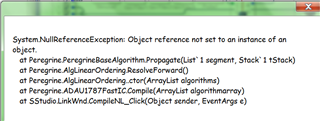
If I add stimulus and probing blocks either side of some filters in the FastDSP it crashes out on compile. Putting them in SigmaDSP path on the same project seems to work OK.
Any ideas on how to check the response in Fast path please?
ADAU1787
Integrated/Special Purpose A/D Converters
Audio CODECs
Hi Dunmail,
Yes, there was bug discovered in FDSP stimuls and probe and is fixed in the new version which will be rolled out soon. I do not have exact date when the new version would be available online but if you provide me your email maybe I could try to send one as Beta version.
Regards
Rajeev
How do I send you my email address please? I'm reticent to post it on here as there's sure to be some scraper looking for email addresses to send spam to.
Hi Rajeev,
Does this also apply to trying to put Simulation Probe in the signal path of Sigma DSP? I have tried placing it between ADCIN1 and a gain stage. When I press the button on the probe block it does not show anything. Same goes for Simulation Stimuli block.
Hello MicheliDE,
The Stimulus and Probe blocks do not run in the DSP. They are only in SigmaStudio and are only for verifying filters that are implemented in SigmaStudio rather than in the DSP. Some of our other DSPs can calculate their own coefficients so the Stimulus and Probe will not work for those blocks. Forturnately, the 1787 is not one of those processors.
The way it works is to look at the filter coefficents stored in SigmaStudio and ready to be downloaded to the DSP. So SigmaStudio is able to calculate the response of the filter and it is done in the PC and not in the DSP. You do not even have to have a DSP attached to the computer.
So if you go through other blocks like compressors or switches SigmaStudio has no idea what is going on in the DSP and those are runtime blocks so the stimulus and probe will not work through those blocks. Also, you cannot take a signal from an ADC because the code is probe is in the computer and not in the DSP.
If you need to see the level then add a level meter into your project. Those have code that runs in the DSP and SigmaStudio polls the meter object to get data from it. Then it calculates the resulting level and displays it on the screen. In that case the code is running in the DSP.
Have a look at this post and it will do a better job at explaining this:
https://ez.analog.com/dsp/sigmadsp/w/documents/14469/stimulus-probe-capability-and-limitations
Thanks,
Dave T
Hi Dave,
Thanks for the example. Yes that makes sense that the stimulus and probe cannot run on the DSP and therefore can not be placed in a DSP signal chain.
The stimulus and probe blocks were confusing to me initially because they have both the Green and Blue Diamonds on them and the article that you attached shows only one of each being used. Blue for Stimulus output and Green For Probe input. This makes sense based on the input and output scheme used for blocks.
I also didn't realize that this type of analysis could be done before surrounding a signal chain with the DSP blocks. It is too bad that that sigma cannot use blocks like compressors and gain stages for this analysis and calculate in the sigmastudio before inserting the signal chain blocks onto the DSP.
I suppose for this reason there are also no test points in sigma studio for the input to the ADC before the ADC takes place I would need to measure this external to the eval board. Similar to the Probe is the Speaker Response:MLSSA block something that only goes in the signal chain for sigmastudio or only for the DSP signal chain? It is located outside the DSP parts of the Tree Toolbox.
I'll use the level meter for on board measurements. Where is the level meter in the Tree Toolbox?
Thanks.
Best Regards,
Dean
Hello Dean,
Here is the information about the MLSSA block.
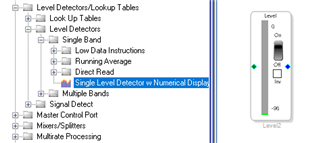
This is where you can find the level meters. The one I selected is usually the best one to use but there are many others.
Now to comment on your comment about test points in the program. There are test points available and a few other tools and tricks to allow you to "see" what is going on in the DSP and in certain points in the program signal path. This is a huge tool! You also can route audio to an unused output in your design, or temporarily take over an output. Then you can look at the signal on a scope or listen to it.
You can construct switches to be able to select what is going to that output. You can have one be the input, one in some point of your program and one in the output to hear and see with a scope what it happening in different places in the program.
So one way is to use the meters. You got that one.
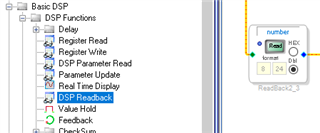
The other is a readback cell.
This cell will capture the data at that point in the program and you can read what the value is. You must remember that the program runs every sample period so you are only getting one sample at the moment you click the ":Read" button. You can also put it on continuous read where it reads I think every 10ms.
Then there is the Real Time display which is a little tricky to use but it can be done.
Then I have constructed programs where it compares data to count when it is different. Or to show the level difference. You have a powerful tool in front of you that allow you to debug your program. You are not blind to what is going on. Try this when working with assembler programs on other DSPs. Not easy.
Thanks,
Dave T
Thanks Dave I will try this out.
Please log in to reply.