Leitura de parâmetros no ADAU1701
Olá, utilizo o ADAU1701 conectado a um microcontrolador via SPI. Controlo o mute, frequência e amplitude de um gerador de áudio. Faço apenas escritas no DSP. Hoje preciso fazer a leitura dos parâmetros frequência e amplitude que estão setados no DSP, alguém pode me ajudar a fazer tal leitura sem modificar o programa atual do DSP?
Audio Signal Processors
microcontroller
SigmaDSP Audio Processors
adau1701
Google Translate from Portuguese: Hello, I use the ADAU1701 connected to a microcontroller via SPI. I control the mute, frequency and amplitude of an audio generator. I only write in the DSP. Today I need to read the frequency and amplitude parameters that are set in the DSP, can someone help me do this reading without modifying the current DSP program?
I'm afraid I don't know how to answer this one.
Hello Tiago,
First I need to say that it is a requirement of the forum to post in English. I should be deleting your post but KJBob was nice enough to translate it for us. So if you can go in and edit the name of the post and the post into English that would be great.
There is a lot of information on the forum for this question but I will post it here so it is easy to find.
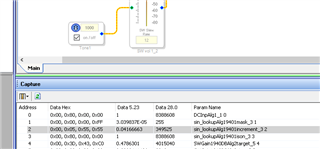
The Capture window has two tabs, one of them is the Params tab and it allows you to see the parameters in real time and even change them if you like. So this gives you an insight into how the algorithm works.
There is a parameter for setting the frequency. You can enter in a new value in the GUI and see the parameter change in the Params window. It is based on the sampling rate.
Here is where you find it:
The formula is easy and is explained here:
https://wiki.analog.com/resources/tools-software/sigmastudio/toolbox/sources/sinetone
Then you can do the same thing with the volume control. You can find the volume control in the parameters and change it directly. If the volume control has slew then this is the best way to do it by using a volume control after the oscillator.
If you do not need the slew feature, if it is OK for the volume to jump up to the new value right away, then you can actually use a trick to save a few MIPS.
If you click on the oscillator ON/OFF checkbox, you will see a parameter being changed from 0 to 1. This is actually a gain factor used to multiply the audio sample. So a zero will mute it and a one will allow a full scale 1.23 signal to pass. However, if you are using a microcontroller you can stuff ANY value in there and change the gain of the oscillator output. It is a gain factor so writing a 0.5 into the parameter will give you -6dB of gain reduction. If you insert a "2" then you will get 6dB of gain over the 1.23 signal level. You are limited to 15.999 due to the 5.23 data format.
So this should get you started.
Dave T
Please log in to reply.