tone control using adau1701/sigma studio
I'm trying to implement bass and treble tone controls using external potentiometers and two of the ADCs on an ADAU1701 board. I would like something like the Tone Control available in the GenFilter2 block in SigmaStudio, only with analog inputs for the tone control 'knobs' in the graphics. Is this possible? Any help will be appreciated.
Thanks.
Audio Signal Processors
SigmaDSP Audio Processors
adau1701
Hello radioguy,
You're absolutely right, what you need are SigmaStudio blocks similar to the GenFilter2, yet with control inputs to which you can connect your Aux ADCs and pots. And yes, there's several of these to choose from. Look in the Tree Toolbox under Filters ==> 2nd Order ==> Lookup. Also called Index Selectable Filters, these are the ones which allow for external control via Aux ADC.
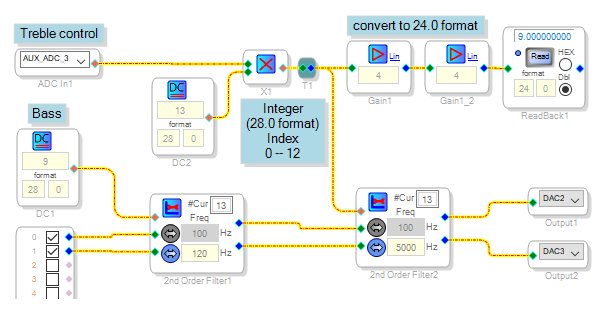
Perhaps the Index Filters most suitable for tone controls are the General (2nd Order/Lookup) Filters -- the 2nd Order Filters shown in the diagram below. Click on the filter's blue box to see its response curves. Play with its numeric entry boxes and you'll find that you can choose the number of curves, how strongly they affect the tone, etc. When you compile your project, SigmaStudio reserves space in the ADAU1701's parameter memory for each response curve and loads a set of five numeric coefficients which the filter uses to actually produce that response. At runtime, your circuit supplies to the filter's index input (red pin) the number corresponding to the desired curve. The filter goes and looks up the correct coefficients, and the desired effect results. All that's left is some pesky details which can easily derail a project such as this. Of these, the format of the numbers you feed to your filters' index inputs is the most critical.
SigmaDSPs use both integer and decimal number formats -- if you're not familiar with these, by all means read about them here:
What Are the Number Formats for SigmaDSP?
The ADAU1701's Aux ADCs output a decimal (5.23 format) number from 0.000 to (255 / 256 = 0.996) according to the voltage at the chip's MP pin and thus your pot position. The Index Filters, however, expect an integer (28.0 format) number. In the example above, the tone filters each have 13 curves numbered 0 -- 12. To convert the Aux ADC signal to a proper index for the filters, multiply it by an integer number equal to the number of curves. With the pot fully down, the ADC reads 0 and the filter gets a zero index. With the pot all the way up, the Aux ADC outputs approx. 0.996, the multiplication works out to (13 x 0.996 = 12.95) -- but arithmetic involving integers always rounds down, so the resulting integer index to the filter is 12. This selects the highest boost of bass or treble. Don't let your index exceed the highest numbered curve -- the filters can't handle an out-of-range input and will mute or worse.
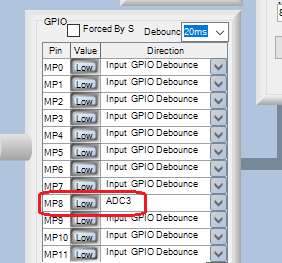
Since my ADAU1701MINIZ board has just one pot, I used the DC source DC1 to adjust the bass filter while Aux ADC3 adjusts the treble. For your board, connect the Aux ADCs associated with your pots. You'll also need to set up the appropriate MP pin registers for the Aux ADC inputs -- for example, to use Aux ADC3, set MP8 as shown below:
Finally, the ReadBack block helps troubleshoot index filters by showing you the index the filter sees. Here we run into another format issue -- the ADAU1701's readback register cuts off the four lowest bits. This merely reduces the resolution of decimal format numbers, but wipes out integers. The fix is to multiply by exactly 16 decimal before the readback. But the -1701 can only handle decimal numbers up to 15.999, so instead we multiply by 4 twice.
The above example uses less than 10% of your -1701's available program space, so you have plenty of room for more functions. Your handle suggests you're interested in radio applications -- search the forum and you'll find some fascinating ones. Keep experimenting, learn how all the blocks work and come up with new projects!
Best regards,
Bob
Tone-control-index-shelf.zip
Thanks a lot, Bob. I used your guidance and created working bass and treble
controls. More importantly, I understand a little better what I'm doing,
particularly with regards to the number formats. I'm considerably less
lost now.
This may be too old school, but is there a manual for SigmaStudio---even
one not necessarily from ADI?
Not that you really asked, I'm building an internet radio based on a
Raspberry Pi that defaults to the radio.garden website. The audio chain is
the Dayton Audio 2x50W ADAU1701 DSP board. I'll search the forum to see if
anything piques my interest.
You've helped me a lot!
Thanks, Steve.
Hello Steve,
Thanks for your appreciation, it keeps me volunteering. And your Internet radio project is cool beans! The SigmaStudio Docs Wiki is AD's manual. I'm not aware of a better one. You'll also find hints and FAQs in the Documents Section. Searching this forum often finds relevant info. And of course you can keep asking your own questions. Finally, if you're curious about how DSP works -- its wonderful strengths and frustrating limitations, why do filters need coefficients, etc. -- AD makes available both a Beginner's Guide and a thorough yet accessible ebook. Really you don't need these to design with SigmaStudio, yet I've found they help is subtle ways easier to experience than to describe.
Best regards,
Bob
Please log in to reply.