[ADAU1701] Possible to make a Eeprom readout and edit with SigmaStudio?
Hi guys,
I have a question and hope you can help me out. I have an existing design based it on the ADAU1701. I builded a couple years ago and it still works like a charm. But now i want to edit the eeprom file, but i do not have the Original copy anymore. I lost it. I would like to know if its possible to make a copy or readout from the eeprom, and edit this with Sigmastudio? Thank you very much!
Audio Signal Processors
SigmaDSP Audio Processors
adau1701
Hello Audiodude,
It appears possible, yet you'll need to perform some detective work in order to discern what to edit. Here's a simple example:
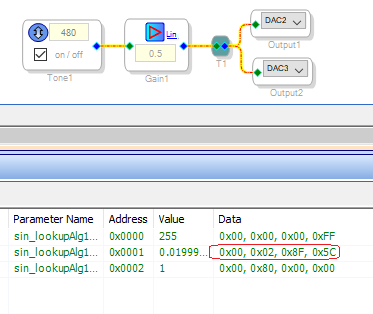
When I change the frequency of the oscillator in the project shown below, the Capture Window displays the hex pattern "02, 8F, 5C." This corresponds to decimal 0.02, which when multiplied by Fs/2 yields the oscillator frequency, 480 Hz. I wrote this project's compilation to EEPROM the usual way, then upon reset the board sang at 480 Hz (somewhat flat of B).
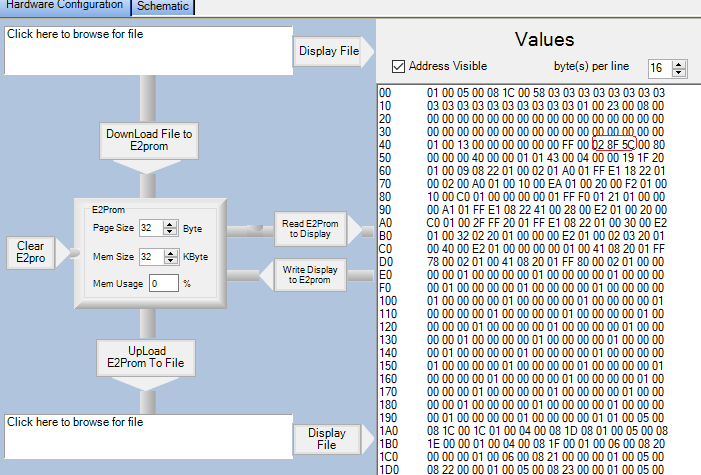
Then I set up a ADAU1701 and a EEPROM in a new blank project. With the board plugged in I went to the WinE2Prom Loader tab and clicked the Read E2Prom to Display button to get the results seen below. In Line 40, notice those three hex bytes corresponding to the VCO frequency:
I changed the first byte from 02 to 01 and then clicked the Write Display to E2Prom button. Then upon resetting the board, it produced an audibly lower frequency as expected. Thus it works!
The blank project had no idea of what the original project was, but of course I did -- so I could find and target the frequency parameter. It goes without saying that searching for a relevant parameter in an EEPROM dump from a large, lost project would be far more difficult. You could try building a test project with just the block you desire to edit. Set the block as it was in the lost project (hopefully you remember!) to see the Capture Window results. Then attempt to find this byte pattern in your EEPROM dump. You could try the Upload E2Prom To File button, then searching with a suitable editor -- I didn't try that.
As I finished writing this, it occurred to me that you would really like to recover the source file and to graphically edit the project, not only adjusting parameters but rewiring it as needed. Unfortunately, if AD has made a decompiler for SigmaDSPs, they haven't released it (and I honestly suspect that there simply isn't one). They haven't even released the -1701's opcodes in order to discourage reverse engineering of products. Personally, I feel that the value of IP is overrated -- knowledge should be for all -- but that's just me.
If you have a good idea of your original project, you could always re-generate it from scratch. Once I had a crash and re-drew a MIPS-ceiling -1701 project in a day and a half. And the new version was much neater and more tractable than the original.
Best regards,
Bob
Hello Audiodude,
KJBob is spot on. There is no reverse compiler so there is nothing I can do to rebuild the project from the hex file.
Dave T
Please log in to reply.