Where can i find document on undocumented Toolbox algorithm
Hi ,
Could you let me know , where i can find information about undocumented Toolbox algorithm .
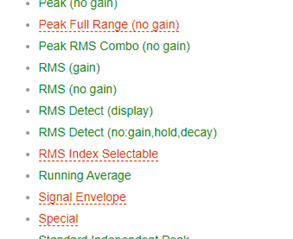
Like the on in the following red which doesn't have link .
We are trying to use ADAU176x.
With regards to IC_1_REG_H__.h file which can be exported from SigmaStudio where can find the detailed register list .
There are lot of registers which are not detailed in data sheet .
Could you also let me know.
Thanking you
Best regards
Hi,
Could you please update me on this.
Will there be an update in the future.
Thanking you
With best regards
Hello,
We can get an understanding of what the blocks missing from the wiki do, from similar blocks which are listed. For example, let's consider the Peak Full Range (no gain) Compressor.. It works the same as the Peak (no gain) Compressor except that its input and output ranges extends to the -1761's full internal 5.23 decimal range (roughly +/- 16, or about +24 dB above where the converters clip). Thus all the info for the Peak (no gain) block also applies to this one.
Sometimes it helps to just put the block into a test circuit and see what it does.
Here I set up the block's graph to limit signals to 1.0 peak (0 dB). My input circuit generates a sine wave alternating between 0.6 peak and 4.0 peak. Since the higher level is above the limit setting, the block cuts gain to keep its output near 1.0 peak when they occur. When the input returns to low level, the compressor slowly increases its gain back to unity.
Unlike RMS dynamic blocks, peak blocks respond nearly instantly to increased input. Their decay time (the time needed to recover to full gain) is set by the Decay type-in box. With the setting of 10, the compressor recovers from a 12 dB gain reduction in just under a second. A setting of 5 would take twice as long, and so on.
Inside this block, first a peak detector measures the peak input by full-wave rectification (absolute value). This peak is held for the time you type into the Hold box. The Hold feature solves a problem common to analog compressors where the gain can modulate with the input waveform, causing distortion. Here, for example, if you set the Hold to 25 mS, it will cover the entire time of a 20 Hz signal from one peak to the next --thus, no ripple in the gain, and less distortion.
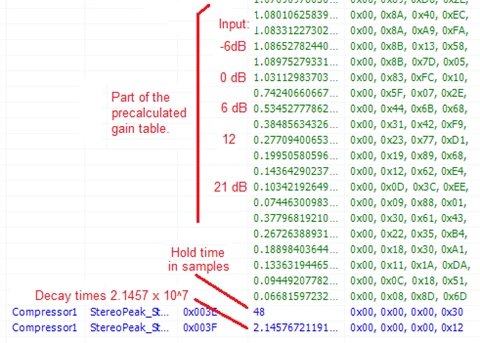
Once the input level is established, it maps to a row in the logarithmic lookup table which determines the compressor's gain. SigmaStudio calculates the table rows whenever you adjust the compressor's graph. The table has rows for each 3 dB increment of input signal. The Capture Window can show us the table rows:
Our compressor has been set for unity gain up to the limiting point where the curve bends at 0 dB. Above this point, we see diminishing gain to keep the compressor's output constant. The two blue numbers are for the Hold time, and the Decay rate. You need not worry about all these values to build a fixed compressor, since SigmaStudio calculates them for you. However, you could have your microcontroller calculate your own values in order to adjust the compressor during runtime.
Continued below...

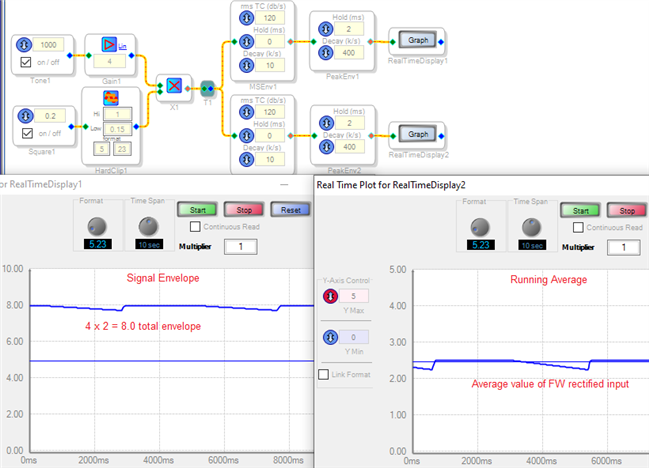
The Signal Envelope block is similar to the documented Running Average block, except that it measures the total + and - envelope, rather than the average. Thus its output is larger for the same input signal.
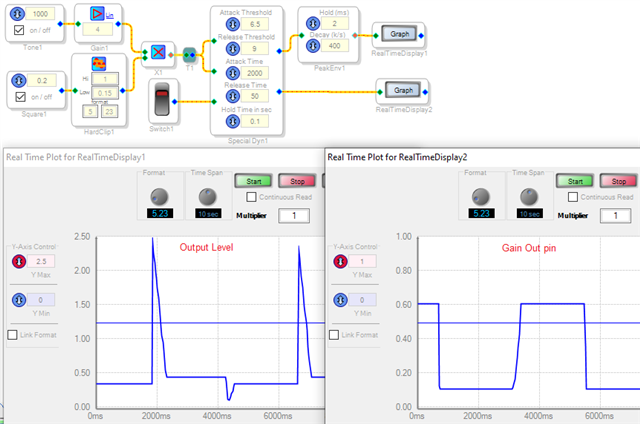
The Special block is -- well, special. Too special for me, I couldn't figure it out. The Audio and Gain outputs shown below are for the same input as the other blocks tested above:
Best regards,
Bob
Hello parziwal,
I will give it a go for explaining the Special Dynamics Cell. This one is a bit different so it is not easy to explain.
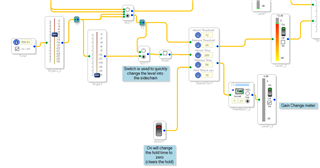
I have setup a project that can demonstrate how it works but it still needs to be looked at carefully. This is certainly one cell where not setting it up correctly would yield strange results.
I changed some of the default settings so it is easy to see how it works.
Basically, the numbers in the Attack and Release parameters are in dB and are actually the number of dB BELOW a full scale 1.23 signal. So you can think of it as a negative dB value.
So in my example I have the oscillator module output, which is a full scale 1.23 number, I feed it into a volume control to lower it by 10dB. So it is a -10 dBFS signal. (Note, for this discussion I will not include the headroom in the DSP core, I will only consider the 24 bit signal into or out of the core as a full scale signal so hence a 1.23 signal is 0dBFS. )
Let's look at Attack first.
With the Attack set to "12" and the release set to "20", what happens is that as long as the signal level into the sidechain is below -12dB there is no compression. The signal passes through unchanged. Then if the signal is exactly -12dB then still no gain change. Then when the level goes above -12dB you will get the amount of compression that is the difference between the sidechain input signal and the value in the Attack parameter. So if you put in -10dB you will get 2dB of compression. If you put in -5dB then you get 7dB of compression. So this is a brick wall limiter that will NOT let the input signal go above the value set in the Attack Threshold. In my example it is set to 12 so it will never to above -12 dB.
Now for the release:
Now if you have the input signal go up to -10dB then you have 2dB of compression. if the signal goes back down below the -12 Attack threshold you will still maintain 2dB of compression as long as it stays between the Attack threshold and the Release threshold. Once it goes below the Release threshold, which I set to 20dB (-20dB) then you have to get below -20dB for the gain reduction to start to decay. It will wait for the amount of hold time then start to decay.
So the difference between the Attack and Release thresholds is a hysteresis zone where there is no change in the gain reduction. So on the way up there is no reduction until Attack threshold is passed and on the way down there is no decay of the gain reduction until the Release threshold is passed. Then it counts down the hold time and then starts to release.
The attack and release times are like all the others. I will not go into that.
The bottom pin is the Hold reset. When this pin is zero the hold time will be active and it will count down the time then start to release. If the pin is non-zero then it will release right way. If you hold it at non-zero then there will never be a hold time.
I set it to 10 seconds to make it obvious and easy to see. Although, I do need to note that when using stable oscillators to test this does pose a bit of a problem. If you go over the threshold then sit at one level, the digitally generated oscillator will always have peaks that are EXACTLY the same. So the program will never see a "new" peak to reset the timer. So if you sit at -10 the counter will never be restarted because the program is looking for a "new" peak level to reset the counter. It is testing for greater-than instead of equal-to. So if you set it to -10 and sit there for over 10 seconds then lower it below -20 the gain reduction will immediately go down because the 10 seconds had expired. For a real life signal there will be slight variations to keep the peak value reset and so the hold timer will reset until it goes below the release threshold.
With my program you can use it with control just to the sidechain or you can mult the oscillator to the sidechain without its own gain.
I hope this helps. It is a bit of a strange one.
Dave T
ADAU1452 Test of Special Dynamics Cell.zip
Hello Dave,
Thanks for tackling the Special block -- it sure is special as advertised. And it turns out to be quite a useful addition to the toolbox, as a designer would have to come up with a rather sophisticated sidechain to achieve a similar function. I do find it a marvel, though, that we both need to reverse engineer the operation of published SigmaStudio blocks. Ideally, each new item would have its wiki entry ready to go at release.
Best regards,
Bob
Hello Bob,
I agree about the Wiki. New blocks we have the designers write up the page as part of the process. The problem is that this was an old block before we started doing this. It was designed for a certain customer so we just added it to the library with no real explanation. I had a long discussion with one of the programmers and we opened up the code to see what it was doing. With assembly it is still a bit difficult to see all the details but it filled in a few details then I experimented with the program to verify what we saw in the code.
We will get it into the Wiki soon.
Dave T
Please log in to reply.