Parametric equalizer stalls in Sigmastudio
Hello,
I have a problem with the parametric EQ in Sigmastudio.
If i drag the "boost" of a filter slowly with the mouse, the corresponding
value is not updated in realtime. It makes relatively big jumps. So there is a difference between
the graphical view and the real value.
But the frequency is shown in realtime while dragging.
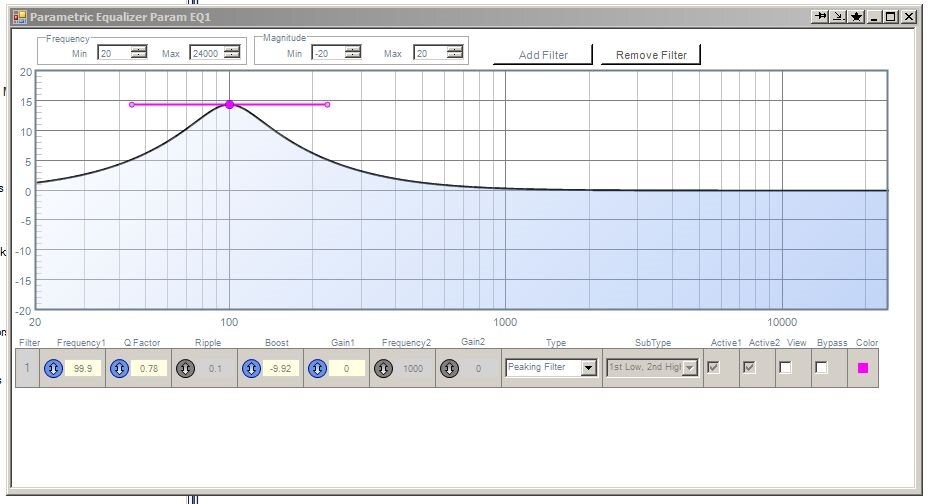
In the attached picture you can see, that the graphic shows a boost of
about +15dB, but the text field contains -9,92dB.
If i increment the text field by 0,01db, then the graph jumps to the
value in the text field.
Is there any solution?
Edit Notes
Added picture and some text
[edited by: Thomson at 3:16 PM (GMT 0) on 3 Jun 2020]
Hello Thompson,
I think you have expectations that this will behave like there was a pot on the controls of an analog filter. This is a tool to help you find the curve you need. Yes, it allows you to make changes in real time which is awesome but it is not meant to be used during a recording or something like that.
There are many variables here with some of them out of our control. Your computer has to compute the filter coefficients and then transmit them out of SigmaStudio into the Windows operating system to be passed to the USB driver. The USB drivers do not have top priority in Windows so as it gathers packets it might be held up. The speed of the USB is also not super fast. Then there are graphics to update which is a lot of computational load on the computer. Then what can make things worse is if you have several continuous reads enabled like meters or Readbacks. This uses up a lot of the communications bandwidth of the USB driver.
Then there is the variable of not knowing what other software your computer is running. Different computers are faster than others. Different graphics cards is a big part of this as well. So you should see some jumps as you move it.
The idea is to drag the curve to get it close to what you want then make small changes by typing in the values in the filter parameters boxes.
I will look into the issue you show where the graph and the text box do not agree. What processor are you using?
It can still be caused by Windows system issues but it might be something missed by the programmers.
I hope this helps.
Dave T
Ahh! Now I see it. If you move the mouse REALLY slowly it does not register that it is moving.
I will bring this up with the programmers to see if it is something they have control over.
Thanks,
Dave T
Please log in to reply.