ADAU1452 RMS and Peak Compressor Calculation
Hey together,
I have a question regarding the calculation of the in-to-out gain-curve of a compressor block. In general I know how to calculate the curve but I was wondering that there seems to be a difference between the peak and the rms compressor block. For your background, we want to calculate the values in a separate MCU and transmit it to the DSP.
PEAK Compressor Block:
For this part I found the calculation in a different post some time ago:
https://ez.analog.com/dsp/sigmadsp/f/q-a/65098/dynamics-processors
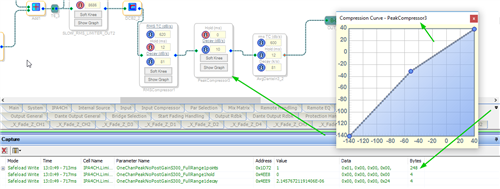
But as here indicated the peak compressor uses 60 dots to calculate the curve. This makes sense when the range goes from -140dB to 40dB in 3dB spacing and one of the range is not included. But when I check the Capture-Window 62 values will be transmitted. So I could understand if it would be 61 vaules because this would include both upper and lower limits but why 62? Can you tell the range I have to use for the calculation? These 2 additional points occur for 30, 60 as well as 120 dots.
248/4 = 62 dots
RMS Compressor Block:
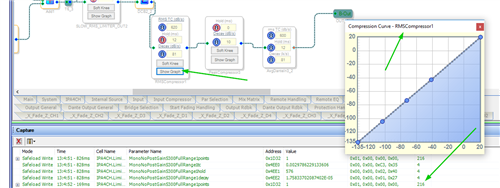
The RMS compressor is again a bit different as the density settings can now vary only between 26, 52 and 104 dots. It seems that the range is now -135dB to 21dB. Is this right? Why is the range different? So it will be not possibile to use the same calculation for PEAK and RMS, right? Also here are the 2 additional dots included.
216/4 = 54 dots
Many thanks in advance,
Eric
SigmaStudio: v4.2
Audio Signal Processors
adau1452
dsp
sigma studio
compressor
SigmaDSP Audio Processors
dsp&processors
Show More
Hi everyone,
does anyone knows where this additonal point cames from and how this is calculated? I found out for all points how to calculate it but it seems that the las point is an exception. Let me show the problem:
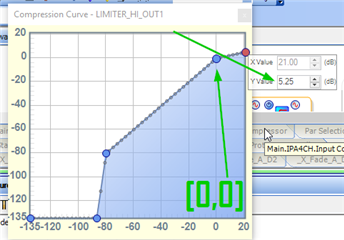
When I set the ratio of the compressor to 4, by setting the end point to the position [x=21dB, y=5.25dB] (y=21dB/4) then I can easily calculate the resulting gain values for the curve. As you will see in the picture below.
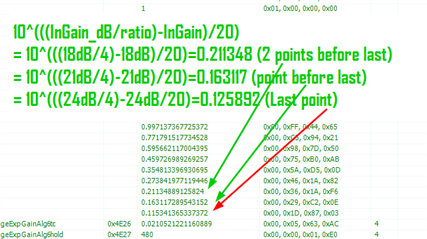
As you can see this works fo all the points except the last point. But why?
It seems that you come closer to the value by using the InGain-value of the step before for the ratio, but keeping the next InGain-value for subtraction like this:
- lastGainPoint = 10^(((21dB/4)-24dB)/20) = 0.115478
But this makes not really sense for me. Maybe someone know where this cames from.
Many thanks in advance,
Eric
Hello Eric,
I will obtain some answers for you shortly. Still trying to get caught up with the backlog after the long break.
I am pretty sure that the extra points on the bottom and top are so the algorithm does not come up with unusual numbers when the audio exceeds the range of the curve but I will check on that.
The difference with the values for the peak verses RMS should be because of the difference in the calculation for peak and RMS. But let me do a bit of research on this.
Dave T
Hello Dave,
thanks a lot, I am looking forward to hear from you.
Dear Dave,
Can I get an explanation to the mentioned question as well!!!
Regards
Hermione
Hello Dave,
do you have any news regarding this topic?
Best regards,
Eric
Hello Eric,
I did ask the programmer. He did say that the points are calculated based on the previous step but then the other detail is that the GUI does not allow the X axis points to go above +21dB. So the final step is most likely truncated to end at +21.
This limitation is based on our older processors that used a 5.23 number and was never updated to an 8.24 number that is available in the Sigma300/350 cores.
Dave T
Hello,
Here's some info on the 'dots' questions:
Peak compressor:
Note signal levels are calculated in the log2 domain for a 8.24 number format, so this gives a log2 range of 7 to -24, but for some reason only 7 to -23 was used. This corresponds to (7 to -23)*6dB = 42 to -138 dB which is scaled by 2dB to give the 40 to -140 range. The 7 to -23 represents 31 table points. Likewise for medium table size (7 to -23)*2 = 14 to -46 i.e. 61 points. And for large table size (7 to -23)*4 = 28 to -92 i.e. 121 points. The memory used is points + 1, since an extra point is added for table interpolation calculation.
RMS compressor:
Again signal levels are calculated in log2 domain, here the signal has been squared and full accumulator value is used with a 8.56 number format, so this gives a log2 range of 7 to -56, but only 7 to -45 is used. This corresponds to (7 to -45)*3dB = 21 to -135 dB. For the medium (default) table size, the 7 to -45 represents 53 table points. As above, the memory is 54 since an extra point is added for table interpolation calculation.
Please log in to reply.