Upsampling / Downsampling bug?
Hi,
So I was trying to troubleshoot a project, and stripped it down to complete barebones to determine the issue.
[Using an EVAL-ADAU1467Z Rev B board]
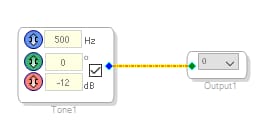
Starting a completely new project & dragging in just a sine generator (500Hz) and patching it directly to an output, it behaves properly:
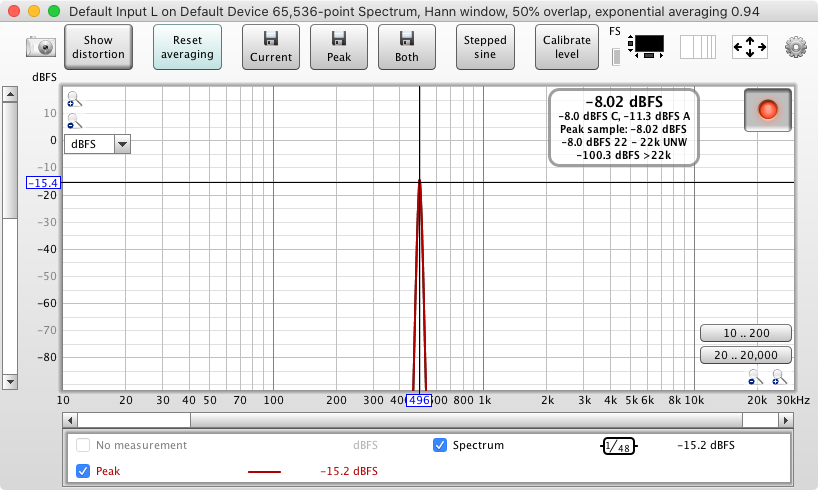
The 500Hz sine is output correctly at 500Hz:
Now for the weirdness.
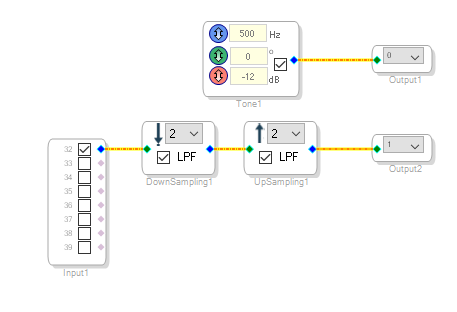
If I add another input, output and connect them together with a Downsampling and Upsampling block, then once again look at the output of the (unrelated) 500Hz generator, you can see the signal is now being output at 250Hz
The output of the 500Hz sine gen:
It is almost like the inclusion of the Upsampling block anywhere on the workspace is advertantly affecting the SR of any other part of the project.
Is there something fundamental I am missing / misunderstanding here?
Thanks in advance,
George
Edit Notes
corrected error in original post
[edited by: Georgeputtock at 11:26 AM (GMT 0) on 27 Jul 2020]
upsample
downsample
Samplerate
bug
multirate

Hello,
I've reproduced this. Thanks for reporting the issue...
I just filed a bug report with our programming team, and I will do my best to push it through quickly.
Joshua
Hi George,
The programming team recommends two actions to resolve this.
The Low Pass Filters built into Upsample/Downsample are known to interfere with blocks outside their path.
Please disable the LPFs built into the upsample/downsample blocks.
You can use separate filter blocks to perform the antialiasing function. I can attach an example project later, if needed.
In the next release of SigmaStudio, the LPF will be removed from the upsample/downsample GUI, so users will need to use a second block for the antialiasing filter.
The DSP core must be set to repeat its program loop at the highest sample rate used in your project. This is achieved through the Start Pulse register setting.
In your project you downsample to a lower rate, then upsample, so I don't think you need to make any change.
However, if you were upsampling from your base rate of 48kHz to 96kHz, the start pulse register setting would need to be changed to "Base_Fs x 2".
If this doesn't resolve your issues, please zip up and attach your project files, and I'll take a look.
Regards,
Joshua
Please log in to reply.