ADAU1787 Readback over SPI
I am not successfull reading a ADAU1787 DSP Readback cell via SPI interface from a microcontroller. Shown below is pard of the DSP schematic showing a DC1 feeding the Readback_DC1 cell. In SigmaStudio I am able to execute the Readback on a ADAU1787 eval board as shown in the Capture window below:
Then I export the project and have the microcontroller load it to custom hardware with ADAU1787. The microcontroller puts the DSP in SPI Control mode, downloads the DSP program and parameters, and eventually reads the Readback_DC1. to obtain the 4 bytes at the the address of Readback_DC1. I am following the SPI protocol shown in Table 34 of the ADAU1787 data sheet, and I can read a byte from control registers successfully (e.g. Vendor Id), so I know that the chip is in SPI mode and my microcontroller code for SPI transactions is working. However, reading 4 consecutive bytes at the Readback_DC1 address always returns 0s.
Am I doing something wrong here?
John
ADAU1787
Integrated/Special Purpose A/D Converters
Audio CODECs

Hoping for a reply, I will ask another question about the issue in my original post: Has anyone sucessfully read Readback cell content from a microcontroller using SPI with ADAU1787 (SigmaDSP v4.5)?
Hello Wygonski,
I would look carefully at the SPI transaction to be sure you are following the SPI read format shown in figure 66 in the datasheet. Note that there is a byte of zero data that needs to be read first before you will get the actual data. Then the readback will be reading from parameter RAM so the size has to be 4 bytes of data. So you will need to clock in 5 bytes, one for the zero data and then four bytes of data.
You asked if anyone has successfully read from a readback, SigmaStudio does it all the time so look at that SPI transaction to see if that helps. That said, the eval board uses I2C so there is a chance that there is an issue here somewhere. Let me know if you are still having issues. I will ask the apps engineer for this product to test this using one of our bench eval boards that can use SPI.
Dave T
Hello Dave,
Thanks for your reply. I checked again that I am following the SPI format from figure 66, where I am reading 4 bytes beyond the "zero data" byte returned.
I defined a function for reading memory registers, and use it like this to read the 4 bytes of the readback register:
sigmaIcReadBlock( DEVICE_ADDR_IC_1_SIGMA, MOD_READBACK1_READBACKALGSIGMA2002_ADDR, 4, &buffer[0]); // Readback cell
The address I am using is the Readback cell address from the parameter header file generated by SigmaStudio 4.5:
/* Module ReadBack1 - DSP Readback*/
#define MOD_READBACK1_COUNT 1
#define MOD_READBACK1_DEVICE "IC1_Sigma"
#define MOD_READBACK1_READBACKALGSIGMA2002_ADDR 8248
#define MOD_READBACK1_READBACKALGSIGMA2002_FIXPT 0x00000000
#define MOD_READBACK1_READBACKALGSIGMA2002_VALUE SIGMASTUDIOTYPE_FIXPOINT_CONVERT(0)
#define MOD_READBACK1_READBACKALGSIGMA2002_TYPE SIGMASTUDIOTYPE_FIXPOINT
On our custom hardware in SPI Control mode, I always read 4 bytes containing all 0s from this address. The point of showing you my read function is that, if I use the same function, same hardware, same DSP program to read the first 4 registers of the ADAU1787:
sigmaIcReadBlock( DEVICE_ADDR_IC_1_SIGMA, 0xC000, 4, &buffer[0]); // Vendor Id, etc.
then I do read back the expected result (0x41, 0x17, 0x87, 0x01) for VENDOR_ID, DEVICE_ID1, DEVICE_ID2, and REVISION. So I cannot figure out why SPI read seems to work for registers but not for Readback.
Also, same DSP code loaded on the ADAU1787 Eval board, using USBi returns correct readback result, though as you point out USBi I2C.
Thanks,
John
Also after reading the ADAU1787 data sheet multiple times to solve this issue, in the section on p. 50 on "Reading and Writing to Memories", it reads
"... must be written starting with the lowest address and continuing sequentially to the highest address for a write to actually occur. Similarly, a read must begin at the lowest memory address. However, for reads, all locations must not be read".
That last statement is a bit confusing, as I would use the address auto-increment to read as well as write, correct?
Hello John,
The quote you stated:
wygonski said:
"... must be written starting with the lowest address and continuing sequentially to the highest address for a write to actually occur. Similarly, a read must begin at the lowest memory address. However, for reads, all locations must not be read".
Let me see if I can explain this clearly...The comms port for this part is byte oriented. The SigmaDSP memory is word oriented. What this means is that the addresses for memory is for the individual bytes of each word. In all the other SigmaDSP products the memory addresses are by the word.
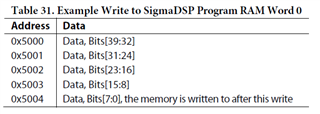
So for instance, address 0x5000 would hold the 40 bit-wide word, (5-bytes). Address 0x5001 would hold the next word, which is another five bytes of memory.
In this part address 0x5000 is only for the first byte of the 5-byte word. So the second byte is 0x5001.
What the statement is saying is that you have to write an entire word starting from the lowest address of the word and you must write the entire word for it to actually write.
For reading this is not required, you just will not get valid results. You can read only one of the five bytes.
Look at table 31 for this to be detailed:
I am not sure why the readback is not working for you. I will talk to the apps engineer for this part about it. They are busy today so it make take a bit of time...
Dave T
Hi Dave,
Thanks for the explanation. To use the Program RAM Word 0 example, I understand how to write a new word value, I must start by writing a byte value to 0x5000 and continue writing 4 additional bytes to consecutive addresses.
My question remains for exactly how to read back the content of the word just written to Program Word 0. I assume I can execute one burst-mode SPI read (data sheet p. 44) specifying the lowest memory address and clocking in 5 bytes, correct?
This is also the way I am attempting the read of the readback, except that I am clocking in 4 bytes of data after byte 3, the all zeros data byte.
I'll be happy to wait for the app engineer's response.
Hello John,
Yes, you will need to do a burst write to all five bytes before raising the CS line. If you write less than five then it will abort the write. For reading it should just read the one byte. I did just try this and it does return valid data if you read only one byte. So it is only the write instruction that needs to be complete.
So I think your reads are probably correct but the write might be the issue.
The two Apps engineers that worked on this part from the beginning are assigned to another project and the first silicon arrived yesterday so they are super busy testing and so I took this upon myself to get some answers. I need to learn this part better anyway.
I setup a project using SigmaStudio and an eval board. I did notice that the first word of the Program RAM is all zeros after writing the program to the DSP. So don't read from that location after loading in the program. I am pretty sure that is a NOP instruction.
So I used the sequencer in SigmaStudio to read and write to program RAM to test a few things.
I was able to write and read from that location. However, SigmaStudio is using I2C. I cannot use SPI on the eval board.
But this does show that a controller can read and write to Program RAM with or without the SDSP Run bit on or off. I tried it both ways. Here is the capture window.
Here is my sequence file in case this is handy to you or someone else.
ADAU1787 Modes for read-Write Program RAM.zip
I will try a readback next.
Dave T

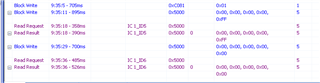
Hello John,
I read four bytes from parameter RAM where I have a readback cell and it worked perfect.
Dave T
Hello John,
I just did more testing and had a long conversation with Patrick about this part.
What I found out is that the Run Bit must be shut off to be able to write to Data RAM. What is interesting is that it does not have to be shut off when writing to Parameter or Program RAM. So this is not the reason you are having issues. That said, it is strongly recommended that you shut off the DSP run bit when writing to any RAM in this part. This will prevent any clocks or pops or other issues since the DSP cannot access the RAM when the comms port is also accessing the RAM. We improved this with the Sigma300 parts but this is a Sigma200 core. So since you must be able to write to the parameter RAM when the DSP is running, you must use the safeload write feature to prevent any memory contention issues.
The datasheet is not exactly clear on this distinction.
Patrick said he has an eval board that he modified to have SPI control but it is back in the lab and he is not in the lab today. We cannot exactly take everything home. :)
Patrick also brought up the detail to remind you that you have to toggle the SPI port three time to set it into SPI mode. I assume this was done since you wrote the program into RAM already and you know SigmaDSP well. I do not expect you missed this detail.
Have you actually looked at the SPI communications between the controller and the DSP on a scope? It would be good to verify what is actually being sent to the DSP.
Are you able to connect the USBi to your hardware and disconnect the controller?
Enough for now.
Dave T
Hi Dave,
Thanks again for your reply. Quick response is that yes, I am sure I am in SPI control mode (toggled the the chip select 3x) because I can always correctly SPI read the first four registers in the ADAU1787, the Vendor Id, etc. and it always returns the expected result from data sheet tables 40-43. And I get the correct result whether I do 4 single-byte SPI reads or one burst-mode SPI read of 4 bytes. So I have confidence in my SPI read function.
Now I suppose my issue could be that the program download through the microcontroller failed, but again I have verified that single-byte writes to control regs work because I can turn the SDSP_RUN bit on and off in the SDSP_CTRL2 reg, and I can read it to see it change state.
I will try alternate way of verifying my program was downloaded and is running correctly. I'll also try your other suggestions especially switching to use I2C USBi in place of the controller.
John
Hello John,
When I suggested the USBi, I meant to keep it using SPI. The USBi is capable of using SPI. You will just have to disable the other master on your board. In SigmaStudio on the config page you would change it from I2C over to SPI.
Dave T
Please log in to reply.