adau 1452 index selectable mulitplexer not working?
Hi Guys,
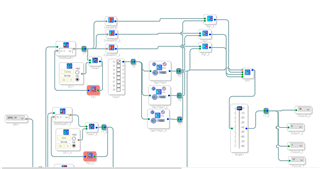
I want to select different filter settings with an external push button connected to uC connected to DSP GPIO and use chimes to indicate which program was selected.. The attached works like a charm as long as I have 3 channels on the Mux.
But this will always sound the chimes. Adding 3 more channels which stream without the chimes enable selecting the channel without the chimes by selecting another index. But now it is like the Mux index selection no longer functions. The chime changes into a very short bip sound on one channel, it connects channel 4 when it should connect channel 1. very strange.
The short bip already appears when I add only 1 channel to the Mux (3 to 4).
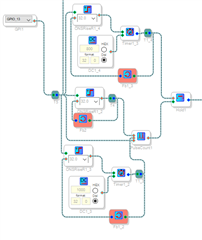
Any suggestions? Attached are the schematic with 3 and 6 channel mux and the pulsecounter.
Thanks for your support as always
Paul

Hi Paul,
Please refer to this post, and let me know if it answers your questions. It details how to use the index selectable filter and there is some info on the chime there too.
https://ez.analog.com/dsp/sigmadsp/f/q-a/166939/lookup-filter-index
Thanks,
Joshua
Hi Joshua,
That was an earlier conversation between us where you suggested the pulse widht detector. But it was more reliable to use a pulse counter. We did not discuss the MUX though?
paul.
What is the output format of the Hold and what does the Mux expect?
Looks like it is 32.0 for both, so the problem is elsewhere I think?
You're right.
Can you zip up your project and attach it here? I will take a look later today.
Thanks,
Joshua
thanks, how can I attach a zip file?
You can either select Insert -> image/video/file
Or, drag the zip file into the editor window.
ok, it looked like it only took the image. Let me know if this works?
Mux.zip
The Value Hold works like this...
The signal on the green pin passes through to the output UNLESS the orange pin is 0. When the orange pin is 0, the value from the green pin is frozen. So it's not exactly a 32.0 input; the hold is either On or Off.
The mux expects a 32.0 integer value to specify the selection.
Thanks, I can open it.
I'm having some trouble deciphering exactly what you are trying to do in those feedback loops. What are the Timers for?
Can you explain the GPIO timing you use on the input?
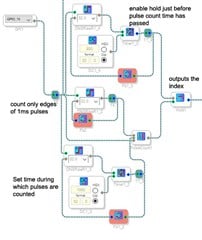
The GPIO receives pulses with 1ms high, 1ms low etc and I use 1 pulse for index one, 2 pulses for index 2 etc.
So in order to make sure pulsecounter only counts 1 pulse and not 48 (48kHz sample f) for a 1ms long pulse I use a feedback loop to only count the edges basically.
The loop in the bottom is to set a total time during which pulse counter counts, set by the timer.
Then there is also a timer loop above to make sure the hold holds the signal just before the pulse counter resets.
And then all above is a timer to set the total chime time.
You can probably do this more elegant then I, but it works :-) At least for 3 inputs mux. Just reduce the algo in the mux to three and try and no problem. Problem comes when adding channels to the mux.
Hope it is more clear now
Paul

Hi Joshua, I changed to the toggle and that works. new problem though, I will post seperately.
Please log in to reply.