SIgma Studio Filter
Dear Team,
Can Someone please explain and clarify the following points for the General Filter Second Order Double Precision:
1. For a Bandpass Filter
a. Ideally a Band pass Filter has two cut-off frequencies which is not evident in the Sigma Studio's GUI for a bandpass filter. The Filter Frequency of the BandPass filter in Sigma Studio (say i set it to 100Hz) is that the cut-off frequency ? If yes how do I interpret the single cut-off frequency for a Bandpass Filter
b. Next what is the bandwidth in octaves and how do Interpret the range please explain with example (say for instance setting the octave to 0.90 for a 100kHz cut-off frequency) .
Regards
Hermione
joshua
Hello Hermione,
You can set the 2nd Order Bandpass filter's low and high cutoff frequencies by adjusting its two GUI settings. The box labeled Freq is the filter's center frequency. The -3 dB Low and High Cutoff frequencies are located at equal distances away from the center frequency when viewed on a log frequency scale. The Bandwidth (octaves) adjustment determines the distance between these and the center frequency.
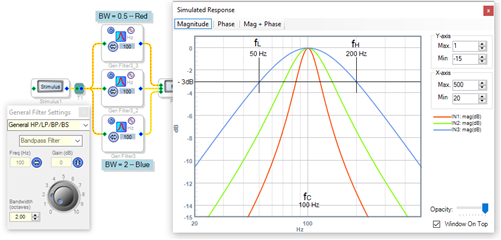
For example, the bottom filter in this image has a BW of 2 octaves. Each octave is a doubling of frequency, so two octaves means that the high cutoff frequency H must be four times more than the low cutoff frequency L. Thus, the blue curve on the graph shows L at 50 Hz, H at 200 Hz, and the center frequency at 100 Hz. The green and red lines correspond to filters of narrower bandwidths, as shown in this table:
BW Line color Low cutoff High cutoff
0.5 red 84 Hz 119 Hz
1.0 green 71 Hz 141 Hz
2.0 blue 50 Hz 200 Hz
In general, if we call C the center frequency, L the low cutoff, H the high cutoff, and BW the bandwidth in octaves, then:
H = C * (2^(BW/2)) and L = C / (2^(BW/2))
We can work this backwards. Given the desired cutoff frequencies L and H, the two figures to enter into the 2nd Order Bandpass Filter GUI are:
C = sqrt (H*L) and BW = 3.322 * log (H / L)
Best regards,
Bob
Dear Bob!
Understood !
Regards
Hermione
Please log in to reply.