ADAU1701 memory limits
I'm working on a project for the ADAU1701, but when I add just one extra option the audio goes total dead. Is it possible I ran into a limit for instructions or memory? And how can I check this?
Audio Signal Processors
SigmaDSP Audio Processors
adau1701
Hello.
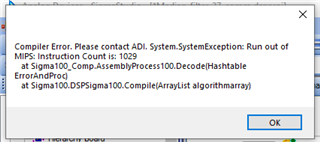
The compiler usually lets you know when you exceed the instruction limit with an error like this:
However, this only works for the default sample rate of 48KHz, where you're allowed about 1010 instructions. If for example your project runs at 96K, you can only use about 500 instructions -- because at twice the sample rate, the -1701 has only half the time before the next sample comes in. The compiler's limit doesn't change for the higher sample rates so you won't be warned. Then strange things can happen such as no sound, white noise, etc.
You can check your instruction usage by examining a file which SigmaStudio places in your project folder -- see how by reading through this thread:
https://ez.analog.com/dsp/sigmadsp/f/discussions/101228/determining-resource-use-for-the-adau1701/
Best regards,
Bob
Please log in to reply.