ADAU1701 signal level detection for GPIO logical output
Hi KJBob and ADi expertise
recently i am working on a project that need some function on GPIO control to somewhere our of DSP itself.
had had been working many days but still can't make a successful SS design implementation.so i ask help here and hope can get best support from you.
Requirement:
1 GPIO output logic level set from DSP based on level detection.
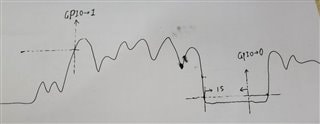
when the audio level high(peak or rms both ok) to a level (let's say -3dB),then the GPIO outpu logic 1
then,after that when audio level lower to a level (les't say -60dB) and has a duration 1 Second(settable),the GPIO output 0
for continues audio above setting and output is continues and repeated.
i attach a picture as show below may help understand,also my SS file for checking and if you can give an modification example will be much appreciate.
adau170x_signal detection to GPIO.rar
Edit Notes
upload picture
[edited by: kingway at 9:08 AM (GMT -4) on 20 Aug 2020]
Audio Signal Processors
SigmaDSP Audio Processors
adau1701
Hello,
Your experimentation shows a good understanding of how SigmaStudio's pieces work. Thus although my version attached below looks completely different,it uses the same principles. Here's the details:
As you have discovered, the Signal Detect block is optimized for uses such as powering down a subwoofer when no audio is present. Thus it only has one threshold, which is usually set to a very low level. Also its minimum hold time of 2 seconds is too long for your purpose. Thus it's of no use to your application.
I moved the MUX selection between ADC and Tone generator near the input end of the schematic so this choice affects whatever experiments you perform.
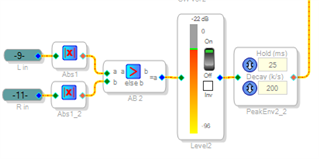
Placing a Absolute Value block for each channel before the MAX function chooses the highest peak in either direction. The Peak Envelope block converts the audio waveform to a varying level -- which is what the following ABCD Comparator needs to correctly do its job.
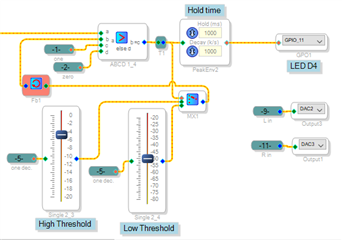
Your requirements call for a high level threshold to set the GPIO high -- then a low level threshold to bring it back low. We can set up these thresholds, then have the ABCD Comparator choose between them according to its own output. Thus the comparator won't go high until the high threshold is exceeded, but once there, it won't go low again until its input falls below the low threshold. The Feedback block is needed to facilitate this recursive operation -- replace it with a straight wire and the compiler will flag a "illegal feedback" error. You'll find how feedback can sometimes be incredibly useful in your designs.
Finally, you could come up with an arrangement including a timer or counter block to stretch the output highs to one second. I just got lazy and used another Peak Envelope block, taking advantage of its Hold time adjustment. There's often more than one way to do things in SigmaStudio.
Best regards,
Bob
adau170x_signal detection to GPIO-2.zip
Hi Bob
thanks your great support and just test it work very well as i expected.
i am new on feedback block so far and still a entry level on Sigmastudio but will continues study.
Hello Bob,
I have a GPIO logic output experiment: LED1 lights up below 0dB, when LED2 lights up above 0dB, LED1 turns off. But my result now is that LED1 will not go out when LED2 is on.
6087.TEST.zip
Hello Evin,
I will take a look...
Dave T
Hello Evin,
I think I see what is happening.
When I first opened your project this is what I saw:
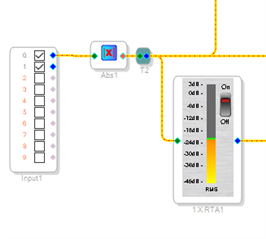
This means that when you last had the meter on and you saved the project, there was a lot of DC on the signal.
The ADC in this part does not have a high pass filter built into it. So the normal DC offsets of the ADC will come out and can be a significant level. Audio has quire a dynamic range on a linear scale.
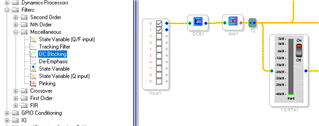
On this part it is always best to have a DC block between the ADC and the rest of the schematic.
Here is where you find it and how to use it. Note, now the meter goes down to zero. So I think the DC level was keeping the LED on
Dave T
I would vote that this post be put in with the wiki about using Sigma Studio with the ADAU1701 chip, this is a very import piece of info
Please log in to reply.