Analyze auxiliary ADC, and output 0 or 1 integer
Hello everyone. I'm going a little nuts trying to solve an embarrassingly simple problem. I have a pot connected to an auxiliary input on an ADAU1701. When I turn this pot up all the way (more than 0.95), I would like to output a 1 control signal, else 0. This control signal will be used to control the top pin on a max and hold block and the top pin on an index selectable multiplexer, which require an integer 0 or 1. But for the life of me I just cannot figure out how to get them that... the best I've gotten is floating point 0.0 and 1.0, or an integer 0 and some other huge integer besides 1.
I can post a schematic with some of the stuff I've tried later today, but here it is in typing:
ABCD block, if pot > 0.95, then 1.0, else 0.0 (using DC inputs set to 5.23 format)
ABCD block, if pot > 0.95, then 1 else 0 (using DC inputs set to 28.0 format for the 1 and 0)
Tolerance analyzer, set to 95 < (pot x 100) < 101
I've tried connecting the outputs from above to a readback to see what's going on, and no matter what, I simply can't get a 0 and 1 when I have the readback set to 24.0 (it doesn't let me enter 28.0). I also tried multiplying the output by 2^23 (8388608) using a DC Input set to 28.0, and 2^-23 using a DC Input set to 5.23. I get a different result in those cases, but not a clean 0 or 1 integer.
I feel like I'm missing something really simple here!
Audio Signal Processors
number format
SigmaDSP Audio Processors
adau1701
Hello,
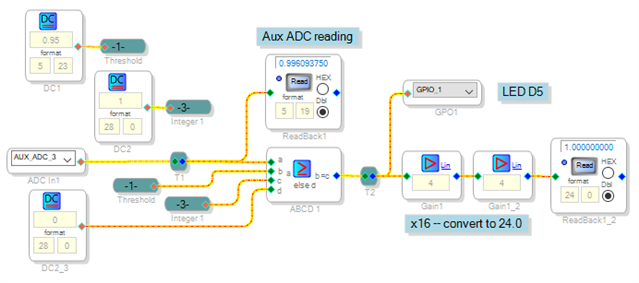
Actually you got the major part of it right -- your version #2 should work just fine. I tried the example shown below and it gave the desired result:
As you have found out, the Readback has no 28.0 (integer) setting. That's because the ADAU1701's readback register drops the four lowest bits (5.19 format). Thus the Readback cannot show integers properly. To work around this, shift the integer four bits left (multiply by 16) before the readback. Because the 5.23 format is limited to 15.999, multiply by 4 twice. With a Readback before and after the ABCD Comparator, you can troubleshoot any problems. The attached example runs on a ADAU1701MINIZ board.
Best regards,
Bob
Aux_ADC_Decision.zip
Thanks for your response! I got it working as you said. What threw me off was getting the readback working the way you did it. I wouldn't have known to do those multiplications.
As it happens the issue that caused me to start investigating all this in the first place was that I also had a min and hold block (didn't mention it before because I didn't think it was relevant) that kept misbehaving. I had thought there was an issue with it not getting the correct 0 or 1 tracking signal, but it turns out there's an issue with the min and hold algorithm itself: when you set the track pin to 1, it starts tracking the signal with an initial minimum value of 0. This means that it can only track the minimum of *negative* or AC signals. If you try to track the minimum of an always positive signal, such as that from an auxiliary ADC, it will always output 0. Once I figured this out, I was able to work around it just fine, but just thought I should mention it in case you want to update the documentation.
Thanks again for the help!
Hello Tony.
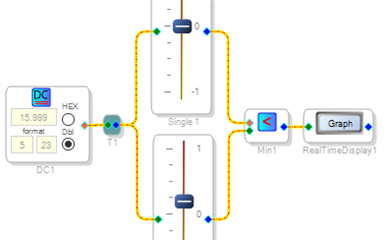
Of course you're very welcome. Having never used the Min & Hold block, I built a silly test circuit and played with it:
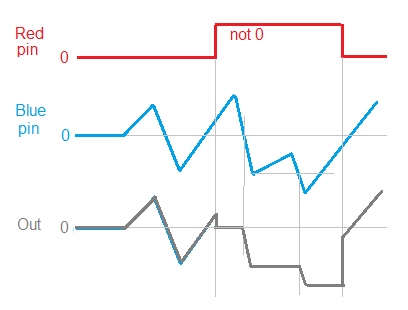
As far as I can tell, its operation follows this graph. Perhaps a graph like this could be added to its Wiki entry:
Best regards,
Bob
Please log in to reply.