[ADAU145x] Downsampling to arbitrary value
Hello folks,
I'm trying to downsample a signal to a sampling rate of 10Hz on an ADAU1452.
The main sampling rate is 48000Hz. My problem is that the downsampling block doesn't allows a downsampling ratios of 5. The only available ones are 2, 3, 4, 6, 8 and 16.
I cannot find multiples that would allow me to bring 48000Hz down to 10Hz with only thoses. It looks like the lowest you can reach is 125Hz with is too much for my application.
Where is 5? What kind of limitation do you have that does allow a ratio of 3 but not 5? Clocks?
Cheers,
Audio Signal Processors
adau1452
downsample
SigmaDSP Audio Processors
downsampling
The ADAU1452, and all of the SigmaDSP parts, compute the algorithm once per sample period. Multirate processing is done by executing the algorithm once every N samples, where N is the undersampling ratio. Therefore, you can only downsample by an integral number of samples. I don't believe that there is any inherent limitation preventing downsampling by 5, but it doesn't correspond to any commonly used audio sample rates and is not supported. Please keep in mind that these DSPs are optimized for audio.
You can downsample as much as you want, but you have to do it in multiple steps. This is the most practical way to do this, anyway, because otherwise you would need very long antialiasing filters. Note that your own FIR filters are strongly recommended over the IIR filters available in the block. Downsampling by 16 three times gets you to just under 12 Hz. You can use the same filter coefficients, too. Without adjusting the base Fs down slightly, I don't think you're going to get closer than that. If it needs to be exact, you would need to move to a SHARC family processor which has very much more power and control.
Ken
Hi Ken,
I am already cascading multiples downsamplers with custom FIR. Thanks for the suggestion.
I also tried to cascade two 16x downsampler like you recommend, but the compiler doesn't like non-integer sampling rates.
###### IC 1 ######
ADAU145X Assembler, Analog Devices Inc.
Version: 4.5.0,1779 (built 10/28/2019)
##### Compile Started: Wednesday, September 16, 2020 11:47:43 PM #####
error (7,DownSampling1_2): Unexpected token '187.5', instruction or type expected (630,14)
error (11,DownSampling1_2): Unexpected token '.', instruction or type expected (634,25)
##### Compile FAILED: 2 errors, 0 warnings #####
I was assuming the core couldn't handle fractional SR, but now that I'm reading your reply it seems like this is another bug. Oops? Not a big deal tho, who wants non-integer sampling rates...
Yes, the Sharcs are beefier (and floating points samples are nice). But they won't fit this board budget. Next time surely.
Is there any way someone could check whether or not the 5x downsampling ratio was just overlooked? Because the available ratios of 3 and 6 do not look very 'audio' to me neither. Only the 5 is missing to be able to get arbitrary integer SR.
I have my workaround. Cascade of 16->8->3-> gives an SR of 125Hz which is manageable by the master MCU. But still. It would be nice to unlock multiples of 5 here. Especially if there is no reason it is missing.
Greetings,
I'm interested in this issue as well - I'm trying to implement an FIR to perform a very long moving average, and was hoping to downsample the input signal significantly first. My target rate isn't exactly critical, it just needs to be <33Hz to put my FIR into a usable range. Somewhere around 10Hz would be ideal.
I also attempted to cascade three 16x downsample blocks, and am getting the same compiler errors as CooperMaze. I guess I'll try a workaround to keep each intermediate Fs an integer, but I'm curious to know if 48kHz (/16) = 3kHz (/16) = 187.5 Hz (/16) = 11.718 Hz is intended to be a supported configuration or not?
Thanks!
Hello PeterThe Red and CopperMaze
Yes, we could provide a down-sample by five since it is an integer value. Right now I think this is a low priority feature addition but it is noted as a suggestion.
The way the down-sampling works is like this.
The main DSP program runs every sample period then performs NOPs until the end of the frame. If you are down-sampling by four then the lower sample rate's program code is divided up into four chunks and is run after the main code is complete for the frame. So when the main code is done, there is a context save and context loading of the lower rate and then it executes instructions up to the end of the frame where it saves its context and loads in the main program context ready for the start of the next frame. So it takes four frames for the result of the lower sampling rate to be ready and so it is running at half the rate.
This is why you cannot have a non-integer result because there is no way to execute and get a result in less than one frame.
So if you down-sample by 16 then down-sample 16>8>3 you are saving and restoring the context of the core three times during every frame. It is adding overhead.
If the goal is to have a slow moving average of a signal then just use an envelope generator. We have a moving average envelope generator that does this quite well. You can adjust the time constants to perform as fast or slow as you like. For something this slow you can use the graphing function in SigmaStudio to test how fast the output changes.
I suggest the Running Average block:
If you want more of an RMS value then square the input going into it or use one of the RMS envelope generators.
Here is the help file on both of these.
Running Average [Analog Devices Wiki]
Envelope Peak RMS [Analog Devices Wiki]
This will be much simpler and take a lot less MIPS than going to a very low sampling rate.
Dave T
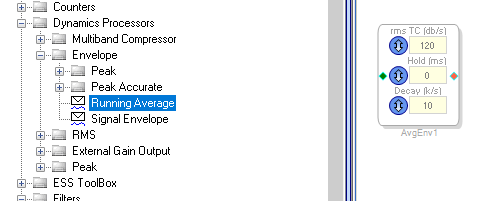
Thanks DaveThib . I'm looking into the Envelope > Running Average block now. I've previously been a bit confused by the uncommon dB/S units, but I found your colleague's explanations here:
RE: Compresser RMS TC from dbpersecond to attack time(ms)
and here:
Sigma Studio - Dynamics and time constants (ms vs dB/s)
Makes sense!
I have some additional questions about these different envelopes however.
- The help files on the wiki show GUI units of dB/s for both 'rms TC' and 'decay.' However, my Sigma Studio workspace has decay in units of 'k/s.' Is this a typo in the GUI, or are 'k/s' different than 'dB/s'?
- The help file for the 'Running Average' block doesn't describe any sort of windowing. Can we assume then it's a simple square window?
Thanks,
p
Attempting to implement this now, and it appears that the dB/s time constant cannot be less than 1, or about 8.6 seconds. That's long relative to audio frequencies, but not long enough for our application, where we're trying to average a varying-DC level over several minutes. Hence my interest in downsampling to very very low Fs. Oh well.
Hello PeterTheRed,
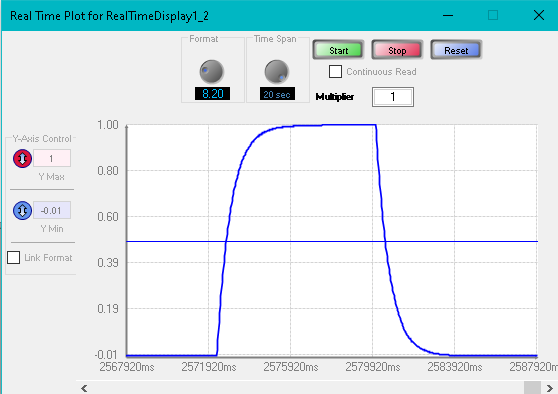
The limitation is mostly due to the GUI. It is limiting it to 1. If you look at the parameters for the block you will see that when you set it to "1" it placed an integer value of 4 into the time constant parameter. However, this block has a few annoying features like a different rise characteristic verses fall. Rice is an RC curve and fall is linear. So perhaps the answer here is to use a more brute-force method. I setup a system where the rise and fall will be an RC curve and the same time constant for rise and fall. Here is what it looks like with a fairly quick rise and fall:
I will attach my project. A quick explanation is that it keeps a running sum. It is summing the absolute value of the input signal, multiplied by a time constant factor so that only a small portion is added during each sample period. The amount being "added" can be negative or positive depending on where the input level is and where the sum is, So it tries to follow the input level but with a long time constant it takes a while. With the time constant set to an integer value of "2" it takes four minutes and 22 seconds to converge when using a DC value that goes from an 8.24 value of 1 to zero or zero to 1. I also put in an oscillator to allow you to use a sine wave to see how it behaves with a fluctuating input. It settles to the average value so if you need RMS then just multiply the output by a conversion factor.
The project has a real time graph object which is where the screenshot came from.
See if this might work for you.
What I did not try is that you could embed this inside of a lower sample rate thread. So divide the sample rate by 16 and then place this code in there and you should be able to get really long time constants and have a bit more of a fine adjustment range.
ADAU1452 RC Curve Up and Down Same TC.dspproj
Dave T
Please log in to reply.