Understanding the "k/s" setting in the Peak Envelope block
It's well known that the Peak Envelope block's decay characteristic is linear, and there's a wonderful workaround to get an often-preferred exponential decay. Should a linear decay be desired, here's how the GUI entry in k/s relates to the resulting decay:
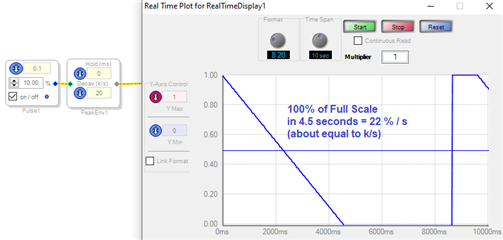
With a Decay setting of 20 k/s, we observe a decay of about 20 % of full-scale (1.0 decimal) per second. So the "k/s" figure can be interpreted as "%/s." Thus you can predict a decay time like this:
Decay time = (percentage decay) / (k/s). For example, a decay going from 0.5 to zero (50%), with a Decay value of 200 k/s, will need a time of 50 /200 = 0.25 s. This relationship holds up to the maximum Decay number of 1000 k/s -- where you'll need an oscilloscope to check it since the RealTime Display isn't fast enough.
Edit Notes
Clarified & fixed typos.
[edited by: KJBob at 7:08 PM (GMT -4) on 17 Sep 2020]
Decay_time
k/s
Please log in to reply.