Volume control module in Sigma DSP
Dear Team,
In volume control module(Tree ToolBox:(IC1)ADAU1452->Volume controls->Adjustable gain->No Slew->Single volume) when input is attenuated to low gain(dB) levels output level is not reduced below -94dB.Kindly find the observations as below.
Observations:
Case1:
Input : -10dB sine 1KHz tone
Volume control parameter : -100dB
Expected output is -110dB but output observed is -94dB at 1KHz
Case2:
Input : -10dB sine 1KHz tone
Volume control parameter : -150dB
Expected output is -160dB(or no output) but output observed is -94dB at 1KHz
We are using SigmaStudio Tool Version4.5 and Processor ADAU1452 (SigmaDSP 300).
Kindly let us know reason for the observations.
--
Kind Regards,
Sivaramakrishna.
Audio Signal Processors
adau1452
SigmaDSP Audio Processors
Hello Sivarmarkishna,
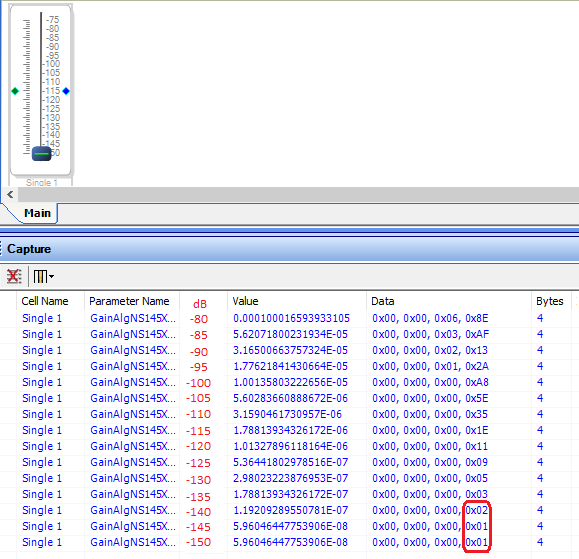
Looking at the Capture Window as shown below, it appears that the Sigma300 Volume Control remains accurate down to about -135 dB -- at lower settings it diverges due to limited parameter resolution:
Of course this doesn't explain why you're not seeing any residual signal below -96 dB. This could be from a noise floor somewhere between the Volume Control and your measuring device -- which includes the codec's DACs and so forth. Try adding a Mute block after the Volume Control and mute the signal altogether -- if the -96 dB reading remains, it's not from the Volume Control.
Best regards,
Bob
Hello Sivaramakrishna,
What is the bit depth of your signal source? It is looking like it is 16 bits.
Also, where are you measuring this -94dB? Are you using the meters in SigmaStudio?
This seems like it could be a noise floor issue.
Another possibility is that it is some DC in the signal. Place a DC block in series. If there is an ADC involved then it can be a DC issue. The DC Block is found in the Filters under Miscellaneous.
I will show some examples in this quick test program I put together.
First let me establish a baseline.
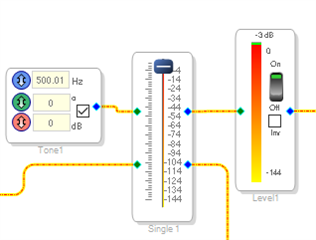
The internal oscillator blocks produce a 1.24 full scale signal. The internal meters will read this as -3dB due to the RMS value. This is shown in this screenshot. The level control is at 0dB
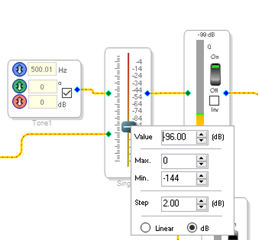
On this next screenshot I set the level control to -96 and the meter reads -99dB as expected.
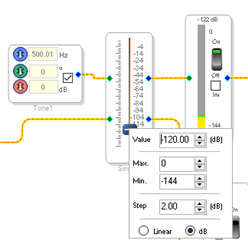
Now I set the level control to -120 and the meter reads -122. This is the accuracy of the meter most likely but could also be a little from the volume control as well. Here is the screenshot. It really should read -123dB.
So inside the DSP the signal resolution is not limited. So I suspect it is something with the signal coming into the DSP or some processing that is happening inside the DSP is creating some residual noise. I would have to look closely at your program.
Dave T
Dear David,
Thank you for the support.
We have used 24 bit Mono stream for checking the above mentioned observations.
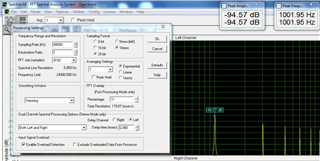
We have checked SPDIF input and SPDIF output. SPDIF output is checked by recording in sound card( by Spectra Lab Tool)
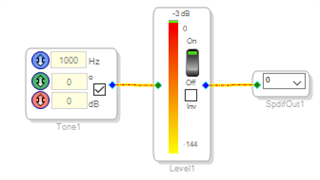
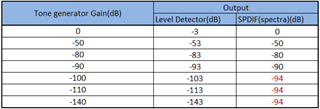
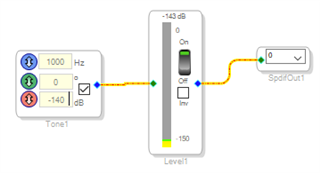
We have checked the observations shared above by using Level detector ,Sine Tone generator and SPDIF output.Kindly find the observations as below
Output is as expected in Level Detector but output is not as expected in SPDIF output.
Tone generator => Level Detector => SPDIF output
Observations:
Output is as expected in Level Detector but output is not as expected in SPDIF output for the input levels below -90dB
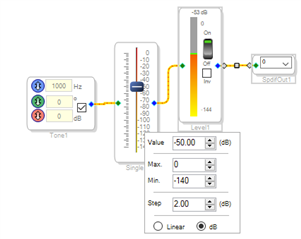
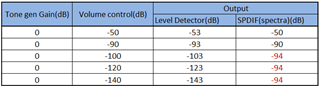
Tone Generator => Volume control => Level Detector => SPDIF Output.
Observations:
Output is as expected in Level Detector but output is not as expected in SPDIF output for the input levels below -90dB set in volume control
Kindly let us know feedback on this.
Kind Regards,
Sivaramakrishna.
Hello Sivaramakrishna,
Thanks for the very well written post with lots of detail. It is so helpful. It looks like you have something truncating down to 16 bits of data size. Perhaps with some dither so you are not exactly getting -96dB.
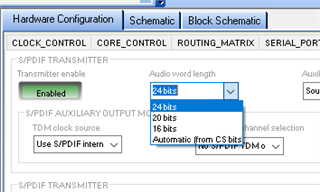
There are two places this can happen. You can have the SPDIF transmitter set to 16 bits. It is not the default setting so I doubt this is it but check it.
Go to the hardware register controls and select the SPDIF_TX tab. Then be certain it is set for 24 bits.
In my testing I was using the Audio Precision where I could see the level and was able to change the bits. I set the SigmaStudio level control to -120 and I was reading -119.85dB at the digital input to the AP. When I change the register setting to be 16 bits I read -96dB into the AP.
When I change the AP to be 16 bits then I read -96dB so either one will produce the same results. If you are using the standard Windows driver I wonder if it is only 16 bits? So check the setting of the sound card and the software.
Thanks,
Dave T
Dear David,
Thank you for the support.
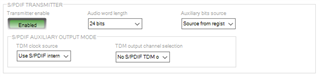
We have checked SPDIF transmitter in SPDIF_TX tab ,Audio word length is set to 24bit.
We have also checked setting of the sound card and the software word length is set to 24bit.
Still output is observed -94dB in SPDIF output ,when we generate the signal with gain of -140dB as an input
Kindly let us know feedback on this.
--
Kind Regards,
Sivaramakrishna.
Hello Sivramakrishna,
I know that if you have the register set to 24 bits then it is sending out all 24 bits. There is nothing with the SigmaDSP that would truncate down to 16 bits with the program you are showing. So the problem will be in the receiving end. Something in the Windows environment that is truncating down to 16 bits. You have checked the sound card application but is the analysis software set to 16bits? I am not an expert on the Windows environment to know where else to look?
All I can say is that the SPDIF going out is 24 bits and I verified that with the Audio Precision. The thing with SPDIF is that the original standard was 16 bits and there was an auxiliary 8-bit audio channel for a different audio signal. It did not take long for people to use these bits as part of the main audio data to expand it to 24 bits. So it is easy for system software written by non-audio programmers to simply make it 16 bit.
So I am afraid I cannot help you further with this. I know that the SigmaDSP is putting out 24 bits onto the SPDIF when it is leaving our part. Unfortunately, with all the CRCC encoding and the bi-phase mark encoding it is not easy to see a screenshot from a scope showing all 24 bits. The Audio Precision is the gold standard so I trust the readings.
Dave T
Please log in to reply.