ADAU1467 filter parameter change using PC GUI
Hi ADi's
One of my customer is developing a product using ADAU1467.
Currently, it is being evaluated using SigmaStudio and it is working as desired.
but now she needs to move the concept to a consumer product.
Now I have 2 questions
1. Customers want to change the filter settings in real-time as they do in SigmaStudio using PC GUI.
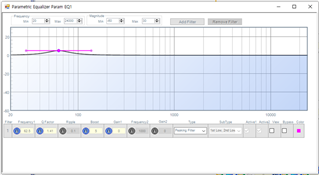
For example, when setting EQ in SigmaStudio, She wants to implement a GUI as shown in the figure below that pops up on a PC.
The filter function currently required is
: Multiband RMS compressor
: Auto-EQ Filter Designer Auto EQ
: Parametric Equalizer Param EQ
There are three like this.
How can I control these filters from outside with PC GUI? without SigmaStudio
How can I check the API or filter design data of the UI configured in SigmaStudio?
2. I want to use Running Average [Single Level Detector] and Direct Read [Single Level Detector W Numerical Display],
Even if I click the On / Off button, no data is displayed in the Capture.
Also, even if I click on all editable "Audio Signal Router", the data does not appear in Capture. How can I do it?
How can I check the registry address and data?
Thank you in advance
Audio Signal Processors
adau1467
SigmaDSP Audio Processors
Hello Andrew,
I will start with question 2:
The meter data is read from the DSP every 10ms. SigmaStudio suppresses these messages because it would swamp and overwhelm the capture window instantly.
I have a document here which explains a about how some of the meters work and the document also is about the compressors.
Other questions can be answered on the forum. The ADAU1467 core and software is functionally equivalent to the ADAU1452 which we also call the Sigma300. The ADAU1467 is the Sigma350. You will see these mentioned on the forum in places.
The meters on most of the SigmaDSPs will work in a similar way with the exception of the ADAU1701/1401. So search the forum, there is a lot of information here.
Question 1:
SigmaStudio takes the information from the curve and uses it to calculate the filter coefficients and download it to the DSP. The programmers used different graphical tools that are most likely part of the programming environment they use to display the graphs. So that is not simple for me to describe here. What ever software the customer is using should have graphing objects. What is derived from the graphs are the center frequency and/or the cutoff frequencies, any gain applied and the order (slope) of the curve. Then that is used in the filter calculations. Here are most of the formulas used:
General Filters [Analog Devices Wiki]
There are MANY posts about how the filters are calculated and translated to the fix point number system on the forum.
I do want to mention that there are a few filter objects in the library for these Sigma300/350 parts that calculate their own filter equations. They do not have a graphical interface, only parameters to enter.
The details of what filter, and the user application of the filters, will guide the choice of which filter block to choose and then how it will be controlled. So I cannot go into too much detail here because there are so many options to choose from.
Dave T
Hello. Dave Thib
I am a hardware engineer and project leader.
Because of my lack of English skills, I got help from the translator.
Help me,
The current situation is
1. I am developing a pro audio product by applying ADAU1467.
2. I used SigmaStudio 4.5 and EVAL-ADAU1467Z to check and modify the SigmaStudio schematic.
3. Progressed my development board.
I connected the MCU to the ADAU1467 by I2C, and checked the SigmaStudio schematic to make sure the export is working properly.
4. It connects to the PC via a network (Ethernet), and everything needs to be displayed and controlled in real time from the PC program.
5. "Level Detector w Numerical Display" has been applied to the schematic, so you need to check the audio level in real time in a PC program.
I need to read data every 10ms like sigmastudio and send it over the network.
6. I couldn't find a way to read the data every 10ms in the PDF material attached above, I looked hard at ADI EngineerZone, but the answers were three.
( "This question has been assumed as answered either offline via email or with a multi-part answer. This question has now been closed out.
If you have an inquiry related to this topic please post a new question in the applicable product forum. Thank you, EZ Admin"
or "This question has been closed by the EZ team and is assumed answered" or "Page Not Found. EngineerZone has recently moved. If your bookmark brought you here, please visit https:ez.analog.com to search for your product support forum or content and re-bookmark the location.")
Help me,
It may be something I couldn't find.
Please tell me how the MCU reads every 10ms like sigmaStudio.
Thank you in advance.
Please log in to reply.