ADAU1452 - Working at fixed sample rate
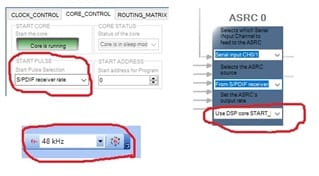
Hi, I'm using custom ADAU1452 board only for S/PDIF audio processing. In SigmaStudio, "START PULSE" is set to "S/PDIF receiver rate". ASRC0 output rate is set to "Use DSP core START_PULSE rate". For these settings, audio is coming out from the spdif output. I don't have any idea on how to determine the correct sample rate option (FS on top) in SigmaStudio. Setting it to 192KHz will make frequency response of the filters invalid. Setting it to 48KHz or 44.1KHz will make sound ok for ears. So, how to configure ADAU1452 to receive any sample rate from S/PDIF input and process/output at fixed sample rate?
Project.zip
Audio Signal Processors
adau1452
spdif
sample rate
SigmaDSP Audio Processors
Hello Hasaranga,
This is a bit of a complicated question that depends on what you need to do in your application. You will have to work around some issues or it can be simple depending on what you need to do.
First, As you most likely know, the drop down box for choosing fs in SigmaStudio is used only for calculating filter coefficients or for other blocks that need to know time since fs is the only way to measure time in the DSP. This would be things like oscillators and attack and release times on compressor/limiters.
For the filters. Sometimes this is not a problem but sometimes it is.
Examples,
If you want to filter out out of band signals that may be produced from a non-linear cell like a clipper, then you would want a low pass filter that has a corner frequency a little under the Nyquist. Like 22kHz when using 48kHz fs. In this case the corner frequency is ~0.92 x fs. Filter coefficients are calculated based on fs so the corner frequencies will move with the fs. So if you take that same filter you designed for 48kHz fs with a corner frequency of 22kHz, and run this filter at 192kHz, then the corner frequency will now be 192kHx x 0.92 = around 176kHz. It will accomplish what you designed the original filter for.
For the second example if you design a filter to get rid of sibilance in a voice signal you might design a filter to lower 5-7kHz range of frequencies. Now in this case if you take this filter designed for 48klHz and run it at 192kHz now the filter will be at 20-28kHz and clearly will not work as designed. In this case you need to either change the filter coefficients or change to a different filter that is setup for 192kHz.
So you can design the DSP program to adjust for these differences but it is a little tricky. What is an issue is with oscillators and compressors and anything else that uses the sample rate for timing.
So solutions?
You can devise a program to monitor the incoming sample rate by looking at the ratio of an ASRC. I have written a program that does that. Then you can switch between filters or change other things in the program.
The simplest thing to do is to use the ASRCs on the incoming SPDIF to translate the audio to the core rate and the core rate would be the one of the internal rates available in the DSP. The problem here is that there is no way to use an ASRC on the SPDIF output. It will follow the core start pulse setting. So the SPDIF output will always be at this core rate. This may be in issue in your system.
If you have a system processor then it can be simple to work around these issues. You actually do not have to run the SPDIF input through the ASRC into the core if all you are using is SPDIF. However, you can still setup one of the ASRCs to monitor the incoming rate and the system controller can read the ratio register. There are some more details.
Enough for now. This will start the conversation.
Dave T
Actually, I am trying to do a simple thing. Since the FS option(top) is a fixed value, I want to run the core at that rate. And the ASRC will convert any input rate into that core rate.
To accomplish that, I changed the core "START PULSE" into "Base_Fs (48 kHz for 48 kHz base sample rate)". After doing that I lost the expected frequency response(treble boost) from the General EQ in my project. The only option which gives correct response is "S/PDIF receiver rate". Why is that?
My Project.zip
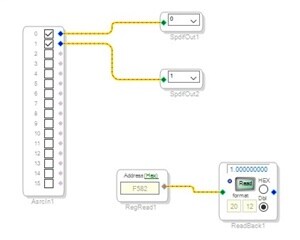
I also found these ASRC ratio values for the following START_PULSE options:
(ASRC0 output rate is set to "Use DSP core START_PULSE rate")
Ratio Option
0.918701172 - Base_Fs / 4 (12 kHz for 48 kHz base sample rate) - (nearly correct filter response)
0.459228516 - Base_Fs / 2 (24 kHz for 48 kHz base sample rate)
0.229492188 - Base_Fs (48 kHz for 48 kHz base sample rate)
0.114746094 - Base_Fs x 2 (96 kHz for 48 kHz base sample rate) - no audio
0.057373047 - Base_Fs x 4 (192 kHz for 48 kHz base sample rate) - no audio
5.511962891 - Base_Fs / 6 (8 kHz for 48 kHz base sample rate) - no audio
2.755859375 - Base_Fs / 3 (16 kHz for 48 kHz base sample rate) - no audio
1.377929688 - 2 x Base_Fs / 3 (32 kHz for 48 kHz base sample rate)
0.229492188 - Serial input 0 rate
0.229492188 - Serial input 1 rate - no audio
1.000000000 - S/PDIF receiver rate - (correct filter response)
Please log in to reply.