ADAU1452 sampling frequency
Hi,
I use an ADAU1452 to EQ a few subwoofers, and noticed the filters were not working properly (ie. PEQ was not affecting the signal in any way!)
I realized I was setting the sample rate only in sampling rate box on the top of the window in SigmaStudio, which it seems does not work to actually change the sampling frequency.
After reading some post and recommendations, I changed:
-. start pulse in the Core control tab, set to "Base_Fs".
-.serial port sampling rates, set as "FS"
The thing is that I can't change the ASRC output rate, and also don't know how to match it to the core rate (now is set to 2047).
I am using SPDIF input (48KHz sample rate), and internal DAC for analog RCA output. Schematic is set to 48KHz. I've uploaded some pictures of my hardware configuration.
Thanks in advance.
Audio Signal Processors
adau1452
spdif
sample rate
SigmaDSP Audio Processors
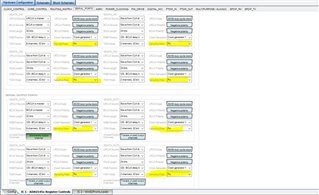
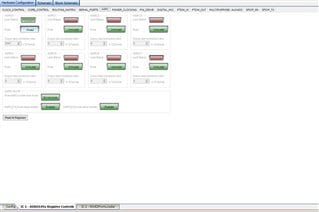
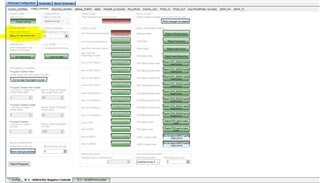
Hello mga2009,
The sample rate setting in SigmaStudio is for the compiler to use for DSP code that needs to know the sample rate. Things like EQs, Oscillators, compressors, timers, etc. The only source of time information in the DSP is the sample rate. So that setting sets up the code.
Then the code is downloaded into the DSP. The DSP's actual sample rate depends on the master clock rate and sometimes other external clocks coming into the DSP. SigmaStudio has no idea what these clocks actually are. So it is up to you to setup the PLL and many other registers to properly setup the internal clocking. If the sample rate is wrong then the code will not function as you expect. The EQ curves will be at the wrong frequency, oscillators will be at the wrong frequency etc.
mga2009 said:
. start pulse in the Core control tab, set to "Base_Fs".
The Start pulse register is the most important setting for what the sample rate of the DSP core is. Keep in mind that you have different "blocks" in the DSP that all can run at different rates. The core has its setting, the Start Pulse, the serial ports have their setting for serial input and output. then the ASRCs as you pointed out also have its settings.
The ASRCs are setup to match the input rate to the output rate it is connected to. So the input rate will be set when you select where it is getting its data. The clock for that data will always automatically be connected to the ASRC input. The output rate you setup on the Routing Matrix page in SigmaStudio.
I wanted to paste in a picture but something is wrong with the web page at the moment and I cannot insert a picture. Look at the Routing Matrix page in the register controls.
The ASRC output rate can be set to one of several core rates or can be setup to a serial output port rate. The best one to use if you are routing data to the core is the Start Pulse rate for the core so it will follow the core rate. If you are using the ASRC for data from the core going out of the DSP then you set it to the correct serial output port.
Dave T
Dave, thanks for your reply.
I have set start pulse properly, serial ports to FS and ASRC0 in routing _matrix to "use DSP START CORE pulse" and still my filters are not working properly. With each change I measure my subwoofer and the frequency its not changing, even when setting a lowpass of 20hz.
What am I doing wrong?
I've read Register Control modifications are uploaded instantly to the DSP if there is USB device programming device pluged, which I have, so I assume all changes are made to the board.
Hello mga2009,
When you say the EQ is not changing I have to understand what you are doing and what EQ block you are using.
Please zip up your project and attach it to the post.
Dave T
Here is my project.
By EQ I mean a low pass filter. Every time I made a modification I tested with REW no see if they were any changes in the frequency, and there were none...
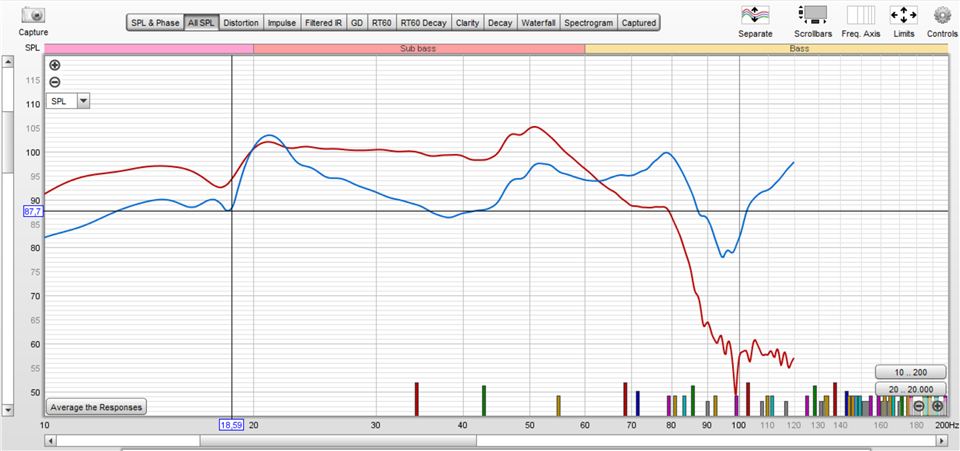
Also, I tested the same filters with an ADAU1701 board I have and they work correctly, low pass, PEQ, all work correctly. Here is a comparison of the same lowpass filter, red is ADAU1701 and blue is ADAU 1452 (please dont consider EQ below 70hz and amplitude difference)
The project is downloaded correctly to my ADAU1452 board, and I can program it without any issue, but the EQ a filter blocks wont work correctly. I can only assume it is related to the sample rate in the hardware configuration in the register control.
I don't recall correctly, but I am almost certain that this problem happens only when using SPDIF input. When using the standard ADC input, everything works correctly.
Best Regards.
SS schematic.zip
Hello mga2009,
This took a bit of effort to find. As you know there are a lot of registers to look at.
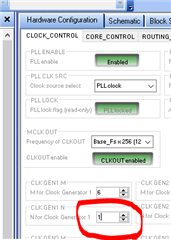
What helped me find this quickly was to put a scope on the LRCLK output and I found that the serial output port was running at 192kHz. Clearly you had it set to the internal clock generator set to the 48kHz setting. But this is not the only place to actually set the frequency of the clocks. The output of clock generator 1 has several outputs that are all divided down. We placed frequencies on the labels with the assumption that the clock generator was set to the nominal defaults. In your case it was not. You have the "N" of the N/M of clock generator 1 set to 4 instead of 1. So instead of getting 48kHz you were getting 192kHz for the LRCLK.
This would cause lots of issues once of which is that the part cannot do TDM8 at that frequency.
So I think you should be good at this point. Change it here:
It somehow was changed at some point.
A couple of other comments about your project.
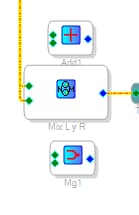
The small two channel mixer you are using to sum the two channel outputs uses more MIPS than needed. All you need to do is either use a Signal Adder or use the Signal Merger. The Add function is in the arithmetic part of the library and it just adds the two samples. So there will be a 6dB boost if they are correlated. The Signal Merger is located in the Mixer section , single control, No Slew. It will add the two signals then reduce the level by 6dB. Your choice as to what to use.
See if this takes care of your issues.
Thanks,
Dave T
Dave,
As always you have been enormously helpful. Thank you very much.
I will try this as soon as I get home.
Oh, and just to check If I understood correctly... the CLK GEN1 N (N for Clock Generator) is related to the "Clock Generator" in each of the "Serial Output Ports" in the "Serial_Ports" tab > SDATA_OUT0 > Clock Generator sliding menu, correct?
If I want to change the sample rate, again to 192KHz I should change it everywhere (start pulse and serial_ports tab > SDATA_OUT0 > sampling rate)?
Also, thanks again for the tips on the channel mixer!
Yes, if you look carefully you will see it says "Clock Generator 1". You can also choose 2 or 3.
I forgot to paste in the screenshot about the mixer I mentioned. Here it is. It shows the other two block I mentioned as options for the simple 2 channel mixer.
Dave T
Thanks again!
Please log in to reply.