Aux ADC controlled mux
Hi all,
the attached file is a project for an frequency generator with i2s output, to test i2s dac's.
The frequencies should be fixed values e.g. 10, 20, 50, 100... Hz
and the signal -90, -80, -70db ... selected by two aux adc's.
For the frequency i use a rotary switch with 12 poles, between ground and +3v3 and
270 ohm resistors between each pole - 11 in total giving 2k92.
The question: the multiplexer does not switch to every index, so f.e. it switches from 200Hz
to 1kHz and skips the 500Hz.
So what do i wrong ?
Kind regards
MichaelI2S_Frequenzgenerator.rar
Hello Michael,
First of all, thanks for uploading your project -- it's so much easier to help when seeing exactly what you have instead of guessing. And after modifying your project to run on my ADAU1701MINIZ board, it ran fine with a potentiometer at the Aux ADC3 input. So the issue lies with aligning the discrete voltages provided by your rotary switch with another set of discrete levels -- those of the integer multiplication driving the MUX selection.
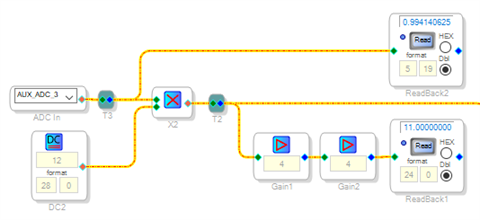
The best way to troubleshoot any issue involving integer selection (as with lookup tables, MUXes, and index filters) is to add Readback blocks to your design as shown below:
ReadBack2 lets you see the Aux ADC output. ReadBack 1 monitors the integer result after multiplication. Because the ADAU1701's readback register truncates the last four bits, you need to multiply by 16 to recover these -- and since the ADAU1701 stops at 15.999, we multiply by 4 twice instead. We'll soon see how useful these readbacks can be.
The -1701's Aux ADCs are eight-bit, thus at full-scale voltage input they output 255/256 = 0.996. When we multiply this by 11, the number of steps in your switch, the result in floating point is 10.96. The integer multiplication we need here, however, always rounds down so with a multiplier of eleven, the maximum integer to the MUX is 10 and thus you lose your highest setting. The usual way to fix this is to increase the integer DC source by one, as you have done. This works quite well with a potentiometer input. But in this application with discrete switch-selected levels, it's getting you in trouble. Toward the high end of your selector range, the levels going to the multiplier are just below the next integer -- so that a small error in the divider can flip to the next one. You can see this effect by rotating your switch while checking the Readback at each position.
Try this fix: Use 11 for your integer multiplier. Then between the Aux ADC and the multiply block, place a Signal Add block and sum in the amount: 1 / (11*2) = 0.045 This offsets each switch level by half the way to the next level -- placing them right in the middle of the range between steps. Doing this reduces the effect of any inaccuracy in your divider upon the selection.
With 12 switch positions and 11 steps, the space between steps is about 9%. It would be best to use 1% resistors in the switch divider, since 5% resistors may use up a lot of the "slop" between steps. However with the suggested fix, 5% resistors may be good enough.
BTW, you could save some instructions by using a lookup table feeding a VCO instead of the oscillator bank and MUX -- though what you have works fine.
Best regards,
Bob
Hello Bob,
thank you for your fast response.
What you suggested works until index no. 9. Switching to 10kHz selects 15kHz, and 20kHz is never reached.
I always use 1% resistors and measured all of them i have soldered to the switches.
Unfortunately i don't have an evaluation board at hand, so ReadBack i can not use ?
And feeding a VCO instead will give me the same problems i actually have ?
Plus not knowing how to fill an LUT with fixed frequency values for the VCO.
Best regards
Michael
6266.I2S_Frequenzgenerator.rar
Hello Michael,
Well, now it works as far as Tone # 9, so we're making progress. If I understand correctly, the project skips from # 9 to # 11, then it sticks there and won't advance to #12. This suggests a possible solution, but first I'll answer your questions:
It's good you chose 1% resistors. The Aux ADC's 30K input impedance does load the divider slightly, introducing a -1.5% worst case error -- yet this isn't enough to cause the present issue.
If you have your board connected to SigmaStudio by a USBi or third-party equivalent, the Readbacks should work. If you're strictly self-booting, then as you suspected, you won't have access to them.
Yes, a lookup table driving a VCO has the same index input, thus won't fix this issue. It will save instructions which may prove helpful later should you desire to add more features. The VCO formula is simple: A 1.0 decimal input results in frequency fs / 2. Thus, to get a frequency f at the sample rate fs, input V is: V = 2*f / fs. For example, a 1 kHz tone results when V = 2000 / 48000 = 0.041667.
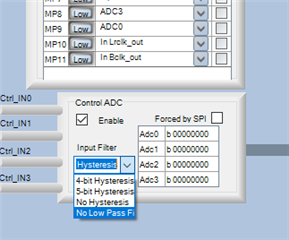
The Aux ADCs by default include a 5-bit hysteresis in their characteristic, which again is more useful with potentiometers than with a discrete input. We can disable this by selection in the Register Settings window:
The No Low Pass F option disables the hysteresis and includes the lowpass filter (the choices are labeled incorrectly). For an explanation of these options and the way they affect a varying input, see this thread:
https://ez.analog.com/dsp/sigmadsp/f/q-a/65706/adau1702-hysteresis-settings
So, see if disabling the hysteresis affords proper operation. If this doesn't help, it will take some more digging.
If you can't use the Readbacks yet do have a scope or frequency counter, you could wire a VCO to the Aux ADC output, feed the VCO output to a DAC and measure the output frequency This would allow you to see the Aux ADC reading for each switch position, which may suggest where the issue lies and how to work around it. Or, perhaps you could connect your multimeter to the Aux ADC input, measure the voltage for each switch position, and post the results. I could then see how my board responds to the same inputs.
Best regards,
Bob
Hello Bob,
i tried this and it did not work.
I will stop with this solution and add an small µC as interface between the switches and the dsp.
With that it will also be possible to use the VCO solution.
Thanks for your help, easy to understand and always helpful.
Kind regards
Michael
Please log in to reply.