Sport config in 21571
Hi,
When I use sport in 21571 to communicate with ADAU1452 or other DSPs, some problems about clk and data config confused me.
In TDM16 mode, I use 21571 to send datas to 1452, my config is below
adi_sport_ConfigData(hSport3B, ADI_SPORT_DTYPE_SIGN_FILL, 31u, false, false, false);
adi_sport_ConfigClock(hSport3B, 0u, false, true, false);
adi_sport_ConfigFrameSync(hSport3B, 0u, true, false, true, true, false, false);
adi_sport_ConfigMC(hSport3B, 1u, 15, 0u, false);
As my understand, I think this config sport to I2S , LRCLK negative , BCLK negative.
So I config 1452 SDATA_IN to TDM16, I2S , LRCLK negative , BCLK negative. Then in my test I can receive correct audio in 1452.
But when I use 1452 to send datas to 21571, remain the config in 21571. If I still use the same config in 1452, the audio receive in 21571 will become noise. In my test, I must change the BCLK in 1452 to positive, then I can get correct audio. I don't know why the config in 21571 and 1452 need to be different., if I was wrong before what's the correct config ?
Another problem is if I config in TDM8, is it same to TDM16?
Audio Signal Processors
adau1452
SigmaDSP Audio Processors
21571
sport
Moved to appropriate community
Hello Foster,
Santha moved this over to the SigmaDSP part of the forum because of your mention of the ADAU1452. I do not think the issue has to do with the 1452. but I can help out some.
Can you describe what devices are the clock master and which one is the clock slave? This is important for both the serial port inputs and output of the ADAU1452. Supplying the SigmaStudio project file would be handy to see how it is setup.
What is the sample rate you are using?
Now making an assumption that you are operating at 48kHz fs and you mentioned TDM16. The frequencies of the data and bit clock are rather high and so PCB design, layout and transmission line design become important. So PCB layout and design may be part of this issue.
I will wait until I hear back before going further.
Dave T
Hello Dave,
I agree it's not the issue of 1452, I think it's 21571 or the PCB problem, since I'm new to SHARC, so I can't make sure where make the problem.
I have tested when I use a1452 to send to another 1452, whatever config I set in sigmastudio of SDout, the same set copy to the SDin of another 1452, it works well. However in 21571, the config is diffrent. Recently I read the hardware refference of 21571, I find that 21571 samples half bit later than the drive signal ,maybe this is why I need to change the polarity of BCLK.
The config is not really the problem confuse me, since I can get the right datas now changing BCLK. What trouble me is that my system is not stable. If I use 21571 as master in TDM8, datas are from 1452 to 21571, noise occur everytime. So I change to 1452 as clock master, then it is good most time, but noise still occur sometimes.
Do you have some suggestions on how to locate my problem?
Hello Foster.
You still did not answer my question of who is the master. So I will explain why I was asking. I was trying to avoid explaining all this if it was not needed.
In a transmission line to transmit the data it comes down to the timing of the bitclock and the data.
It is correct that the transmitting device will change the data on the start of the bit and the receiving device should sample half a bit clock later. So if the bit starts with the bitclock falling then the receiving device will sample on the rising edge. This gives time for the sending device to change the output to the level of the new bit. Then it does take time for this new level to travel down the PCB trace to get to the receiving device. Just like if I were to toss a tennis ball to you from across the room and you clasp your hand at exactly the same time I release the ball you will miss it every time. You wait for it to arrive.
This is the timing margin. Now there is another wrinkle in this. By far the best way to get the most timing margin is to have the device that is sending the data be the device that it driving the bit clock and frame (LRCLK) clock.
If the sending device is a clock slave then the bitclock is coming from the receiving device. So the receiver changes the bitclock level. This change has to travel down the PCB trace to get to the sending device. Then the sending device has to recognize this clock edge and then internally signal the data driver to change to the next bit and send that out. Then the new data bit has to travel back to the receiving device. The turn around time inside a device as a slave is a long time. Look at table 9 in the newest rev in the ADAU1452 datasheet. Look at the tSODS specification. In this newest revision I went through a lot of trouble to detail this specification at different drive settings. Because the 35ns is too slow for high rates of bit clock.
So if you are running the serial output port as a slave then the data is probably arriving too late and missing the timing of half the bit clock rate. At a bit clock rate of 12.288MHz you have ~40ns for the data to get there. That is most likely on the edge but if you are using a 24MHz bit clock then it WILL be too late. The ADAU1452 drive strength setting will help but the clock drive strength also needs to be increased. If you operate as a master this tSODS specification does not apply.
Then there is the PCB issues. Long lengths of clock lines can be a problem but if the termination of the transmission lines is poor then there will be reflections that will cause errors as well.
So look at drive strengths, who is the clock master and your PCB layout and you should be able to solve this issue.
Dave T
Hello Dave,
Thank you for explaining to me in detail. No one talked about this issues with me before, it helps me a lot.
In part of my system, 1452 send datas to 21571, both TDM16 and TDM8 is used. In TDM16 mode, master clock is another chip out of 1452 and 21571, 1452 send datas in BCLK rising edge and 21571 receive in falling edge. In TDM8 mode , 1452 is clock master, I set the same config, noise comes sometimes.
I have used 1452 for a long time , in my projects ago, it's 1452 send to another 1452, I always set the same falling edge of BCLK in both 1452s, there is no problem before. But now after you explained, it means I was wrong before, I need to set the Tx 1452 as master and SDATA_OUT BCLK negative which means sending datas in falling edge of BCLK . Then make the Rx 1452 as slave and SDATA_IN BCLK positive which means receive datas in rising edge. Is my understanding ture?
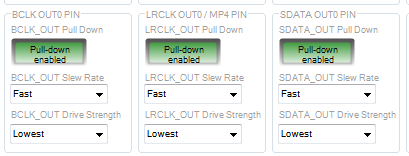
As you said, set 1452 drive strength can help, I use the default config as the picture shows.
There are BCLK, LRCLK, SDATA pins, do I need to set all three pins? Besides strength , if the setting of pull-down and slew rate will help too?
If I add a drive chip in my PCB, is it better than config in 1452?
In my PCB, between 1452 SDATA_OUT pin and 21571 DAI pin ,there is a 100 ohm resister, will it make data transfer slower?
Hello Foster,
We have to keep different subject separated.
1) Master clock. This is its own subject and it seems like you have that setup correctly by having one master clock for all the parts.
2) Serial input port clocks. These are the bit clock and LRCLK ( sometimes called Frame Clock ) So which device is the master?
3) Serial output port clocks. Again the bit clock and LRCLK and which device is the master?
The bit clock rate is what is important here. This will be a combination of the sample rate, the number of channels and the number of bits in each channel slot. When this clock is at 12.288MHz then signal integrity becomes important but if this bit clock is 24MHz then signal integrity becomes vitally important.
The 100 ohm resistor will be slowing down the edges a lot. Usually this resistor is somewhere in the 10 to 33 ohms. The correct value should be determined using signal integrity simulation software. The software uses IBIS models and the exact details of the PCB layout to simulate what the transmission line will do with the clock signals.
The pull-down resistors will not help in this case but the lowest drive strength setting is very slow so you should set these to high. Keep in mind this only applies to pins that are masters and are driving a signal.
Leave the slew rate set to the default.
In your PCB you should be treating the BCLK, LRCLK and SDATA lines the same. If you have a damping resistor you need them on all three. The timing of the edges need to be kept the same.
Now the discussion about the data change edge and the data receive edge of the bit clock. The ADAU1452 hides this detail to keep the settings simple. When you set the serial input port to bit clock falling edge you are actually sampling on the rising edge. The thinking is to set the data change edge of the signal, tell the part what is the format. So looking at the data format of the connection the data is changing on the falling edge and being sampled on the rising edge. So set it for that format. The 1452 will know that for that format it needs to sample on the rising edge on the input side and change the data on the falling edge on the output side. On the SHARC you have to set it yourself so you will see a different setup for an output verses an input. One the ADAU1452 you will set both input and output ports to the same settings and the part will know what to do.
Do not add a chip on the clock and data lines unless you need to drive many inputs and over a long distance. Adding a part will only add latency.
Dave T
Hello Dave,
Thank you for reply!
I use a 24.576MHz crystal as MCLK which connect to all chips XTALIN pin. I have some other questions which confused me a long time.
1) If the same MCLK input is needed with multiple chips. For example, one 1452 use 12.288MHz MCLK and another 1452 use 24.576MHz MCLK, can the two 1452 transfer datas normally?
2) I use the same one LRCLK and BCLK to drive many serial input ports and many serial output ports from diffrent chips, I wonder if there are some rules to make sure which device as clock master?
3) About the early frame and late frame in some other chips, does early frame mean I2S format and late frame mean left justify format? When LRCLK use 50% duty type rather than pulse, is it the same format?
Hello Foster,
1)
Yes, they can transfer data but there are some details. First, the difference in frequency is not a problem because the PLL pre dividers will adjust so that internally they are both running at the same system clock frequency.
But, even if they both have the same crystal frequency there is no way the two crystals will be exactly the same. So either you fully slave one of the DSPs from the serial port of the other. This would include the core clock. Or or need to use an ASRC. This is a big subject and this is a short answer. There are many ways to solve it.
2) Which is a master and what is a slave is often just about what makes the system simpler or what part has the most stable and lower jitter clocks. If high sample rates are used or TDM16 at 48kHz the bit clock frequency can often be high at 24.576KHz. This can cause issue with timing margins. In those cases it is best to have the device that is sending the data be the master. This gives the greatest timing margin. If you are just using I2S then it is usually not an issue.
3) We call it left justified, or delayed by one bitclock period. Those are very popular formats. There are some parts that need to be right justified so then the data is delayed by 8 bits if the slot size is 32 bits and the data size is 24 bits.
50% verses pulse is not quite the same. Some parts look at the mid-frame transition and do not. So you really need to setup the parts with the same format. Some parts want the pulse to be longer than one bit clock but we cannot do that format. Fortunately it is uncommon. Our parts are programmed to just need it to be at least one bit clock but it could be longer.
All of these topics can be a long discussion. It is best to workout a block diagram for your system and see what the formats are and what is needed. Then work out who is master and who is slave and many other details.
Dave T
Please log in to reply.