Checking SIgmastudio Design / question about timing function
Hello,
I'm building a new DSP designewith an ADAU1701 processor. At this point i'm going to write the program flow with Sigmastudio. For testing purposes i use an ADAU1701 learning board first.
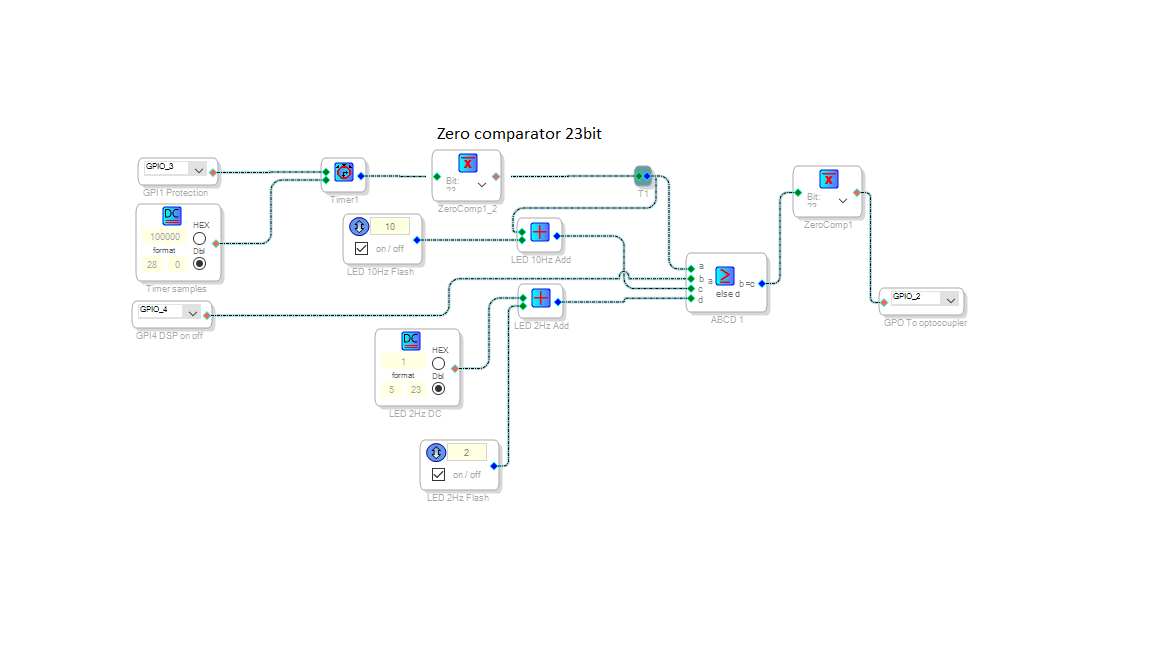
I created this flow:
This is going to use for a status led. It works great, but i was wondering if there are ways to make it easier? And when i powered up this circuit the time immidiatly started to work. Is there a way to prevent this? I only want to start the timer when GPIO3 is getting low. Thank you!
Audio Signal Processors
SigmaDSP Audio Processors
adau1701
Hello Audiodude,
It looks like you need to invert the GPIO going to your Timer input so the timer runs when the GP input goes low. You could add a Zero Comparator at the timer input -- yet here's an easier way: Go to the HW Configuration tab atop the schematic, then the IC1 - 170x/140x Register Control tab below. Click the Invert box for the MP pin connected to the timer (I used different MP numbers since my learning board is wired differently than yours):
Your schematic's logic is quite sound and shows a good understanding of how the blocks work. Perhaps others would like to offer suggestions to simplify it so we could get a discussion going.
Best regards,
Bob

Hello Bob, first of all, thank you for helping me out! I have tried what you suggest, but it make no difference. After studying my own flow, i concluded that it works just fine, the timer did start at the right time, and before that time the ab/cd comparator flashes the other LED channel. I can make an adjustment into the hardware so it's not a problem.
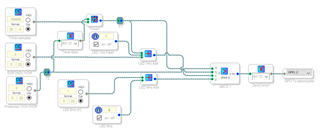
I have tried to make the circuit easier. See the result:
I have replaced the GPIO inputs by DC generators, for testing purposes. The last ZeroComparator (before the optocoupler output) is only needed for my testing board. The test LED has connected to Vcc. On the final board it drives an optocoupler that is connected to VSS.
Just another question: is it possible to create an auto ramping for the audio signal pad? An auto ramp is an automatic gain control. When powered up, it raises the signal slowly to the maximum gain so the connected amplifier cannot blow instantly connected speakers. If so, how can i do this?
Thank you!
Hello,
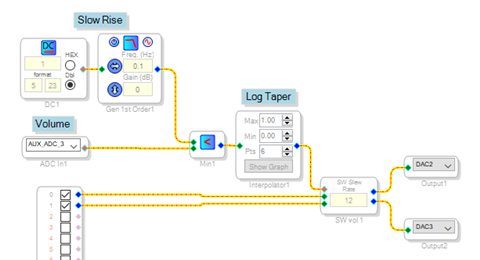
There's a number of ways to provide a fade-in. One is shown below:
The Aux ADC provides a 0 -- 1 decimal signal according to the position of an external potentiometer, for your volume control. The DC Source and 0.1 Hz filter produces an output beginning at zero upon power-up, slowly rising to 1.0. The Min block selects the lower of the volume control and the rising limit. The Linear Interpolator implements a "audio taper" control -- otherwise, most of the potentiometer's perceived action is at the first quarter of rotation. I attached the circuit, your ins and outs may differ according to your hardware.
It may also be necessary to have a delayed GPIO enable your power amplifier.
Best regards,
Bob
P-on-Fade.zip
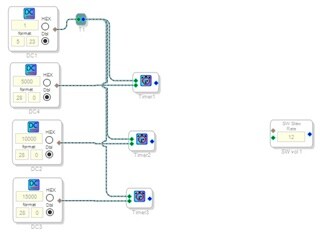
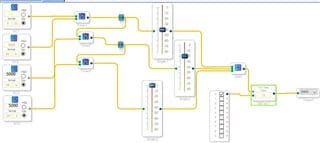
Thanks again Bob! I'm going to try this tomorrow. I shall let you know if it works. And for another way: Is it possible to use the "single slew ext vol" (or maybe another) volume control with an set of timers? Something like this:
Is it possible that timer 1 switch the volume control open for let me say 25%, timer 2 for 50%, timer 3 for 75% and timer 4 for 100%? Just to experimenting with this function and maybe for future functions. Thank you!
Edit: Something like this:
Can this work? At this time i havent prepared the audio connections on my DSP board, so i cannot test this i purpose. Thank you for helping me out!
Hello,
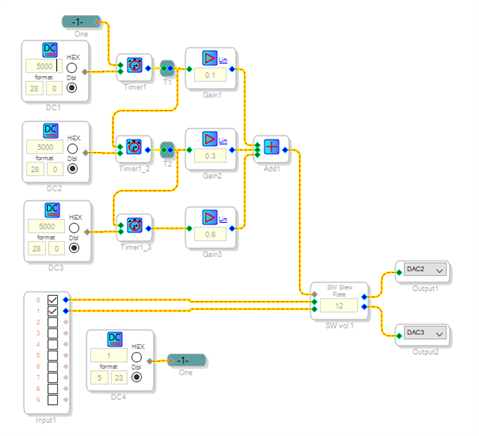
Your idea works! The sequential triggered timers are quite neat.
I substituted Linear Gain blocks for the sliders since these are more compact, also it's easier to add up linear gains to 1.0 (they add directly) compared to having dB gains sum to 0 dB (dB's add when cascaded, not when summed with an adder).
Best regards,
Bob
Hello Bob, thank you for helping me out. This morning i test all of our posted flows, and the autoramp works very nice! The gain blocks are a better way than my sliders. Sigmastudio is a very nice program! I have tested several things, but the possibilities are endless! Very nice! I only use 2 outputs of the DSP and needed a full differential (balanced) output. It's possible to invert the not 2 used outputs, so i have an fully balanced output without extra hardware! Very very nice! The next step is to add some AD converters. I will let you know when its ready!
Please log in to reply.