Audio signal roaming in Sigma Studio
Hello everyone,
I'm new to sigma studio and DSP, and I am using an ADAU 1701.
I'm building a loudspeaker with ADAU 1701 embed for DSP, and I want the user to be able to switch through three different profiles. Each profiles has their own equalizer. The switch is performed using an arduino ESP 32 communicating with the ADAU 1701 by I2C.
Here is my question : How could I do it? I can't find a function which allow to roam the signal in different EQ depending on which profile is selected.
The ideal solution would be a button with 3 different choice (because we have 3 profiles) {0, 1, 2} , and depending the choice, the signal is sent to different output pin.
I hope i'm clear enough, thank you
Elliot
Hello Elliot,
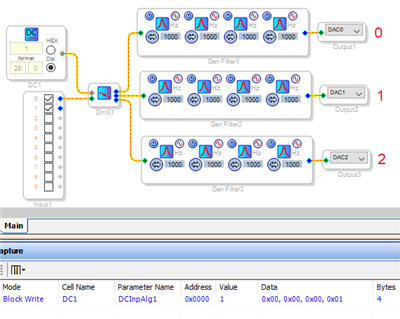
A Index-controlled Demultiplexer can route your signal to one of several paths, each with its own EQ and output. It has two outputs by default, you can add a third output by right-clicking and "growing" it. The DeMux selects the path according to the integer (in this case 0 - 2) at its red control pin. In the ADAU1701, integers are 28.0 format -- if you're unfamiliar with how numbers are defined in SigmaDSP, refer to this guide.
With GPIOs and the GPIO Conditioning blocks it's possible to wire pushbuttons directly to the -1701. You can instead have your uC control the DeMux path via I2C. The easiest way to do this is to place a DC Source in your project connected to the DeMux control pin as shown. Then Link-Compile-Download the project (with or without hardware connected). Change the DC Source value and observe the resulting entry in the Capture Window. This tells you the address in Parameter Memory which your uC needs to write to. In the example above, I changed the DC Source from zero to one, and the Capture Window shows a 1 written to address 0000. Use the Safeload writing method to avoid disrupting the DSP while it's running, which may cause audible pops. Safeloading is described on pages 30, 37 of the ADAU1701 Data Sheet as well as in many EZ posts. The mechanics of I2C writing depends upon the available functions in your uC's programming language.
Best regards,
Bob
Please log in to reply.