ADAU1467: SPI Interface, ESP32 + USBi
Hi All,
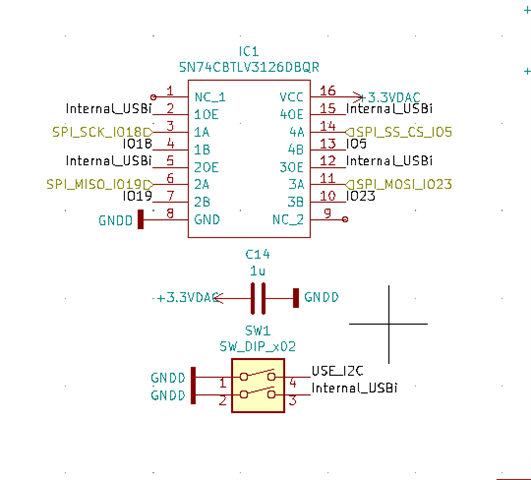
I want to have the ability to use both USBi and ESP32 on the same SPI lanes, so therefor i have directly connected ESP32 too ADAU1467, and the ADAU1467 is placed on a MediaWorks board, here the USBi interface is on the board. When i setup this i had issues using the USBi when writing to the board, it seemed fine when reading (removing ESP32 fixed the issue). So as a solution i though i could use a quadruple FET bus switch between ADAU1467 board and ESP32 and my issues where gone but that did not happen. Still same problems whenever writing to the unit, no mather which state the bus switch is placed at, by removing the bus switch the problems once again went away. Look at attached diagram, dont mind the I2C part, this is for controlling SPDIF interface from ESP32, nothing to do with adau1467. Any ideas on next step? I would like to maintain the ability to program through USBi while debugging, and programming through ESP32 when im finished.
Internal_USBi is pulled up by a 10k resistor.
Audio Signal Processors
adau1467
SigmaDSP Audio Processors
Hello,
First, let me rephrase the question to make sure I understand.
It looks like your goal is to flip a single DIP switch (on SW1) to deactivate the connection between ESP32 and ADAU1467; thereby removing any contention on the bus and allowing the USBi full access to the DSP control port.
This is a promising idea, but I think it is more complicated than you need. How about setting the ESP32 pins as inputs (Hi-Z) when using the standalone USBi? I have done similar things with other microcontrollers.
In your application logic, you could use the Internal_USBi signal (or something in your own UI) to change the mode from SPI Active to SPI Hi-Z.
If your PCB design is already finalized, we can look more into this FET switch, but I would need to know more about the rest of the board and its layout to help in debugging.
Regards,
Joshua
Hi cod3gen
Best way to do that is read saved configuration at SPIFFS if you can or using one PIN/GPIO of ESP32 to choose, no needs external ICs.
If ( digitalRead(GPIO) ) {
pinMode(SPI_PIN_CLOCK, INPUT);
pinMode(SPI_PIN_MOSI, INPUT);
pinMode(SPI_PIN_SELECT, INPUT);
} else {
pinMode(SPI_PIN_CLOCK, OUTPUT);
pinMode(SPI_PIN_MOSI, OUTPUT);
pinMode(SPI_PIN_SELECT, OUTPUT);
}
Note: Setting pinMode as INPUT will allow any other comunication over SPI BUS without problems, also MISO is always INPUT so no need change it.
I forgot to say, if your PCB design is not already finalized, you can use SELECT pin from USBi Interface connected to ESP32 GPIO, this will automaticly disable ESP32 SPI without any manual switch.
Additional info: Very automatic way! This will solve your problems too...
function WriteToDsp( address, data ) {
pinMode(SPI_PIN_CLOCK, OUTPUT);
pinMode(SPI_PIN_MOSI, OUTPUT);
pinMode(SPI_PIN_SELECT, OUTPUT);
digitalWrite( SPI_SELECTPIN, LOW );
SPI.transfer( data ); // read or write
digitalWrite( SPI_SELECTPIN, HIGH );
pinMode(SPI_PIN_CLOCK, INPUT);
pinMode(SPI_PIN_MOSI, INPUT);
pinMode(SPI_PIN_SELECT, INPUT)
}
Please log in to reply.