Change mux input based on last active input
My question is similar to this - https://ez.analog.com/dsp/sigmadsp/f/q-a/65902/auto-select-the-mux-input-with-signal-help
I have three inputs, A, B, and C. If any of the three inputs becomes active from being silent, a mux should switch to it.
In practice, this is what I am looking for: All inputs are silent. Audio input begins through A, the signal is detected, and a mux switches the input of the DSP to A. Input then appears on C, and the mux is switched to C. Input to A is paused for a few seconds, then played again, and the mux switches back to it. While both A and C are playing, audio appears on B, and the mux switches to input B.
To boil it down further because I have no idea if anything I am asking is making sense - I want a mux to switch to the input which has become active most recently. It does not matter if other inputs are active and have audio being input to them, if any input goes from nothing to something continuously for more than a few seconds, the mux should switch to that input. The end goal is a home theatre audio switch which automatically jumps to the most-recently-active audio source whenever anything starts playing on said source.
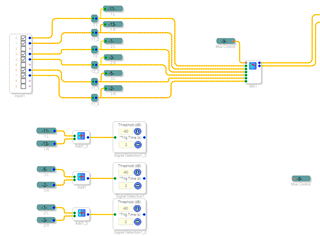
I've attached a screenshot of what I have so far but honestly I am completely stumped as to how to implement the switching/edge/latching logic.
I am extremely new to SigmaDSP programming and my board is still in the mail, please be gentle Thank you!!!!
Hello Audrey,
It looks like you've already got some of the programming figured out, and it is possible to build the desired selection logic. However, I'm a bit concerned about the available audio inputs.. Here's why: The 10-pin Input block shown suggests that the board you're waiting on is based upon the ADAU1701 DSP. With its two built-in A/D converters, this chip accepts one stereo analog input which then appears at pins 0 and 1 on the Input block. The other Input block pins have no converters, thus cannot receive analog inputs on their own. If your board includes A/D converter ("codec") chips for the other inputs, you can have additional analog inputs. Otherwise your board can only accept one stereo analog input.
The other Input block pins can accept I2S digital streaming inputs, yet this gets complicated if those are provided by external equipment. The ADAU1701 is not the best chip for this since it lacks ASRCs ("asynchronous sample rate converters") to synchronize the digital audio samples from these inputs.
If you provide a link to your board's Web page I'd be happy to determine if it's suitable for a three stereo input application.
Best regards,
Bob
Hi Bob,
Thank you for your reply! The input block usage there was completely arbitrary, and was for illustration purposes only. I should have made that clearer. I am using a JAB5 and APM2 from Wondom. I intend to use the one analog input and a number of i2s inputs and switch between them based on activity. The JAB5 is the best board I can find in this small-ish form factor and with integrated amplifiers - if you know of one with a higher end chip with ASRCs please let me know as I have been looking for one, and am trying to figure out how to handle high sample rate inputs.
I have made some progress! Here is my latching system, based on three pulsed inputs. This works perfectly as tested with switches. When "A Pulse", "B Pulse" or "C Pulse" is pulsed for a short amount of time, the LUT outputs 0,1,2 respectively, which is then fed to a mux for switching.
What I am now stuck on is the actual creation of the pulses. Based on an earlier response from you to another question here https://ez.analog.com/dsp/sigmadsp/f/q-a/66376/generate-a-single-pulse-with-adau1761-and-sigma-studio/252568 i have designed this! Unfortunately it does not work, and I am not sure why.
I would love input as to how to fix my pulse generator, but if you think there is a significantly better way to handle this switching, please let me know :)
Here is my test program for any ADAU1701 board, it uses no inputs or outputs, just internal audio for testing. Thanks
mux plz work.zip
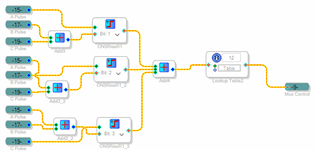
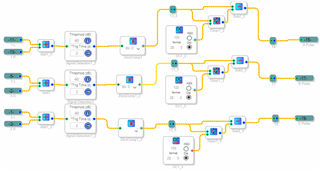
Hi Audrey,
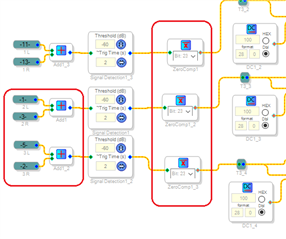
Your input select logic is quite efficient! And only two errors needed fixing to make it work. Both are shown below:
Inputs 2 and 3 were flopped so that each opened the other's input, allowing only Input 1 to work. And the Zero Comparators needed to be set for 5.23 number format to match the timer outputs -- to allow the subtraction to work.
Best regards,
Bob
Ahhh, number formats! I'm still having a hard time wrapping my brain around what exactly uses what format, and why, and what the different formats actually are.
Do you know if there is a more efficient/elegant/clean way to do what I have done with the lookup table and oneshot rise resets? It seems to work fine, but also seems a little bit hacky to me. I'm only using bits 1,2,3 (values 1,2,4), but need to have entries for value 3 as well as I can't remove entries in the LUT. Is using the oneshot rise resets to output their "1" in different bit positions ok / a good way to do it?
Hi Audrey,
If it works, it's a good way. The "one-shot rise" blocks are really latches -- they latch the input pulse ON until reset. Since your desired function is to keep a given channel ON until another channel goes live, their use makes sense here. You could replace the lookup table and MUX with individual Slew Volume Controls for each channel (and then setting all the One Shots to 5.23 format). I tried this and it works, but unfortunately I cannot presently attach the project or even provide a readable screenshot. This is a known forum bug which the EZ folks swatted back in March but I just ran into it again today -- please see this post for a description:
https://ez.analog.com/how-to-use-engineerzone/f/q-a/547703/limited-menu-showing-up-again
Best regards,
Bob
Hey Bob,
Your slew volume control idea solves another issue, clean switching between channels. "Index selectable slewing mux" seems to only exist in a mono format, so this might be the way to do it. Thanks The only issue with this (which may not be an issue at all) is about audio quality - do i lose anything by using a set of slew volume controls into a signal adder instead of a straight mux? We hear "digital volume control is bad" all the time, but at full volume after the slew is complete, is the data identical through both options?
Everything else seems to be working now! I am very grateful for your input, thank you so much!
Audrey
Hi Audrey,
No worries, in this application the Volume Controls are running between fully off (zero input) and unity gain (1.0 in 5.23 format input). Thus they're acting like a Slew Mux, and will not affect the audio quality. Glad to be of help. You'll find all kinds of neat things you can do with SigmaDSP.
Best regards,
Bob
Hello Audrey,
Bob has done an awesome job helping you get this sorted out as he usually does. I just want to jump in and comment that since you plan on using the serial port with several different sources, I have to ask about clocking? Will all of these sources be using the same master clock that the 1701 is using? If it is not then you will have issues with either the audio muting and cutting in and out or no audio at all. The part has a strange behavior that if you send it clocks based from a different master clock but you are just listening to the on-chip ADC it will still mute the audio.
Since I think you most likely are using sources that are not synchronous, you really should be using the ADAU1452 platform that has ASRCs built in. The only down side is you will have to include a codec for your local analog signal.
Dave T
Hey Dave,
Thank you for the input. Unfortunately I can find no alternative to the setup I am planning to use (Wondom/sure audio JAB5 + APM2) with ADAU1452. If there was any way to use it, I would. If you know of any similar hardware which is readily available I am all ears
The APM2 handles input switching and equalization, then passes I2S out to the JAB5 for active crossover and amplification.
I intend to use two TOSLINK / SPDIF to I2S cards, both in slave mode, along with an XMOS asynchronous USB to I2S board, which will provide MCLK. All 1701s will be run in slave mode, and all hardware will recieve MCLK from the XMOS board. I will be using the ADCs of one 1701 for analog input. Will I have any issues with this?
Thank you
Hello IAmAudry,
This is a complicated setup and I think the ADAU1452 would handle all the switching, EQ and crossover needs. I would still have to have a better understanding of the entire system to give any further advice. But, this would require you to design your own hardware and it seems like you are looking to purchase hardware parts to put together a system. The XMOS board may be the glue to hold all this together. Using the MCLK from the XMOS is good. So I think you will probably be fine. You may get some clicks or pops when switching from one source to another if the MCLK has to change but it most likely will not be too bad and if you can implement a mute while the switching is happening you will be fine.
I just commented on a problem that I saw coming up if things were not on the same master clock.
Dave T
Hi Dave,
Yeah I am aware that the ADAU1452 is a massively better solution. Maybe in the future I might be able to put together my own board, but I want to start slow and with readily available hardware.
I am still wrapping my head around the I2S protocol and wiring - can you shed any light on this problem?
Say I am using an ADAU1701 to take input from two I2S slave devices (my SPDIF boards), and one Master device (my USB card).
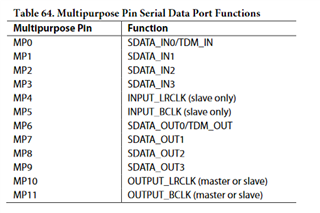
As per this table in the datasheet, the INPUT_LRCLK/BCLK ports function only in slave mode - as such, I would need to provide an external LRCLK, BCLK, and MCLK - these clocks come from the Master I2S device, which is the XMOS board in this case.
I would wire LRCLK, BCLK, and MCLK from the master device to all slaves (including 1701), then connect the data lines of each source board to its own individual SDATA pin. This would allow me to "listen" to all i2s sources simultaneously, and pick and choose which one to output using my program as seen above. Do I have this right?
Hello,
I can appreciate your approach of taking things one step at a time. People always learn in layers, a bit more detail with each layer.
As far as the connections to the 1701 you are correct. You can take the clocks supplied by the XMOS board and send it to all the devices and then they will send their audio based on the clocks. Then the audio will show up on the digital section of the input cell, inputs 2-9.
What I have difficulty seeing that this solution will work is this:
SPDIF inputs the clock is from the remote source and is recovered from the SPDIF stream. There is no way to slave an SPDIF receiver. Unless you are in a broadcast facility where everything in the building is running on house sync. Then a USB source is the same thing. It is the computer's internal clock and cannot slave to external clocks.
With an SPDIF board, you will have an SPDIF output so in that case it can slave to the incoming clocks and send that out of the SPDIF transmitter. Now it comes down to the device on the other end, if it can slave to the incoming SPDIF clocks and use that to send its SPDIF data then the data being received at your SPDIF board will be in sync. I have a feeling that the device on the other end of your SPDIF board will not have that ability but I could be wrong.
For USB I have never seen one be able to adapt to incoming clocks. So do these devices have sample rate converters? Then you are good and it will work.
For an example on this, the ADAU1452 has an SPDIF receiver and transmitter built in. You can either run the entire system on the incoming SPDIF clocks or you have to go through the ASRC to get to the core which is the better way to go. The SPDIF TX on that part uses the internal clocks of the DSP.
Sample rate converters really go a long way to "glue" together clocks from different signal sources and with so much audio now coming in from things like networks, the clocks are never synchronous.
The XMOS board may come to the rescue here. If all the audio is going through that board and the switching is done there, then it will lock to the incoming clock and send out the LRCLK, Bitclock and Master clock based on the source. If you select a new source then it will lock to that source.
Just be ready for issues like this. Hopefully, you can get it all running without too much trouble.
Dave T
"SPDIF inputs the clock is from the remote source and is recovered from the SPDIF stream. There is no way to slave an SPDIF receiver. Unless you are in a broadcast facility where everything in the building is running on house sync. Then a USB source is the same thing. It is the computer's internal clock and cannot slave to external clocks. "
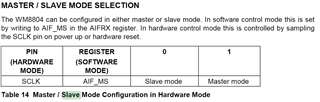
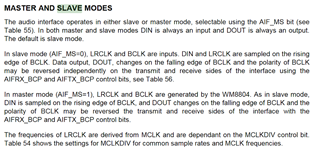
The datasheet for the chip used in my SPDIF boards seems to say otherwise unless I am misunderstanding, which is highly probable: https://www.cirrus.com/products/wm8804/
|
From what I can see here, the datasheet does say that the chip can be placed in slave mode, and will use external clocks. What I don't know is if this applies to both transmitting and receiving data.
https://www.cirrus.com/products/wm8804/
This page does say "A crystal derived, or externally provided high quality main clock is used to allow low jitter recovery of S/PDIF supplied main clocks.", which leads me to believe that this should work? I'm really not sure at this point. Is "main clock" here MCLK, or is that just an unfortunate coincidental naming issue?
Hello,
I don't have time to dig too deep into the 8804 datasheet, Some of our older eval boards use the CS8416 for SPDIF. That one can be slave or master but the clocks you feed it are only used for the TX side not the RX side. The test of the snip you provided sounds to be this is for the PLL to use but I am not certain.
Without a sample rate converter I just do not see how it can be a slave.
Let me describe this. If the clocks you are sending to the SPDIF are faster that the clocks coming in via the SPDIF itself, then at some point it will be asking for the next sample when it has not arrived yet. If you ask for data at a faster rate than the data is coming in then samples will be duplicated.
The other way around, if you are pickup up samples too slowly then some of the incoming samples will missed, thrown away, because they will never be picked up in time and it will be replaced with the newest sample.
So it is basically impossible to make the incoming SPDIF signal slave to any other clock. The clock has to be recovered and then sent to the rest of the system to play back the audio.
Dave T
Hi Dave,
You are absolutely right. That slave mode is only for transmitting data, I can confirm. I would need an ASRC to do this.
I've found a discrete ASRC which would cost about $70 shipped for two i2s channels, so I'm bailing on making the adau1701 work and am moving to a board like this with a 1466, which should have zero issues with sample rate conversion. https://www.aliexpress.com/item/1005001421618447.html
I greatly appreciate your input, thank you very much for your time
Audrey
Please log in to reply.