EVAL-ADAU1467Z - writeback circuit purpose
Hi there,
Sorry for this simple question. But I am again reviewing the EVAL-ADAU1467Z schematic and I don't really understand the purpose of the writeback sub-circuit and its subsequent connection to MP6 on the ADAU1467Z. I looked at the ADAU1467Z for the term "writeback" and find nothing. Can you please help me understand the purpose of this function? Looking at other posts I'm assuming it has something to do with self-boot and EEPROM?
Kind regards,
Mark
writeback
EVAL-ADAU1467Z
Mark,
At this point, there is no purpose to the writeback function. Originally, the idea was to provide a hardware mechanism that would allow the DSP to write parameters to a self boot EEPROM in the event that it lost power. For example, if there is no microcontroller in the system, and the algorithm uses GPIO switches to control volume, you would not want the volume to reset to the default value every time the system is turned on. You would want the volume stored in nonvolatile memory somewhere. The only nonvolatile memory is the EEPROM, so this provided a mechanism to write it back. The way is worked is by monitoring the 5V rail and triggering a GPIO when it began it drop. The DSP would have about 200 ms from the bulk and bypass capacitance to write values.
However, since the board was designed, the Interface Write and Interface Read blocks were added to the library. The allow parameters to be continually updated to the EEPROM eliminating the need for a hardware mechanism. That is why it is not documented. It's a vestigial feature of the board.
Ken
Many thanks for that great explanation, Ken! So I guess when designing my own circuits around the ADAU1467, so long as I implement the Self-Boot Memory part of the circuit then I don't need such a function. I'll NOT include the writeback functionality in my design. Thank you!
Hello MDThommo81,
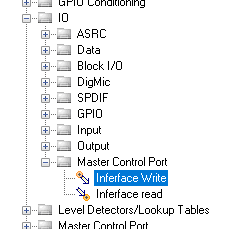
The "Writeback" functionality will not be there if you do not include the interface read and write blocks from the IO-->Master Control section of the tree toolbox. If you do not do that and do not set it up properly, the DSP will not remember the old settings when it reboots.
Dave T
Thanks, Dave. Do you have a guide on how to "set it up properly"?
Hello MDThommo81,
First pull out these objects from the Master Control Port section of the toolbox.
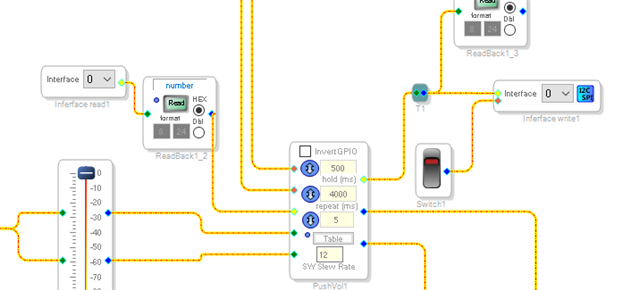
Then connect them to the object that needs to be "remembered" .
The readbacks are not required and the switch is there only because this one was set to GPIO as an update option.
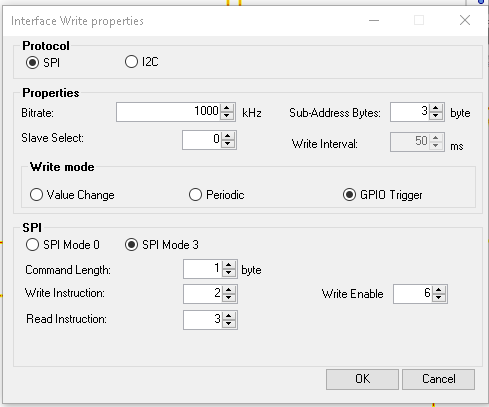
Then on the Interface Write cell, click on the blue square and you will see this:
Note in the middle it is set to GPIO. If you select either of the other two options the GPIO input will disappear on the object in the schematic.
So you can set it to periodic write to the EEPROM or you can have it write only when the setting has changed. That is the most popular way to do this.
Then the rest of the settings are what I referred to being setup correctly. You have to say if it is SPI or I2C and the other settings. This object does not get this information from the EEPROM Properties GUI which would have been a great way to do it. So set this all up and click on OK and you will be off and running.
One thing to note is that if you are using Selfboot, which is likely, then the checksum feature of the program loading when selfbooting will be disabled. The reason is that writing back to the EEPROM will change the checksum and when you try to selfboot the next time the DSP will calculate the selfboot and see that it does not match the original value and it will not run the DSP program. The selfboot will fail. So to get around that the checksum feature is disabled by writing zeros into the checksum. When the DSP loads in the program and sees it is zero then it will just ignore the checksum value and run the program.
Dave T
Excellent detail. Many thanks for your guidance, Dave!
Hello Dave!
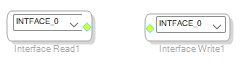
ADAU1701 has slightly different blocks.
Tell me please, will 1701 be able to save the volume level using this blocks?
Please log in to reply.