latency in ADAU1772
Hello, i'm using AUAU1772 in my ANC project.
To measure system internal latency, i wrote a program in host(TI-C6748,McASP interface) which generate a digital sine signal and transfer it to 1772 using I2S, then 1772 transform it to analog form and play it.
A audio line connect DAC_OUT and ADC_IN so the signal can be caught and transform to digital signal and transform to host using I2S.
1772 was running at 192kHz ADC sample rate and the I2S interface was running at 96kHz。
However, I found that the latency between two sine signal is much more than i thought.
In my opinion, the latency shoud be 38us(analog to analog latency)+2*10.4us(I2S transform latency) + 10us(mcasp interrupt latency and data processing).But the test show me a 140us.
Could you plase help me find out what phase may have problem,or I have misunderstanding in latency calculation?
Thanks.
adau1772
Integrated/Special Purpose A/D Converters
Audio CODECs
Hello Linear Leaf,
Figure 39 in the datasheet does show close to one of your test cases but the graph does not include the core. So add the 10.4us for the core and you get close to what you measured. The additional delay you are seeing is caused by the ASRC filters.
The ADAU1777 is capable of bypassing the sample rate converters but it is a bit tricky to setup and I don't think we detail it in the datasheet. The ADAU1787 is another part that is more flexible when it comes to the ASRCs. For the ADAU1772 there is no way to bypass them. It was designed for fast throughput from analog in through the core to analog out. The data coming into the serial port is meant to be data that is slower because it is things like Bluetooth or line level audio which low latency does not matter. The ease of communicated with the part at any sampling rate was far more important so that is why they are there. For an ANC application you only need to take the microphone feedback signals back into the core with a very low latency. not the incoming audio from some external source.
Dave T
Thank you for you reply.
Now I understand that ASRC is the main cause of internal latency.
Actually, I'm developing a program to reduce Rangehood's noise.
I handle data on external DSP to have more flexibility and better performance.
I will discuss with hardware engineer later if it's nessary to replace 1772 with 1777.
Would you pleasr show me how to setup ASRC for ADAU1777?ADAU1787 may be too expensive for us.
Hello
It could not be easier to do this. The ASRC clocks are setup to follow the clocks for the data source and destination that you setup in the Signal Routing page of the registers.
On this page you select the routing of the data. You also must enable both of the ASRCs even if you are not using both.
Then on the Chip Control Tab, you must enable the power to the ASRCs.
They are all disabled by default.
Then setup the serial port as needed. If you have the serial port setup as a slave the ASRCs will simply follow the sampling rate of the incoming LRCLK. It requires no intervention by the user if sampling rates change. It will mute and relock to the new rate.
Dave T
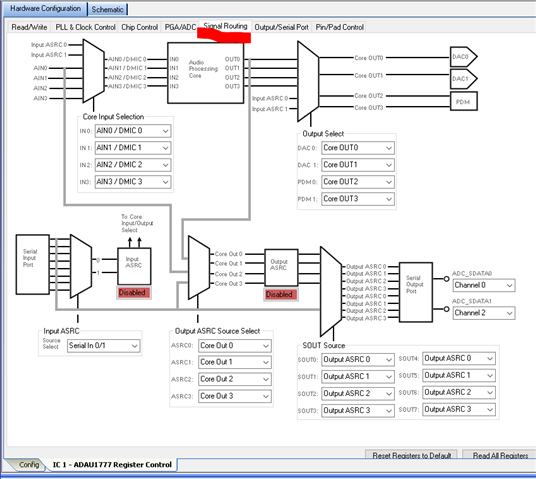
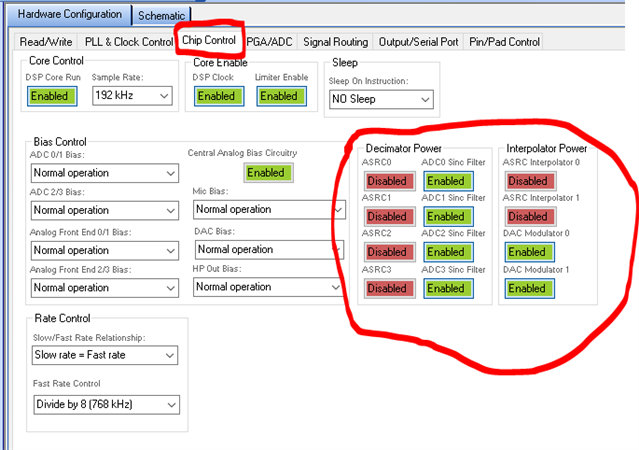
Hi, we recently designed a new circuit board and replace 1772 with 1777. There are something confuse me in page "signal routing" .
Since we bypass the ASRCs in both in and out direction, should I disable both input/output ASRCs like your picture or enable them according to this?
DaveThib said:
You also must enable both of the ASRCs even if you are not using both.
Besides, should I choose Input ASRC0/1 for DAC0/1 so I can put data from serial input port to DACs?
Now I configure the chip like this :
And another thing is that I find "fast rate" and "slow rate" in adau1777's datasheet but can't get info about them in both datasheet or on wiki. Would you please explain their function?
Thank you for your reply.
Linearleaf
Emm, are you still there? Or I need to open a new question instead?
My picture in my earlier post was a picture showing the controls that must be enabled. So no, do not copy the settings as shown in the picture, I mentioned in the text that they must all be enabled.
Your screenshots are not visible in the post. Please redo and repost the screenshots.
I will work on a better explanation of the Fast and Slow rates.
Can I ask how you are planning to use the part? Earlier you mentioned 192kHz sampling rate. What are some of the details of your application so we can more directly help you setup the part the way you need it. It is difficult to answer general questions with direct answers because it all depends on how you want to use the part.
Dave T
Thank you for your reply.
Sorry for those broken pictures. They look like below:
BUT it doesn't work. C6748 can't transfer data with ADAU1772, which means both mic_data from 1777 and output_data from C6748 goes wrong. So I can't measure system loop latency just like what I've done in 1772.
2.Well, we try to reduce noise from rangehood by using ADAU1777/1772 as AD/DA and C6748(TI's DSP) as core proceesor.
That is, we try to build a broadband-noise controller.
The system is actually working at 16kHz, we use I2S interface at 192kHz so we can decrease internal data latency to gurantee system causality.
3. I still confuse about fast and slow rates, is there anything I can refer to? I have no idea how to configure them. I doubt I have misconfigured them.
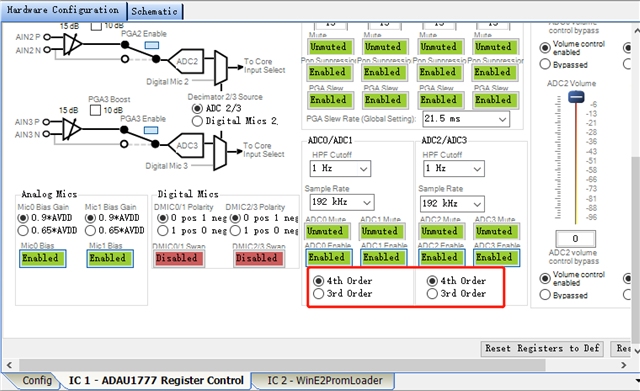
4.Besides, what does 3rd/4rd means in below?
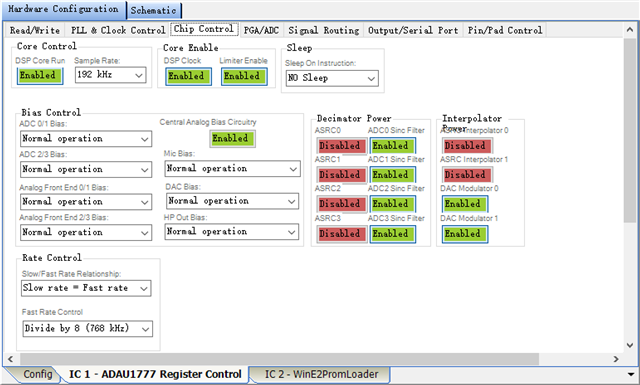
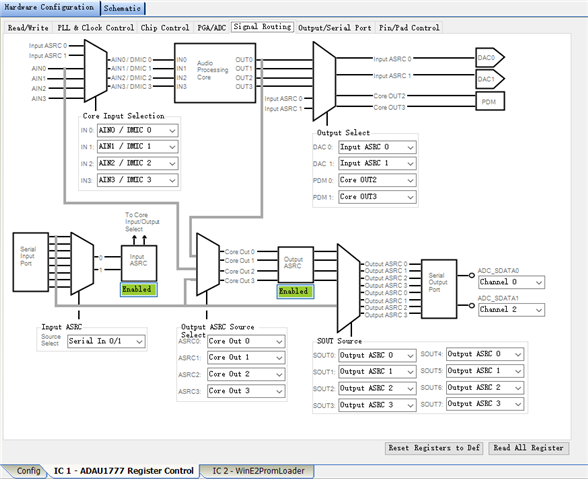
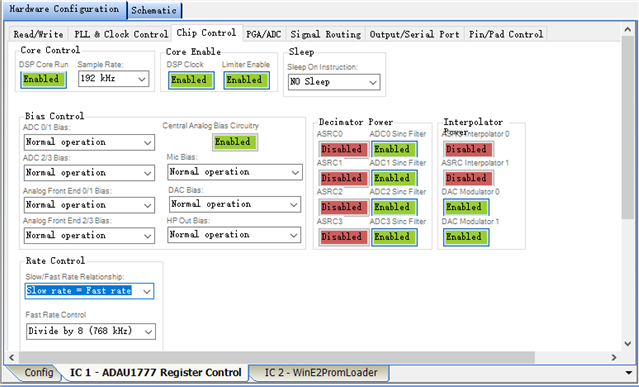
When you mention the system is actually running at 16kHz, can you explain further? If the serial port, ADCs and DACs are running at 192kHz, and the CORE_FS is 192kHz, then I am unsure what rate would be 16kHz in the ADAU1777 or in the system?
We do not recommend bypassing the Input ASRC or the Output ASRC for the ADAU1777. So if we are using the serial port input or output, we need the ASRC’s to be enabled in the “Chip Control” tab. For the DAC input this means enabling the ASRC Interpolator, for the ADC output this means enabling the ASRC decimator. This needs to be done in addition to enabling the Input ASRC and Output ASRC in the “Signal Routing” tab.
The fast rate settings only apply if CORE_FS = 768kHz. So in this project where CORE_FS = 192kHz, this is not a concern. The fast rate settings give additional sample rate options beyond 768kHz, such as 384kHz for example.
The 3rd/4th order options are for the sinc filter in the ADC. The 3rd order allows for slightly lower latency, but the 4th order allows for slightly improved filter performance.
I have attached an example project that has working ADC to serial port output and serial port input to DAC output paths at 192kHz. It also has some of the lower latency options for the ADAU1777 as well.
ADAU1777_ExampleProject_Nov11_2021.dspproj
At first, Sorry for not reading your reply eariler.
1.Running at 16kHz means C6748 will handle ref/err mic data and generate anti-noise signal at 16kHz, while ADAU1772 exchange data with C6748 though serial port(McASP) at 192kHz. We do this in order to minimize the internal latency.
2.Do you mean ASRC can be passed through only when we use sigmaDSP as core processor? Dave told me that disable ASRCs will reduce loop latency, do you mean he is wrong?
DaveThib said:
The ADAU1777 is capable of bypassing the sample rate converters
Or you means that we can make both DSPcore and AD/DA work at 768kHz so that we can pass through ASRC?
3. Do you mean AD/DA will work at 768kHz+384kHz while core work at 768kHz in other word upsampling? And I notice that you don't explain what slow rate is.
4.Thanks I got it.
5.Well, it seems that you send input ASRC0/1 to CORE and then send them to DAC0/1 to reduce latency?Why not config DAC0/1 to Input ASR0/1 to enable mic0/1? Or you just want to show me a pass-though?
ADCs convert mic signal to digital forms and then send them to C6748 though I2S.
C6748 will calculate an anti-noise signal and then send them to 1777 though I2S and then to DACs.
Waiting for you reply.
Please log in to reply.