Parametric EQ missing from ADAU1452 in SigmaStudio 4.6 and AutoEQ parameteric EQ not working either.
Hi Everyone,
I am working on a loudspeaker system using the ADAU1452. Previously we had used the ADAU1701. Although the Parameteric EQ is available in SigmaStudio for the ADAU1701 under 2nd order->Double Precision->Multichannel in the toolbox tree, I cannot find it for the ADAU1452. The Automatic EQ is in the ADI algorithms folder for the ADAU1452 and while it does compile for us, none of the changes I make to the Parametric filters settings in that tab seem to have any effect or are saved. Each time I close and open the tab it reverts to the Default flat response. (I haven't loaded any MLSSA files but went directly to the filters tab to see if we could use that).
Does anyone have any idea how I can do my EQ with the ADAU1452 using parametric or automatic EQ?
Many Thanks!
Audio Signal Processors
adau1452
adau1452 sigmastudio
SigmaDSP Audio Processors
adau1701
Hello bradiko2,
The 1452 is a Sigma300 core and is a huge step up in processing power so there is a lot more this processor can do so some things got moved around and changed. One of the major things is that this processor has enough power to calculate filter coefficients so it can do things like slew between filters or blend between filters in an index controlled filter. But I digress from your question.
There are two different parametric EQs to choose from. ( well a bit more but I will keep it simple )
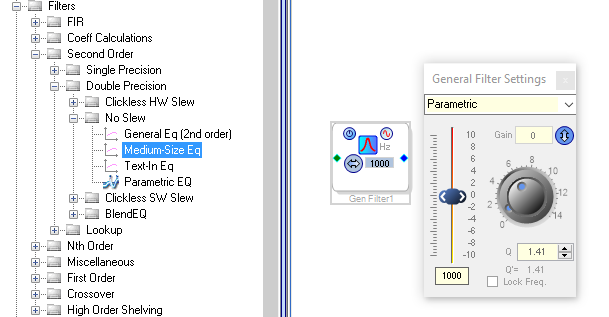
Here is the location of the " standard " double precision 2nd order filter:
You can grow this one to add more filter sections if you need to.
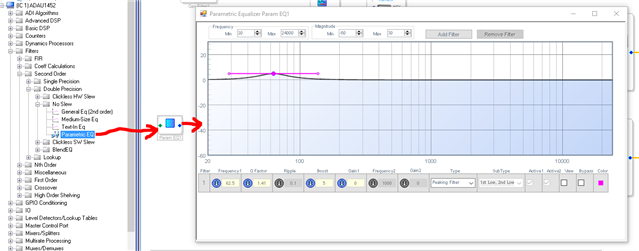
Then there is this one which is really great.
With this one you can add several filter sections and see the resulting graph in real time.
So these two should get you started.
Regarding the Auto EQ, There are a few issues with it but here are some posts that talk about how to use it. This post has a link in Josh's response to another post.
(+) Automatic Speaker EQ Error - Q&A - SigmaDSP Processors and SigmaStudio Development Tool - EngineerZone (analog.com)
Dave T
Please log in to reply.