Exactly what dB level at the output produces clipping?
I've got several embedded projects using an ADAU1701. I cannot watch the dB levels in realtime in sigma studio since I program the DSP using an embedded MCU.
I have the gain path optimized between the DSP and the amplifiers so I need absolute maximum output, with a dB or two of headroom. To maximize the output level without clipping, should I be limiting to -1dB or can we go to +2dB (the maximum of the level meter - 1dB)?
Thanks in advance!
Audio Signal Processors
SigmaDSP Audio Processors
adau1701
Hello djamps,
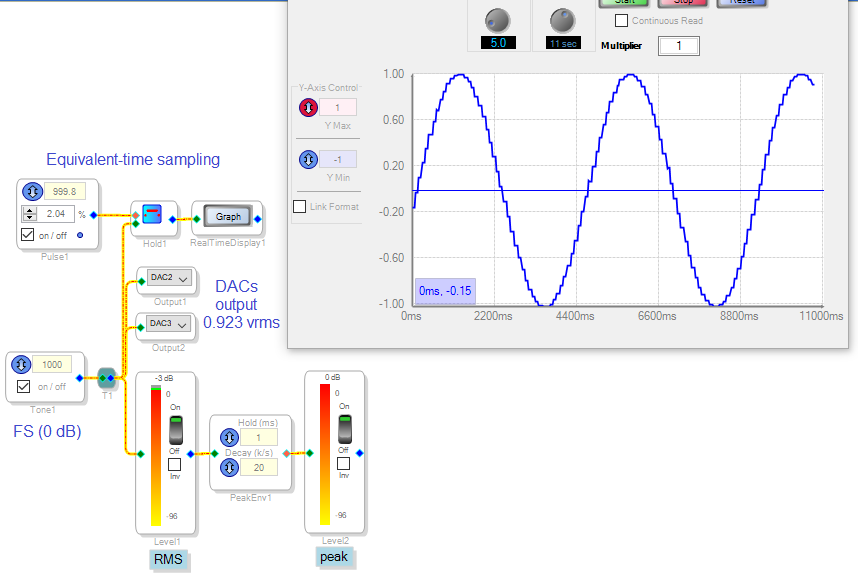
Although the math inside a ADAU1701 allows for signals up to roughly +/- 16 (5.23 format), the various audio ins and outs (ADCs DACs, and serial) only allow for a 0.23 format signal -- or +/- 1.0. This level is considered "full scale" or 0 dB. The 1000 Hz oscillator in the test project below has exactly this output. It's wired to the Real-Time Display through an arrangement which samples its signal at a slightly lower frequency, causing an "equivalent time" sampling -- since the Real-Time Display is too slow to capture a 1 KHz tone. We can see the amplitude hits +/- 1.0 peaks as expected. The first level meter reads -3 dB because it senses the audio's RMS level. RMS of a sine wave is the peak level divided by sqrt 2, which is 3 dB lower. The peak detector before the second meter makes it read peak level, which again is 0 dB.
According to the ADAU1701 Data Sheet, we expect 0.9V RMS at the DAC output pin when converting a full-scale signal. I measured 0.923 V RMS on my ADAU1701MINIZ eval board, which works out to 1.5 dBm or -0.7 dBv. This is essentially the clipping level, so ideally your external signal chain should clip at this level to get the most dynamic range out of the -1701.
Best regards,
Bob
Thank you very much Bob!
Please log in to reply.