Has anyone used SPI to interface an Arduino and their DSP like on ADSP-BF706 EZ-KIT Mini
I'm trying to get my BF706 to work as an SPI slave to an Arduino and cannot find any examples of how to get the BF706 to work as an SPI slave. Below is one configuration I've tried. What am I missing? Am I using the correct function to read the transceiver?
//set up SPI
//*****************************************************************
/* SPI driver handle */
ADI_SPI_HANDLE hDevice;
/* driver API result code */
ADI_SPI_RESULT SPIresult;
/* transceiver buffers */
uint8_t RxBuffer[7] = {0};
uint8_t TxBuffer[7] = {0x0,0x1,0x2,0x3,0x4,0x5,0x6};
/* transceiver configurations */
ADI_SPI_TRANSCEIVER Transceiver1 = {NULL, 0, &TxBuffer[0], 7, &RxBuffer[0], 7};
/* open the SPI driver */
SPIresult = adi_spi_Open(0, SPIDriverMemory, (uint32_t)ADI_SPI_DMA_MEMORY_SIZE, &hDevice);
CheckSpi(SPIresult);
//Configure SPI
SPIresult = adi_spi_SetMaster(hDevice, false); //slave msb first
CheckSpi(SPIresult);
//SPIresult = adi_spi_SetHwSlaveSelect(hDevice, false); //HW slave select
// CheckSpi(SPIresult);
//SPIresult = adi_spi_SetSlaveSelect(hDevice, ADI_SPI_SSEL_ENABLE1);
//CheckSpi(SPIresult);
//match transmitted
SPIresult = adi_spi_SetClockPolarity(hDevice, false);
CheckSpi(SPIresult);
SPIresult = adi_spi_SetClockPhase(hDevice, true);
CheckSpi(SPIresult);
SPIresult = adi_spi_SetWordSize(hDevice, ADI_SPI_TRANSFER_8BIT);
CheckSpi(SPIresult);
SPIresult = adi_spi_RegisterCallback(hDevice, NULL, NULL);
CheckSpi(SPIresult);
/* Diable DMA */
SPIresult = adi_spi_EnableDmaMode(hDevice, false);
CheckSpi(SPIresult);
/* submit the SPI transceiver's buffers */
SPIresult = adi_spi_ReadWrite(hDevice, &Transceiver1);
Audio Signal Processors
interface_with_arduino
spi slave
Blackfin Embedded Processors
adsp-bf706
Hello,
As this issue is being handled through private support channel. Let's continue the discussion there and post the outcome here, if appropriate.
Thanks,
Jithul
Hi SneakyPanda,
I had a look at the following manual:http://www.analog.com/media/en/dsp-documentation/evaluation-kit-manuals/ADSP-BF706_ezkit_mini.pdf
My observations are SPI1_MOSI, SPI1_MISO & SPI1_CLK are multiplexed with PA_02, PA_01 and PA_00. Here PA is GPIO PORT A. The physical pin numbers from the Blackfin processor are 78, 80 & 88. The number 11, 12 & 13 you are seeing are at the connector P5.
To configure pinmux you may have to select as shown in below picture
I guess it is better to start a new thread instead of posting in one year old "Answered" question.
Best Regards,
Sudheer
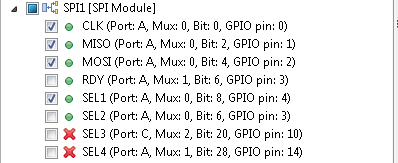
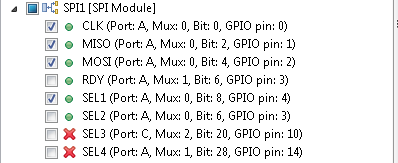
I am also trying to establish communication between an Arduino Uno R3 and the BF706-Mini. Looking at the schematic, it lists pins 11,12, & 13 as SPI1_MOSI, SPI1_MISO, & SPI1_CLK respectively. Using the pin multiplexing plugin, I can't find this configuration under any of the peripherals. Under SPI2, I see pins 11&12 listed correctly as MISO & MOSI respectively, but the other pins are not what they need to be. Any idea what configuration I need inside the pin multiplexing plugin to work with the Arduino compatible pins shown in the schematic?
Did you ever get this working? I finally have the toolchain working so that I can go from SigmaStudio->CCES->CLDP to make bootable code. Now I want to control the BF706 from an Arduino using SPI to select various DSP functions. I can always reset the board and step through the functions but would prefer to use the Arduino.
Thanks.
This question has been assumed as answered either offline via email or with a multi-part answer. This question has now been closed out. If you have an inquiry related to this topic please post a new question in the applicable product forum.
Thank you,
EZ Admin
Please log in to reply.