Is this the best I can do for center channel with adau1701?
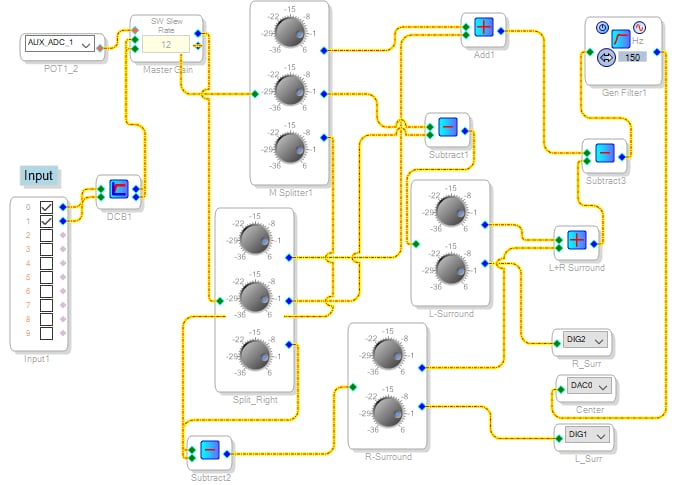
I managed to cobble together a functional center for a stereo project but I'm wondering if there are any suggestions or obvious improvements I could make given the ADAU1701 toolkit. It seems the HDSX trial features were removed some time ago, so it's down to the basic toolkit.
I'm not even sure if you can pull off a least-mean-square, PCA, or any of the other algorithms I was able to quickly research, but if it's possible I'd be interested!
I thought I'd share this because I didn't see an example anywhere else. The second addition is unnecessary as it could be extended in the subtraction, but after that I'm out of improvements. Thanks
Audio Signal Processors
SigmaDSP Audio Processors
adau1701
Hello misPT1,
This is an interesting project so I took it as a challenge to come up with something. You are using the splitters where you have the same level for all outputs so it is more code than you need. All you need to do is to split the signal to save on MIPS. That can be done with either a "T" connection or an Alias. Then it looks like you are sending out the Right minus left as the right signal and the Left minus Right as the left signal. Then the sum of the differences subtracted from the sum of the Left and Right. I do not think this will work.
I edited this response since I had some mathematical errors which made the entire program invalid. Then it took me a week to get this up due to computer issues with the forum and hotel room internet speeds.
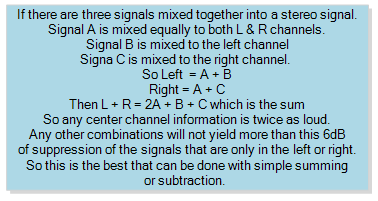
Basically, this is about all you can do without very intensive source separation algorithms which will be beyond this DSP to execute.
Here is what I came up with"
There is really no way to separate out the center channel information without having at least one negative signal. This is why with stereo radio that is mono compatible they encode a mono signal and then a L-R signal. Then with that L-R you can derive the left and the right out of the mono signal. To get the left or right separated from the center signal you need to have the -L and the -R to do it.
I suppose you could try some tricks using an expander so that when the summed mono center channel is above a threshold it will make the center channel louder so it may seem like you are getting more than 6dB of increased level and possibly keep some more of the stereo image. This is an interesting problem and I encourage the rest of the forum users to chime in here.
I have attached my project. I did setup a signal generator to test the separation using sine tones.
6663.ADAU1701 Phantom Center Channel Extracting.dspproj
Thanks,
Dave T
Dear Dave, thank you so much for your response! Really looking forward to giving it a shot soon. I'm just glancing now but I can see the excellent programming and effort you put in. I had started dissection of the test bench but it's all going back together now :) Thanks again, can't wait to give this a more thorough attempt
~Mispt1
Hello Dave and mispt1,
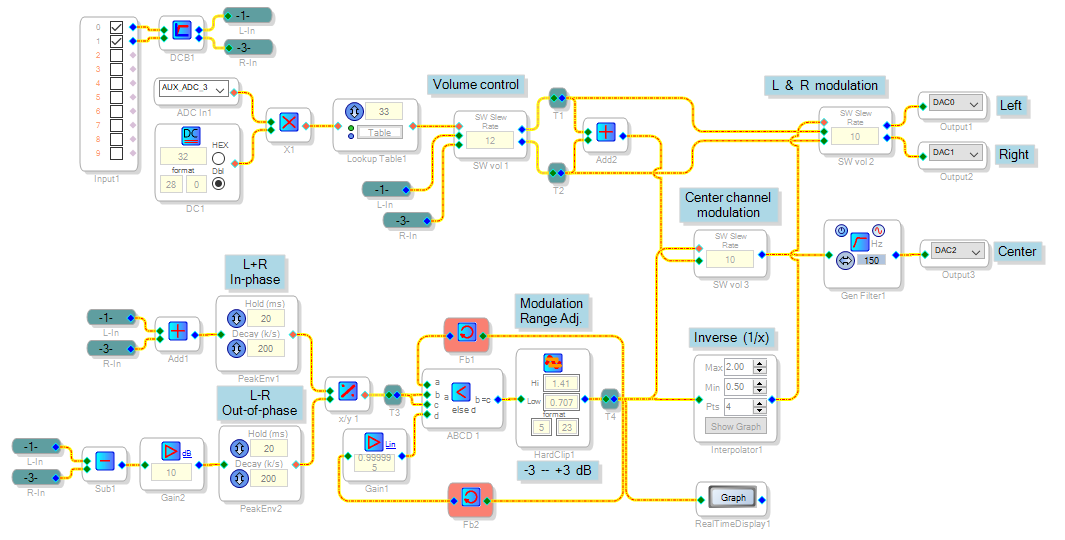
Here's an example of an expander circuit to boost the apparent imaging of the center channel:
The circuit compares the (L+R) and (L-R) signals. It favors the center channel when the in-phase signal is stronger than the out-of-phase signal. On the other hand, when the out-of-phase signal is stronger it favors the side speakers. The result is an apparent increase in center channel selectivity beyond the theoretical maximum of 6 dB. Those of you who were around in the 1970's might remember the matrix "quadriphonic" systems of the day, which also suffered from poor separation (in this case, from front to back). One of the fixes was called logic, which essentially did something similar to this application.
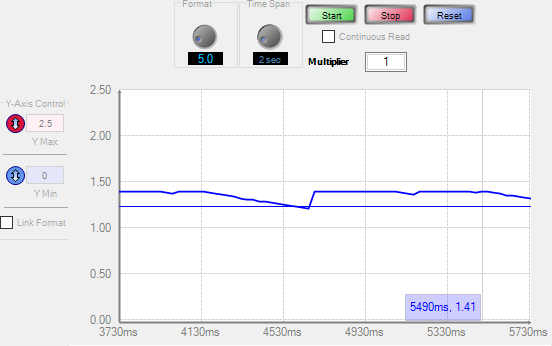
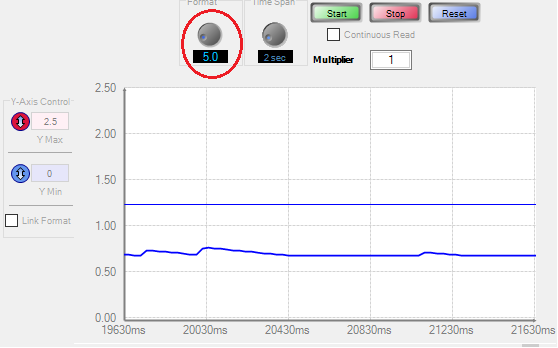
The Real-Time Display shows the level of center-channel enhancement. With a movie soundtrack playing I observed the results below:
With spoken dialog, the enhancement boosts the center channel:
With other content, it attenuates the center channel:
The Real-Time Display's format isn't always saved with the project so for the ADAU1701 you must set the circled control to '5.0'. In general when setting up a Real-Time Display, adjust this control until the Y axis shows the full range of the DSP -- +/- 16 for the -1701, and +/- 128 for the -1452 and above. Then uncheck the Link Format box and set the Y axis as desired.
Best regards,
Bob
Center-ch-1701-rev2.zip
Please log in to reply.