How to verify parameter update from MCU in Sigma DSP ADAU1452.
Dear Team,
I am updating Sigma studio cell parameters from MCU. And need to check this parameter update in DSP. For Example, If I have changed the Volume gain from -6dB to -2dB from MCU. This gain parameter change to be confirmed in Sigma DSP code. Is there any option to verify this in Sigma DSP ADAU1452 with Sigma studio 4.5. Please share your suggestions.
Also I have to know the purpose of 'Link Compile Connect' option in Sigma Studio.
Regards,
KS2021
Hello,
The tuning capability of SigmaStudio is generally one-way. Changes made on the PC appear in the SigmaDSP hardware, but changes made in hardware will not be reflected in the schematic.
However it is possible to read the manually read the memory contents of a DSP, and from there, check whether your MCU parameter change went through.
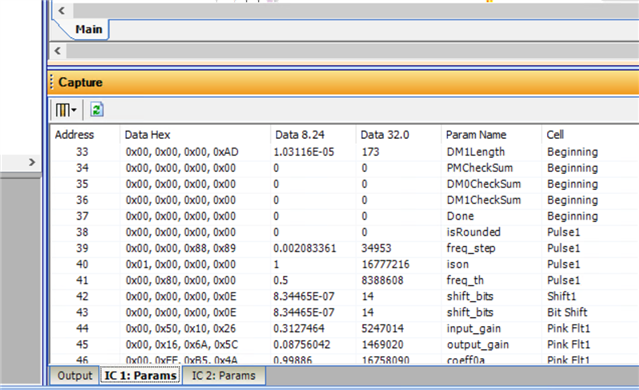
In the capture window, where the USBi transmissions are recorded, there is a toolbar at the bottom. If you select your IC, a memory map similar to the one in the picture will appear. Click the green refresh button to read the entire memory map from the DSP. Any parameters that changed between refreshes will be colored red.
Note that the mapping between memory addresses and parameter names is determined when you compile the project. So if the SigmaStudio project and MCU are out of sync, the memory map will not be correct.
The link-compile-connect option is almost identical to link-compile-download, except that it doesn't program the connected DSP. It can be useful to see whether a project compiles even when you don't have hardware on-hand, without getting USBi error messages.
Best regards,
Joshua
Hello again, I thought of another solution which is probably easier for you.
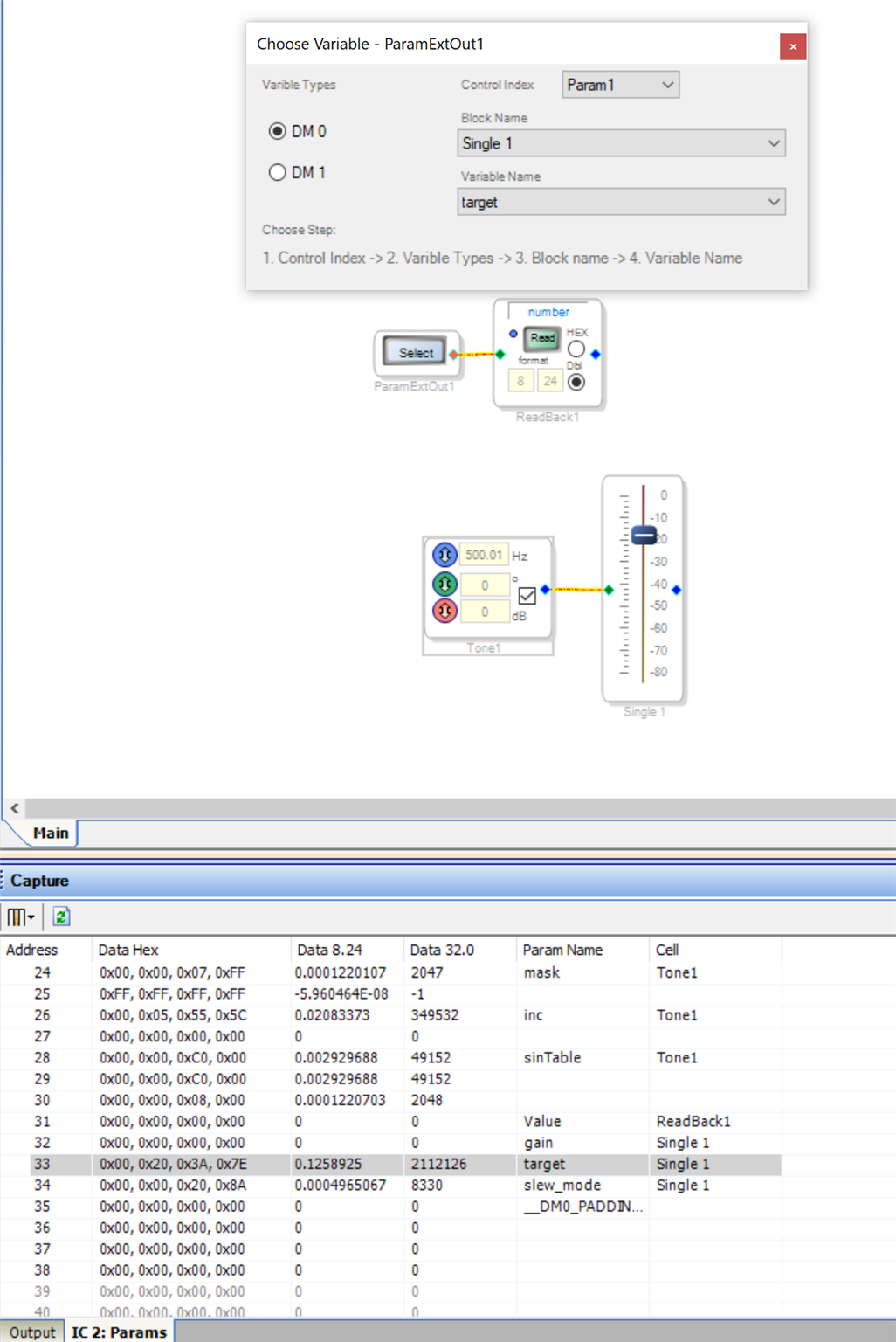
The Parameter Ext. Out block (under Basic DSP/DSP Functions in the tree toolbox) can read the real-time value of the volume control's target gain; then we can see the value in SigmaStudio by sending it to a DSP ReadBack.
The Parameter Ext. Out is calculated on the DSP itself, reading the value every sample, so when the DSP memory is updated the ReadBack will update too.
Note that if you are using a slewed volume control, the value to update with your MCU and read back is actually "target" and not "gain". When the "target" gain is updated, the current "gain" is gradually slewed to match the "target" gain. You can choose the slew rate by right-clicking on the Volume Control block.
Best regards,
Joshua
Hello Joshua,
In Sigma Studio4.5 for 'ADAU1452' processor, 'Parameter Ext. Out ' block cannot be located under Basic DSP/DSP Functions in the tree toolbox. We can find 'DSP Parameter Read' block instead, but this block looks as same as 'DSP Read Back' and has no input and output pin. Please share your feedback in this.
Regards,
KS2021
Hello, the Parameter Ext. Out block is not available in SigmaStudio 4.5. It is newly added as of SigmaStudio 4.6.
The memory contents window from my first post is available in SigmaStudio 4.5. It will provide the functionality you need (if you don't want to use the 4.6 release).
Best regards,
Joshua
Hello Joshua,
Thanks for your support, By using IC1: Params window, we can check the command update from MCU.
Regards,
KS2021
Please log in to reply.