ADAU1701 response to digital pulse time
For an active loudspeaker project, I am trying to control a WISA receiver with an ADAU1701. For now, I am using an Arduino to mimic the WISA's pulses and behavior. In the end I will have to read a 26us pulse and, given some conditions, give an appropriate signal in return.
I have the Arduino currently set up to give pulses through a gpio and the DSP is reading these and turning on an led through the gpio to simulate the response. However, I am unable to sense a pulse that is shorter than 21ms. I am aware that the clock speed of the DSP has an impact on the time of pulse that can be measured, but changing that from 45Khz to 192Khz has no effect.
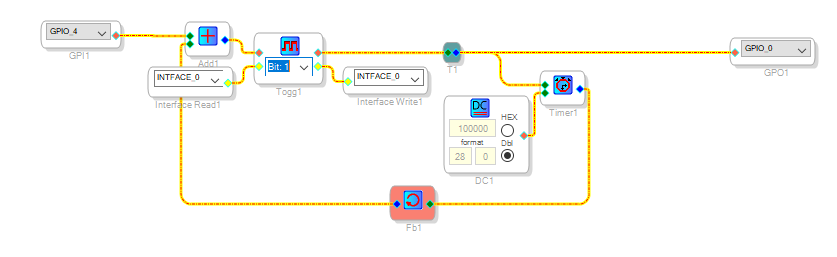
Bellow the programming I have used in Sigma Studio:
Does anybody have any clue as to how to read a 26us pulse?
Audio Signal Processors
pulses
time
SigmaDSP Audio Processors
adau1701
Hello Dikkie,
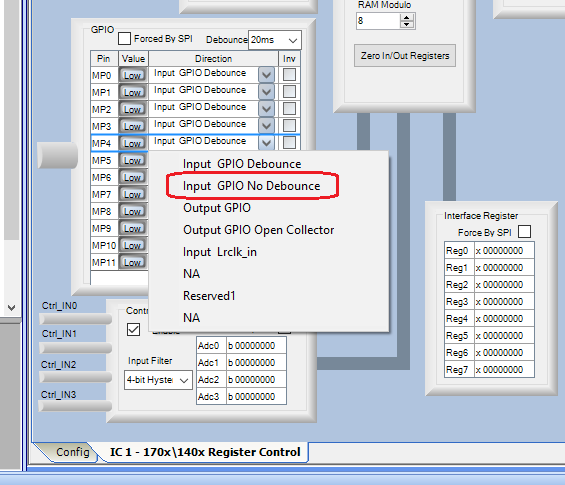
To achieve a faster GP input response, choose the HW Configuration tab atop your Schematic window, then at the bottom of the window that appears, choose the IC1 - 170x\140x Register Control tab. Finally, locate the GPIO section and change the GPIO_4's HW register setting to No Debounce as shown below:
This disables the built-in Debounce feature for this input, which is designed to ignore transitions faster than 20 mS to avoid responding to the contact 'bounce" often encountered in mechanical switches and buttons. I'm not sure how fast the GPIOs operate without debounce but expect it would be within one sample interval (about 21 uS at 48K). Edit -- the worst-case response time is listed on page 8 of the ADAU1701 Data Sheet as 1.5 x (1/fs) -- about 32 uS at 48K.
Best regards,
Bob
Hi Bob,
That makes perfect sense, thank you for your reply! Edit, I was under the impression that I would be able to see a pulse within one sample interval. Thank you for pointing out to page 8 though. It seems we will need a small microprocessor anyway, that saves me a lot of headaches down the line.
Best regards,
Dirk
Please log in to reply.