How/What to load SigmaStudio compiled data into ADAU1452 from an MCU?
Hi Support,
We are using ADAU1452 and SigmaStudio v4.6.
The SPI Slave Control Port of the ADAU1452 in our design is connected to an SPI Master port of an MCU. Our design includes a big flash storage. We are intended to store all relevant data and program files for ADAU1452 and load them into ADAU1452 via the MCU and starts the ADAU1452 operation.
These files are located in the project folder after SigmaStudio v4.6 linked and compiled:
1) DMem0.dat
2) DMem1.dat
3) ParamAddress.dat
4) PMem.dat
5) Program.bin
6) Program.dat
7) report.dat
8) compiler_output.log
Please help with the following questions.
1) Could it be possible that the MCU loads all relevant data and program files into the ADAU1452 and then starts the ADAU1452 operation?
2) What files are to be loaded to the ADAU1452? And how to load these files?
3) How does the MCU change the parameters ADAU1452 algorithms (for example, Volume Control algorithms) on the fly?
regards,
ping
Audio Signal Processors
adau1452
adau1452 code download
SigmaDSP Audio Processors
Hi Support,
Please forget this question at this moment. I have found more answers in the wiki.analog.com.
regards,
ping
Hello Ping,
Great, glad you found it. For others reading this go to this page in the Wiki,
Tutorials, Guides, Walkthroughs, and other Information [Analog Devices Wiki]
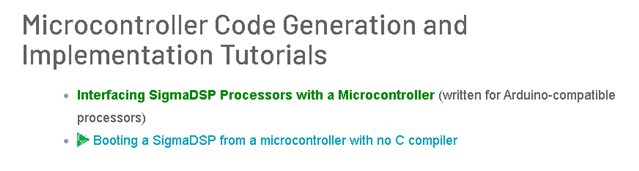
Scroll down not too far and you will see this.
This should have the information to help with using the system files.
Dave T
Please log in to reply.