Arduino safe load write - need help
\Hello,
I'm very inexperienced with code but I'm trying to get my arduino to make a safe load write to the ADAU1452.
I made a simple Sigma Studio project that has a volume control at address 0x0019 and I am able to write directly to that 2-byte address with a 4-byte linear gain value. No problems there.
When I try to do this as a safe load I get no result. Would someone be kind enough to see my code and let me know what might be going wrong, please?
I did read somewhere that the target address must be reduced by 1 when doing a safe load, however I didn't see this in the ADAU1452 datasheet. I've tried doing that and it didn't help.
#include <Wire.h>
byte safeDataAddr0[2]; // 2-byte address to send first data word during a safe load.
byte safeDataAddr1[2]; // 2-byte address to send second data word during a safe load.
byte safeDataAddr2[2]; // 2-byte address to send third data word during a safe load.
byte safeDataAddr3[2]; // 2-byte address to send fourth data word during a safe load.
byte safeDataAddr4[2]; // 2-byte address to send fith data word during a safe load.
byte safeTargetAddr[2]; // 2-byte address to send target address during a safe load.
byte safeTrigAddr[2]; // 2-byte address to send number of words to write and trigger the safe load.
byte safeTrig1[4]; // Trigger safe load of 1 data word.
byte volAddress[4]; // 4-byte address of volume control.
byte volData1[4]; // 4-byte linear gain value 1.
byte volData2[4]; // 4-byte linear gain value 2.
void setup() {
//Below addresses are fixed for safe load operations, do not change.
safeDataAddr0[0] = 0x60;
safeDataAddr0[1] = 0x00;
safeDataAddr1[0] = 0x60;
safeDataAddr1[1] = 0x01;
safeDataAddr2[0] = 0x60;
safeDataAddr2[1] = 0x02;
safeDataAddr3[0] = 0x60;
safeDataAddr3[1] = 0x03;
safeDataAddr4[0] = 0x60;
safeDataAddr4[1] = 0x04;
safeTargetAddr[0] = 0x60;
safeTargetAddr[1] = 0x05;
safeTrigAddr[0] = 0x60;
safeTrigAddr[1] = 0x06;
safeTrig1[0] = 0x00;
safeTrig1[1] = 0x00;
safeTrig1[2] = 0x00;
safeTrig1[3] = 0x01;
// Below variables are user configurable.
volAddress[0] = 0x00; // Address of the volume module. Sigma Studio shows 0019 but I reaqd this should be reduced by 1 when doing a safe write.
volAddress[1] = 0x00;
volAddress[2] = 0x00;
volAddress[3] = 0x19;
volData1[0] = 0x00; // Linear gain value (-10dB)
volData1[1] = 0x50;
volData1[2] = 0xF4;
volData1[3] = 0x4E;
volData2[0] = 0x01; // Linear gain value (0dB)
volData2[1] = 0x00;
volData2[2] = 0x00;
volData2[3] = 0x00;
Wire.begin(); // join i2c bus
Wire.setClock(400000); // Set 400KHz frequency
}
void loop() {
// Safe load volume level -10dB
Wire.beginTransmission(59); // Begin I2C transmission to 7-bit address (0x3B) adds R/W bit automatically.
Wire.write(safeDataAddr0, 2); // Prepare to write safe load data bank 1.
Wire.write(volData1, 4); // Write linear volume value -10dB.
Wire.write(safeTargetAddr, 2); // Prepare to write target address.
Wire.write(volAddress, 4); // Write aadress of volume control module.
Wire.write(safeTrigAddr, 2); // Prepare to writing number of data banks used (1-5) and trigger safe load.
Wire.write(0x00000001); // Trigger safe load writing 1 data bank.
Wire.endTransmission(); // Send data queue and end transmission with stop bit.
delay(3000); // Wait 3 seconds.
// Safe load volume level 0dB.
Wire.beginTransmission(59); // Begin I2C transmission to 7-bit address (0x3B) adds R/W bit automatically.
Wire.write(safeDataAddr0, 2); // Prepare to write safe load data bank 1.
Wire.write(volData2, 4); // Write linear volume value -10dB.
Wire.write(safeTargetAddr, 2); // Prepare to write target address.
Wire.write(volAddress, 4); // Write aadress of volume control module.
Wire.write(safeTrigAddr, 2); // Prepare to writing number of data banks used (1-5) and trigger safe load.
Wire.write(0x00000001); // Trigger safe load writing 1 data bank.
Wire.endTransmission(); // Send data queue and end transmission with stop bit.
delay(3000); // Wait 3 seconds
}
Edit Notes
lala
[edited by: ssashton at 6:16 PM (GMT -5) on 12 Nov 2021]
Audio Signal Processors
adau1452
SigmaDSP Audio Processors
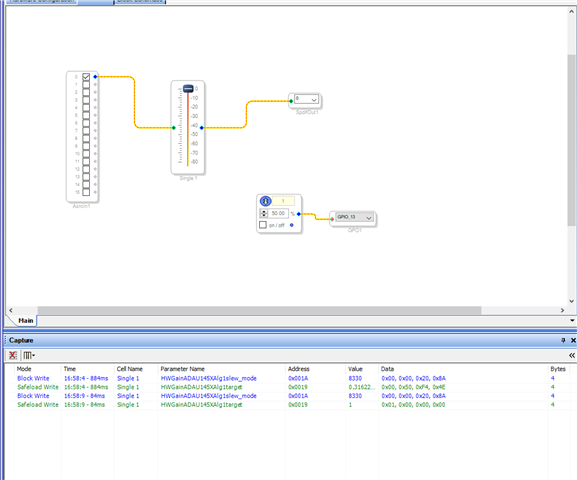
Before you ask, here is my Sigma Studio file :)
ADAU1452 Control Test 1.zip
Hello ssashton,
Before I get too far, have you looked at this Wiki help files section:
Interfacing SigmaDSP Processors with a Microcontroller [Analog Devices Wiki]
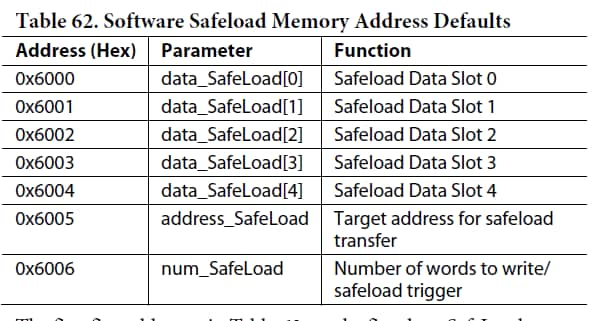
It looks like you are writing to the wrong address for the Safeload function. It used to be located at the start of data memory but we later changed it to the start of DM1so it is more out of the way and does not move.
This is shown in the Rev D of the datasheet in the Software Safeload section. Here is the table:
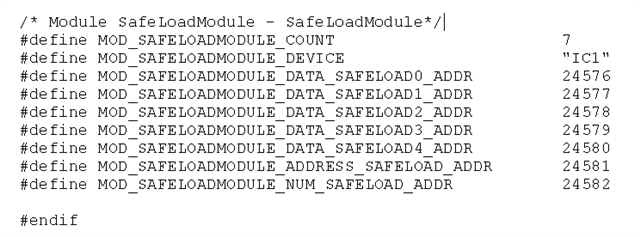
Also, if you export the System Files you can see this in the PARAM.h file at the very end:
Then once I had written a sequencer XML file to demonstrate how to do this using only Write instructions showing how it is done. SigmaStudio sort of hides the details be just saying "Safeload Write" in the Capture window. It does simplify the Capture window data so I think that is done correctly.
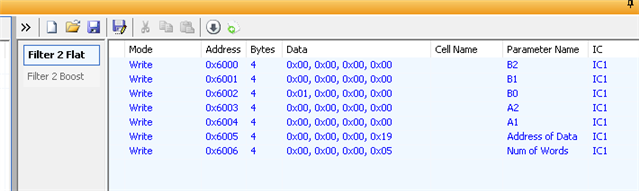
Here is what I had done for writing to a filter:
I changed the address to be in Hex. Much better than the PARAMS file that lists the addresses as a decimal number.
There should be something in here to help you properly format the writes. The first link I sent is for an Arduino compatible controller so that code should help you.
Dave T
Thanks for your reply.
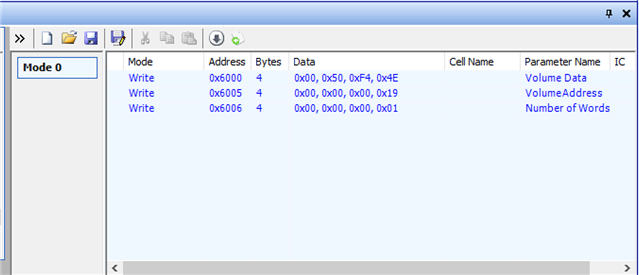
I tried to my own sequence by manually adding each write in Sigma Studio. It works as expected.
I believe I have the correct safeload address. Lines 21 - 46 in my code above.
However it does not work when running my Arduino code.
I wonder if my problem is something to do with the number of bytes in each write, or double zeros getting rounded to single zeros?? Any help would be appreciated, like I said I'm very new to codeing.
Hello ssashton,
It very well could be the number of bytes. The best way to answer that question is to either use a scope or something like Beagle protocol sniffer to see what is actually going out of the I2C/SPI port of the Arduino. Yes, it needs to be 32 bits, 4 bytes, of data in each write because if there are less that four and the transmission is ended the new data will not be written to the destination.
So I think you are really close to the answer. I do not know the Arduino methods well enough to notice if you are using them correctly to get 4-byte transmissions.
Dave T
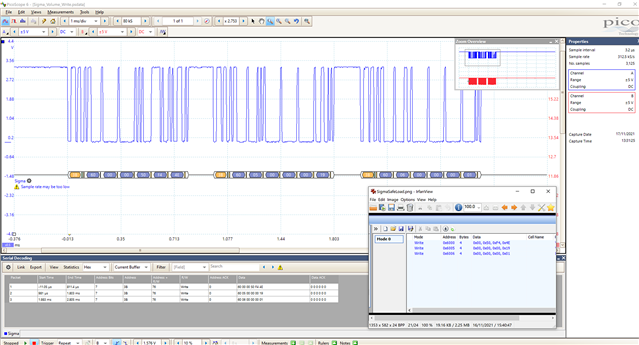
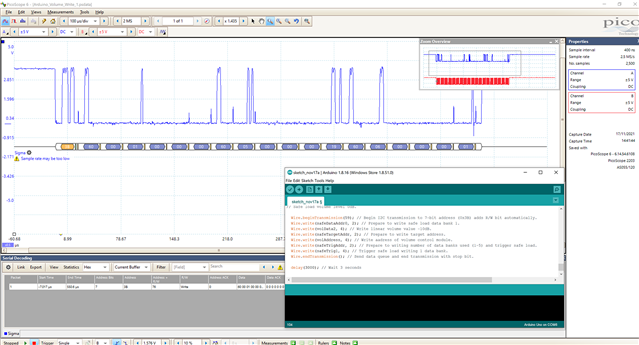
Got it! Pulled out the 'scope as you suggested.
When I look at the data from SigmaStudio it sends each safeload address write as a separate packet, starting each with the DSP address (3B) plus a write bit.
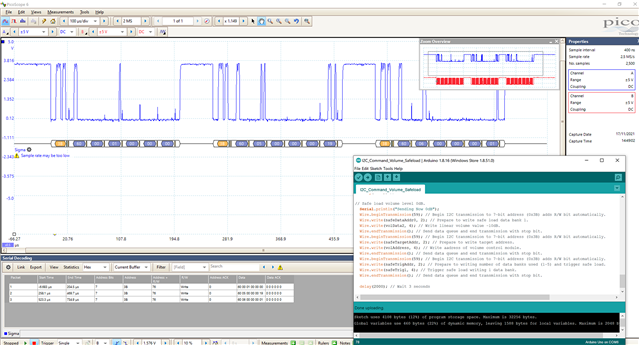
My Arduino code on the other hand sent the entire safeload as a single packet, transmitting the DSP address only once.
Easily fixed by adding a few more "Wire.beginTransmission(59);" and "Wire.endTransmission();" lines to create new packets.
You'll probably think "well duh, that's I2C protocol", but you don't know 'till ya know!
Hello ssashton,
Great work! This is diving deep for most who write only software so thumbs up that you did it! It is a view into what is happening and often either makes the issue obvious or it verifies that you are doing the correct writes.
If you were updating a filter that has five coefficients then once single write would have worked. If you keep sending data the DSP will increment the address and keep stuffing data in. In your case the addresses you were writing to were not contiguous so it did not work.
Glad you got it going. Always seems simple after you find it! LOL
Dave T
f you were updating a filter that has five coefficients then once single write would have worked. If you keep sending data the DSP will increment the address and keep stuffing data in. In your case the addresses you were writing to were not contiguous so it did not work.
Ahh, that makes sense! I do remember reading in the datasheet that the address will increment automatically. Ironically, I will need to write some filter coefficients which is why I needed safeload but I thought it would be easiest to test my code starting with only a single word. Still I learned a lot and hopefully someone else will find this helpful in the future.
Please log in to reply.