dspproj file will not open
Hi,
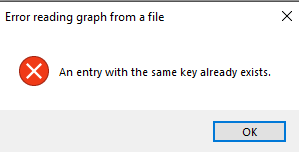
I was happily editing a sigma studio project when I wanted to make some more dramatic changes, so I saved the project as a new project, I then closed the project. Now when I try to open either project file I am greeted with the following error.
I have seen users with similar errors in the past have their project recovered by AD staff. Can someone please assist with attempting to recover the project file?
Note: I cannot upload the project file to a public forum, please contact me via the email address associated with my account so I can share the broken project file.
Thanks,
MJ
I have managed to recover my file from a previous backup, so have recovered my work. If AD would like the project file to debug what happened I am happy to email through the broken version.
I’m glad you were able to restore a backup. Everyone needs to keep multiple copies of work in progress. Unfortunately, non-openable projects do happen from time to time. I’ve had one or two in seven years.
Hello MJGar,
Glad you had the backup file. I agree with Bob that it is a good idea when starting to do an edit to save a backup. Things have changed here in the company and the programmer who has been the guy I go to for fixing these files has been assigned to another group and SigmaStudio is no longer in his work duties. It was great because he was local and I could send him a file and 20 min later he would send it back. Now I have to deal with India and they often make me put it in a work request so this means it is days or weeks before I get anything back.
Usually the bugs would be some object that was recently dropped in or grown in the project developed some corruption in the code. It is often not noticed when it is running but only when you try to load it in later. The fix is usually just to delete the offending object. The progammers all come back and usually say they have no idea what went wrong if it cannot be duplicated which is often the case. Fortunately, as Bob said, it does not happen often but then those are the most difficult things to debug and often it is operating system related and not our program.
So the moral of this story is to keep backups. The best idea for us (ADI) as an improvement to the program would be some sort of automatic backup system. I know I get working for sometimes entire days and forget to save. You get involved in your work.
Glad you are back up and running.
Dave T
Yes! A auto-save function as common in word processors, etc.
I have come across this before. If you zoom in or out with a component selected, the component's name disappears, when you retype in the name a similar error is flagged up (maybe at compile time), try to enter a different name doesn't resolve it and I seem to remember that deleting the component and copying in a new one wont resolve the name conflict. The only thing that worked was to shut down without saving. unfortunately if the damaged component was not in view after zooming it is possible to not notice it and then save leading to a corrupt file.
Hello pbthesp,
You are correct that this may be one of the ways a file becomes corrupted.
My suggestion is to never use the zoom function. The graphical extensions that SigmaStudio was built on does not handle zooming well and when you zoom you lose control of the DSP. So there is not much of a reason to zoom in or out. If you happen to accidentally zoom in or out then go to the View menu at the top of the window and select Zoom to Normal. This will restore control of the DSP.
If your project is getting large so it is difficult to get to the section of the schematic you need to work on then think about how to use hierarchy boards to simplify the main page and distribute the schematic over many boards. There is an advantage because you can save and copy boards.
Dave T
Hi Dave,
Thanks for the reply! I think you are correct with your comment that the issue didn't raise it's head till I tried to re-open the project. I was very confused why I could not open the file that I had just been editing only 30 seconds earlier.
The moral of the story is definitely to keep backups and make sure that your backups work. I was working off a backed up network drive and was lucky that the backup was only an hour old.
In the past when working with tools without an automatic backup system, we have used a .bat file on windows to run robocopy to copy the directory and its contents into a backup folder then create a timestamp for each backup. You just had to make sure that you ran the .bat file every day or as often as you wanted backups. This solution obviously doesn't save you from harddrive failure etc, it only saves you from file corruption or saves you from yourself when you break the project you are working on.
Please log in to reply.