Sigma studio program crash
When I open dspproj file with my PC, Sigmastudio program just turns off without any error message.
But, when I open the file with the other PC it works fine.
Hello ,
There might be some missing dll. You can check it by going to Tools>>Ad-ins browser. Otherwise Please Uninstall your SigmaStudio tool and re-install it. Please revert us if you are still facing issues.
Regards,
Harish
Hello Harish
It is nice to have feedback from you
I've checked dll files as you recommanded and SigmaLP3.dll was unchecked.
So I checked it but that didn't solved the problem.
Uninstall and re-install didn't helped either.
I also tried to copy all dll file from Sigma Sutio normally operating PC to mine, but it didn't worked
Regard
Mark
Hi Mark,
Sorry for the delayed response.
Could you please check the SigmaStudio versions and the Operating system on both the computers? Are both same?.What is the version number which you are using?
Are you using any add-in features that required separate installation?
If you create a new project on the PC showing an error message, add a component, save, and reopen, does that work?
Issues are noted with SigmaStudio running in virtual machines (VMware, etc) and it's recommended to run on a default Windows machine.
Regards,
Harish
Hi Harish
Both computers are in a same condition
Sigma studio: ver 4.6 Build 0, Rev 1812
OS: window 10
I installed A2B Target and GUI software(ADI-A2B-Software-Rel 19-3-1.exe), if that means "add-in feature".
If I create a new project, it reopens without error.
It looks like "add-in" feature has something to do with the error, since not only the project file that I was going to use but also sample project files that were installed with Sigma studio are not working.
No virtual machines were used.
Regard,
Mark
Hello Mark,
Could you please send us your file.We will have a look and get back to you.
Regards,
Harish
Hello Harish
I gues insert function is not working on this page,
can you share your e-mail address? I will send the project file through an email
or if there are any other ways to share the file through this web page, please let me know
Hello Mark,
Could you please just try once by following this screenshot. If you still can't send means Kindly revert us.Then we will see an another way.
Regards,
Harish
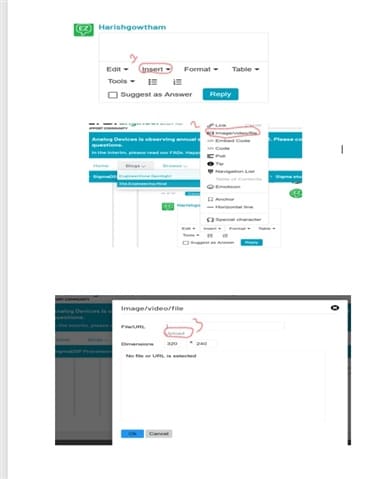
Hello MArk,
I will also add that you can drag and drop a file into the reply box as you write your reply.
Dave T
Hello, I am observing the same issue. Every time I open my project or a sample project, it crashes. I am using Windows 10 with Sigma studio 4.7. Can you please help?
Hello DishSri,
Well, Hmmm... Sort of the same questions... Did you create the file on this computer?
If it was on a different computer then what version created the files and what OS?
Have you installed the same extensions and libraries like if you are using A2B?
Windows 10 is getting to be old now.
Attach your project so I can see what is in it and what it is using?
Also, to see if it opens on my system.
Dave T
Hello Dave,
Thank you for replying. I did not create the project on my Windows machine. It was created on a different machine(windows 10) with the same version of Sigma studio tool. VoxTop_2.dspproj
I have attached the project file here. Please have a look and let me know.
Thank you.
Hello DishaSri,
FYI, I was able to verify that it does crash on my system as well. What DSP are you using in the project? Did you ever have it working and then all of a sudden it started crashing? If so then what did you add or change?
Thanks,
Dave T
Hi Dave,
It never worked on my system. But it works on one of colleagues Windows 10 system. We also tried to run it on a Windows 11 system but it crashed. I even tried to open a sample project in my system but even that is crashing. I am not sure, how to check the DSP.
Also there is another project that opens up on my system which is related to this one. Let me share that as well.
VoxProc1.dspproj
Please log in to reply.